
To create a Shopify collection, go to Products, then Collections, then Add collection. Since July 2026, Shopify collections can mix conditions that add matching products by themselves, products you pick by hand, chosen sizes or colors, and other collections. Pick a sort, then add it to a menu.
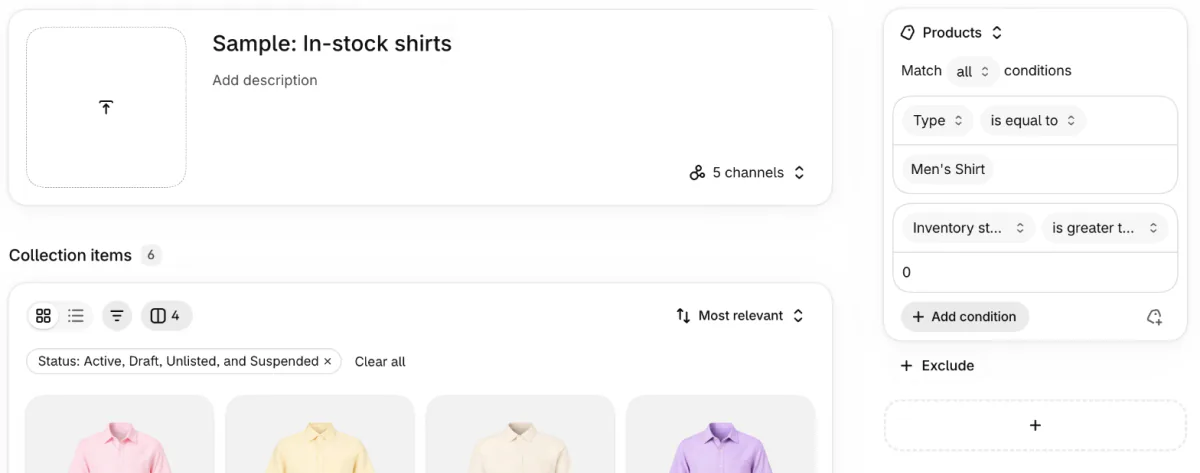
Say you add 30 linen shirts before a summer launch. A collection you fill by hand holds none of them until you click each one in. One condition, Tag includes linen, adds every shirt you tag and drops it when the tag comes off.
What is a Shopify collection?
A Shopify collection is a group of products with its own page, the aisle a shopper walks down to compare what you sell. Tops, Sale and Summer are typical ones. Your theme lays out each collection's page, the grid shoppers browse before opening a product. Collection filters let them narrow it by size, color or price.
Collections come with the Basic plan or higher. One product can sit in many collections at once.
Are manual and automated collections gone in Shopify?
As two separate types, yes: since July 2026 one collection can hold products you pick by hand and products that conditions add. Before, you chose Manual or Automated when you created a collection, and you couldn't switch later. Shopify's July 16, 2026 update replaced the type with sources, the parts of a collection that say where its products come from. A new collection starts with one Products source, which takes conditions, hand-picked products or both.
| What older guides say | Where it lives now |
|---|---|
| Manual collection | A Products source with products you pick by hand |
| Automated collection, which many guides call smart | A Products source with conditions |
| The type can't be changed later | Add a condition to any collection, and the products you picked stay |
Your existing collections moved to the new editor by themselves, so there is nothing to delete or rebuild. Shopify's Help Center no longer calls a collection manual, automated or smart.
An app that hasn't been updated for Shopify's new collections may not see a collection that has an exclusion, more than one source, other collections, chosen sizes or an app. Ask the app's support before you build one that way.
How do you create a collection on Shopify?
Go to Products, then Collections, click Add collection, and fill its Products source with conditions, products you pick, or both.
- In your Shopify admin, go to Products, then Collections, and click "Add collection".
- Type a title, such as Summer shirts, and a description if you want one on the page.
- Add a featured image if your theme shows one.
- In the Products source, click "Add condition", the button that adds a rule products must match, then pick a product detail and how it matches. To choose products yourself, click "Add products", or the icon labeled "Manually include products" once a condition is in.
- Once you add a second condition, the source shows "Match all conditions". Keep it on all, where a product must pass every one, or switch it to any, where one is enough.
- Pick a sort, such as Best selling, Newest or Manually.
- Click Save, then add the collection to a menu.
Shopify's Help Center lists these steps, read November 11, 2026, with the labels checked in the Shopify admin the same day.
You can schedule the day a collection goes live. Or leave it unpublished and use it only in the admin, as the product list of a discount or a tax override. Sidekick, Shopify's assistant in the admin, can build and update collections too.
Which conditions can an automated collection use?
A condition can test the details you already fill in on a product: its title, type, vendor, category, tags, status, price, weight, stock or a custom detail.
| Product detail | How it can match |
|---|---|
| Title, Variant title, Type or Vendor | is equal to, is not equal to, starts with, ends with, contains, does not contain (the last two take 3 characters or more) |
| Category | is equal to or is not equal to, with or without its subcategories |
| Tag | includes, does not include |
| Status | is equal to, is not equal to |
| Price, Weight or Inventory stock | is equal to, is not equal to, is greater than, is less than |
| Compare at price | the same four, plus is set and is not set |
| Metafield | a custom product detail, listed only once you switch on "Use as a condition in collections" in its settings |
Condition names as the Add condition list shows them in the Shopify admin, checked November 11, 2026. The match options and the Metafield row are from Shopify's Help Center, read the same day.
Each Products or Variants source takes up to 60 condition values, exclusions included, and a condition naming two tags counts as 2. A sale collection built on Compare at price has its own steps in building a Black Friday sale collection.
Three rules decide what lands in the collection:
- One matching size is enough. A condition passes when any one size or color of the product matches. A shirt with one size left stays in an "Inventory stock is greater than 0" collection. Products that sell out completely drop out of it. To keep them listed, but last, push them to the bottom instead.
- Products you pick stay. Conditions govern only the products they added. A product you picked yourself stays even when it fails every condition.
- Exclude wins. An exclusion, added with the Exclude button below the conditions, keeps products out and beats every inclusion, your own picks included. Its conditions take only category, tag, type and vendor. Under Match any conditions, a "does not contain sock" condition can't keep socks out once another condition lets them in. Put them in Exclude instead, as hiding a product from one collection shows.
Can a collection hold other collections or only some variants?
Yes to both: since July 2026, other collections and chosen variants are sources, just like products.
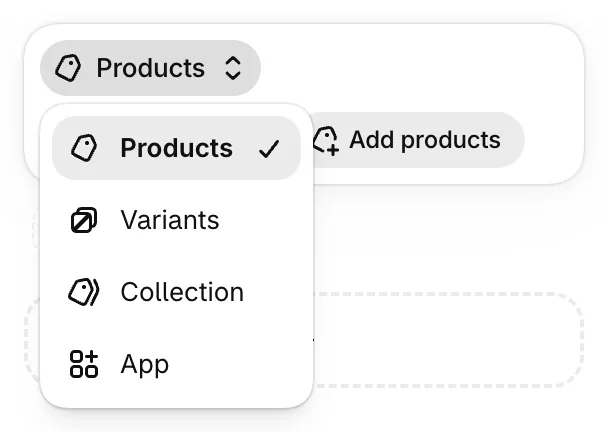
The source menu offers four kinds: Products, Variants, Collection and App. To add one, click "Add source", the plus box below your first source, then switch the new source's menu from Products to the kind you want.
- Collection. A Tops collection made of your Shirts, Tees and Knitwear collections stays in step as you add to them.
- Variants. Only the sizes or colors you choose, such as every navy shirt across many products. That collection's filters then show the price range, swatches and options of those choices alone. Shopify variants covers how sizes and colors are set up.
- App. Products an app supplies, once you connect it.
A collection takes up to 10 sources, and a product added by two of them shows once. Per store, Shopify allows 50 collections that contain another collection, 5 that exclude one and 100 that hold chosen variants.
How do you sort products in a Shopify collection?
Each collection has one sort, picked from the sort menu above Collection items, the product list on its admin page. The choices run from Most relevant and Best selling to price, title, date and Manually.
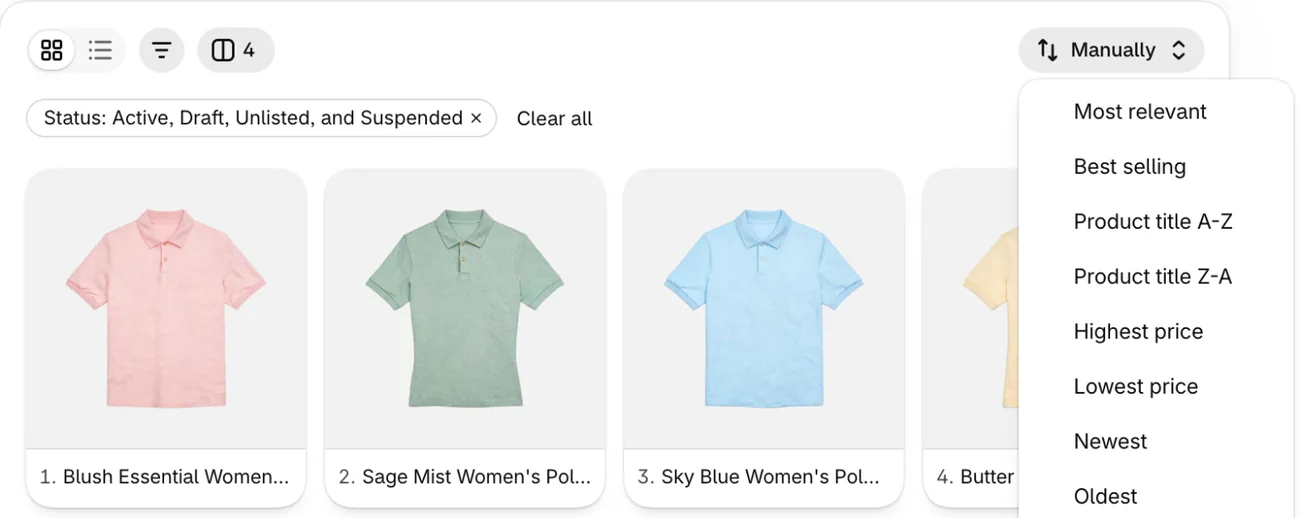
Price sorts use your base prices, not market or B2B catalog prices. The admin list shows 60 products a page, or up to 250 if you change it. On Manually, drag products, or select some and click "Move" to send them to the beginning, the end or a chosen position. Sorting a big collection by hand has its own catches.
Shopify can't put three chosen products on top and let an automatic sort order the rest, and none of its sorts looks at stock. A merchandising app such as Sledge lets you add rules to the collection pages it shows: pin chosen products first, boost the best sellers of the last 7, 14 or 30 days, and push sold-out products after the ones in stock.
How do you add a collection to your store menu?
Add a collection to your store's menu under Content, then Menus. Open the menu, such as your main menu, and click Add menu item. Type a Label, the words shoppers see, then click the Link box, choose Collections and pick yours. Click Save.
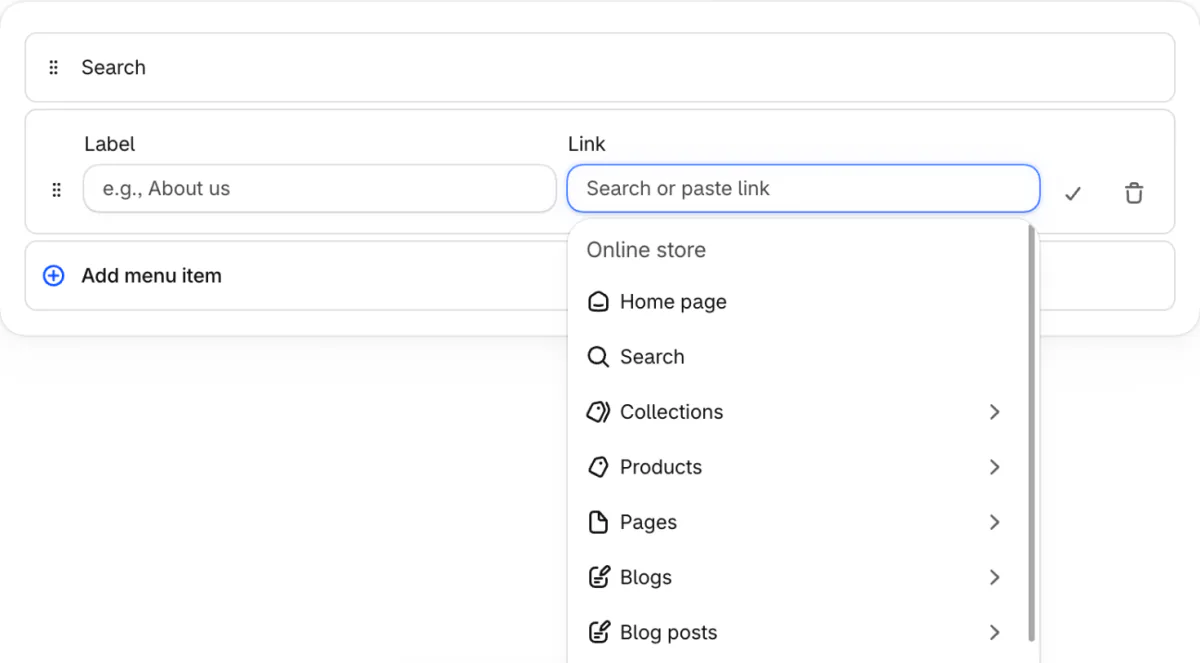
The collection has to be available on your Online Store channel first, and making it available doesn't put it in a menu by itself. To nest it, drag the item under a top-level item. Shopify allows two levels of drop-down menus beneath one, if your theme shows them. Showing a collection on your homepage is a theme setting, not a menu job.
How do you set a collection's image, search listing and address?
You set all three on the collection's page in your admin: the featured image, the search engine listing and the URL handle. Your theme decides where the featured image shows, if at all. Under Search engine listing you write the Page title and Meta description that search results may show. Shopify warns that a title over 70 characters or a description over 320 might get cut off. Writing a meta description covers what to put in it.
The URL handle is the end of the collection's address. Change it rarely, and when you do, let Shopify create a redirect from the old address, as Shopify URL redirects explains. The rest of ranking a collection is in our Shopify SEO checklist.
FAQ
Questions, answered
-

14-day free trial
Explore Sledge on your store before you decide to commit.
-

No credit card required
Start improving your store with no upfront commitment.
-

Setup in minutes
Get Sledge running without a lengthy setup process.
-

Built to grow sales
Turn shopper behavior into actions that help you sell more.
What is the difference between manual and automated Shopify collections?
Since July 2026 they are no longer two kinds of collection. A manual collection held only the products you picked. An automated one, also called smart, added every product that matched conditions such as a tag or a price. Now one collection does both: conditions add matching products on their own, and products you pick stay until you remove them.
Can you change a manual collection to automated in Shopify?
Yes, since July 2026. Open the collection, click Add condition in its Products source, pick a detail such as Tag, and save. Shopify moved existing collections to the new editor by itself, so there is nothing to rebuild. Products you added by hand stay in the collection even when they don't match the new condition.
Why isn't a product showing in my Shopify collection?
Check five things. Draft, archived and unlisted products don't show on your theme's collection pages. A condition set to is equal to needs the whole value, not part of it. Match all conditions needs every condition to pass. An exclusion beats every inclusion. And the collection has to be available on your Online Store channel before shoppers can open it.
Can you create sub collections in Shopify?
Yes, in two ways. In the admin, a collection can take other collections as a source, so a Tops collection can hold your Shirts, Tees and Knitwear collections and change when they do. A store can have 50 of these. For shoppers, a menu item can hold two levels of drop-down menus beneath it, if your theme shows them.
How many collections can you have on Shopify?
Shopify sets limits by kind: up to 5,000 collections with conditions, 50 that contain another collection, 5 that exclude another collection and 100 that include chosen variants. Each collection takes up to 10 sources, and each Products or Variants source up to 60 condition values. Search & Discovery filters stop showing on a collection over 5,000 products.
How do you make a new arrivals or best sellers collection on Shopify?
Give the collection one condition every live product meets, such as Status is equal to Active, then pick its sort. Newest sorts by date created. Best selling counts all-time orders, so an old hit can stay on top. The Add condition list has no detail for the date a product was added, so new arrivals is a sort.
Your collection is built. Which products lead it?
Sledge doesn't create your Shopify collections, set their conditions or build your menu. Where it shows your collection pages, it adds filters, pins chosen products first, boosts recent best sellers and can keep sold-out products last. Try it free for 14 days. Growth Intelligence turns on when you pick a paid plan, and its suggested fixes add up to one dollar figure, labeled Est. potential.

