

Shopify URL redirects sit under Content, then Menus: click the URL redirects button, then Create URL redirect. Type the old address in Redirect from, the new one in Redirect to, and click Save redirect. A redirect works only from an address that no longer loads, and you can add up to 100,000, or 20 million on Plus.
You cleared out last season, or moved your store to Shopify. The old links still sit in emails, pins and Google's results, and every click lands on Page not found. Shopify can send those clicks to a live page, once you find the screen. It moved.
Where are URL redirects in Shopify?
In your Shopify admin, go to Content, then Menus, and click "URL redirects". Older guides still send you to Online Store, then Navigation. Shopify moved menus, and the redirects with them, to Content in late 2024.
The list that button opens is where you add, edit, import and delete redirects.

How do you add a URL redirect in Shopify?
A URL redirect takes two fields: the old address, and the page it should open instead. It works the moment you save it.
- In your Shopify admin, go to Content, then Menus, and click URL redirects.
- Click "Create URL redirect".
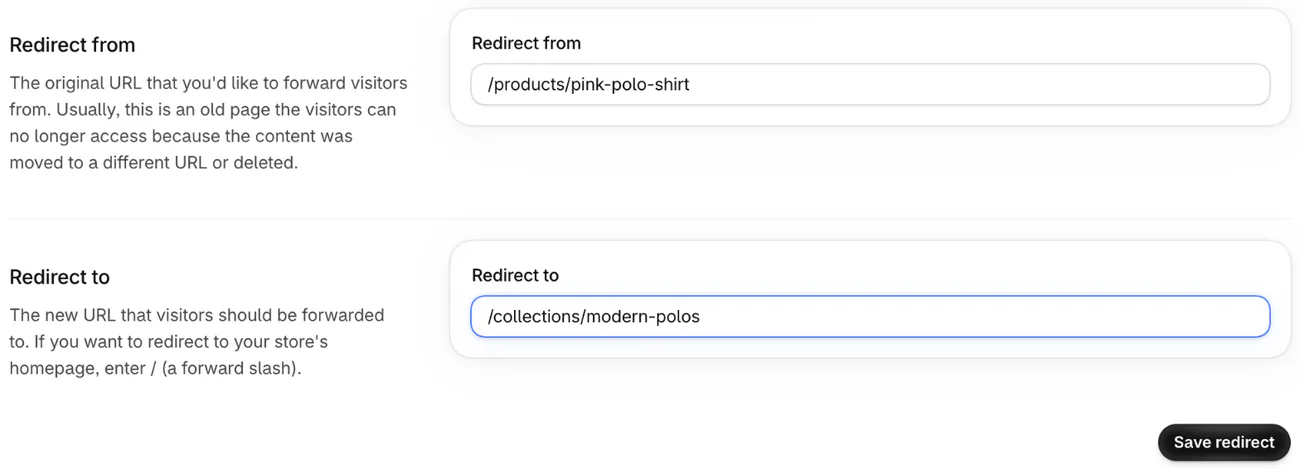
- In "Redirect from", the old address, type the part after your domain, starting with a slash.
- In "Redirect to", the page it should open, type that page's address the same way. Use a single slash for your homepage, or a full web address to send people to another site.
- Click "Save redirect".
- Open the old link in your browser and check it lands on the new page.
So a dropped product at yourstore.com/products/pink-polo-shirt goes into Redirect from as /products/pink-polo-shirt. Point it at the closest live page, such as the collection it sat in. Shopify's Help Center has the full rules.
Does Shopify add a redirect when you change a product's URL?
Shopify offers one when you change the product's URL handle, the last part of its web address. Open the product, click the pencil on "Search engine listing" and edit "URL handle". A box appears, labeled "Create a URL redirect for" followed by the old and new handles. Shopify ticks it for you, so leave it ticked and click Save.
Collections offer the same box when you change their handle, and a page such as your About page comes with the box already ticked. Change a handle rarely: Shopify warns that editing it too often can keep the product out of search results.

What happens to a deleted product's link?
A deleted product's address shows Page not found, and Shopify's delete box offers no redirect. Add one yourself, as above, to the closest product or collection. Skip the homepage: Google says sending many old addresses to one unrelated page can confuse shoppers, and it may count them as missing pages anyway.
If the product may come back, set it to Draft or archive it instead of deleting it. How to hide a product on Shopify shows what each does to its link.
If nothing replaces it, let the address show Page not found. That error, a 404, is what Google asks for when content is gone, and Google drops those addresses from its results over time.
Delete products often? Shopify's free Flow app, on the Basic, Grow, Advanced and Plus plans, can create a redirect each time a product is deleted. You no longer have to remember each one. The cost is building that workflow and trying it on a test product first, because Shopify can't restore a deleted one. The workflow can also miss: Shopify's example builds the old address from the product's name, and Shopify says it might not work if you changed that product's URL handle.
How do you import URL redirects in bulk?
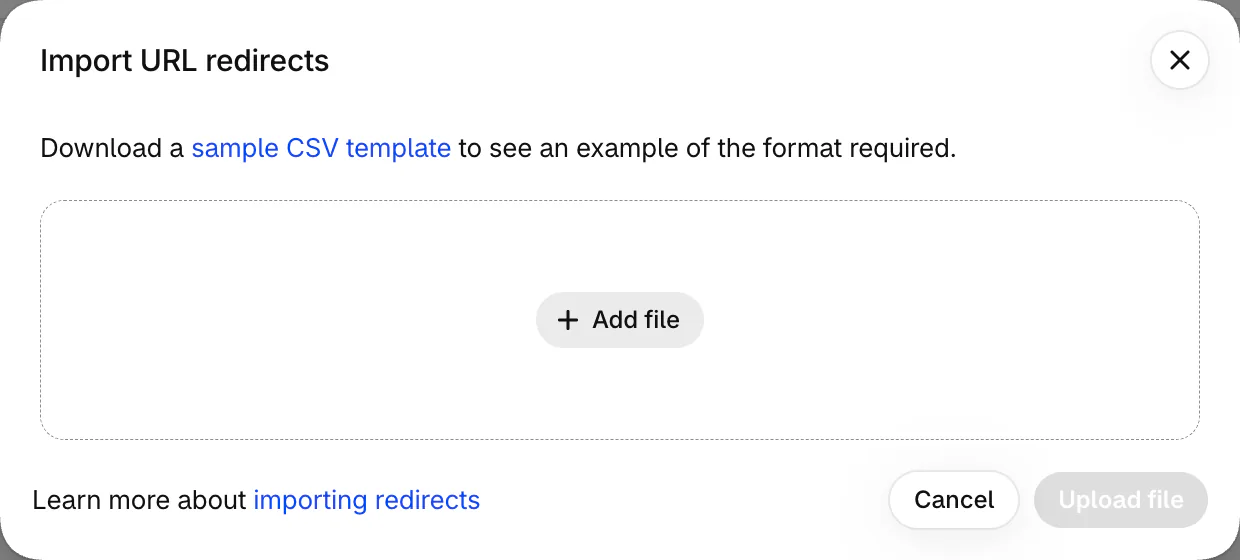
Import a spreadsheet with two columns, Redirect from and Redirect to, and one old address per row. Save it as a CSV file, the plain format Shopify's import reads. Export your current list first, or start from Shopify's sample, and you have a file in the right shape.
- On the URL redirects list, click "Import".
- Click "Add file", pick your spreadsheet, then click "Upload file".
- Check the list Shopify shows you, click "Import redirects", then "Close".
Moving from another platform? Shopify's migration advice is to set up redirects before you move your domain, for the pages people bookmark or link to. Then type each old address into your browser to check where it lands. How to migrate to Shopify puts every step of the move in order. Leaving Squarespace? Its pages move by copy and paste, and Shopify vs Squarespace covers what else its export can't carry.
Each row catches exactly one address. The form has no wildcard, a rule that covers every address starting the same way, and an address can carry only one redirect. For a large number of redirects, Shopify's tip is a redirect app. A store can hold up to 100,000 URL redirects, or 20 million on Shopify Plus.
To change a redirect, click it in the list. To remove some, tick them, click "Delete selected redirects", then "Delete". Google asks you to keep redirects for at least a year, so don't clear them out early. And when a page you redirected to moves again, point the old row straight at the newest page, because Google advises against a chain where one click hops twice.
Why is your Shopify redirect not working?
A URL redirect fires only from an address that shows Page not found. Work through these checks in order.
The old page is still live. A live product, a visible collection and an Unlisted product all keep loading, so nothing redirects. For a collection, Shopify's fix is to set "Online store visibility" to Hidden. For a product, set it to Draft or take it off every sales channel. Its address then shows Page not found and the redirect starts working. Make the item visible again and Shopify deletes the redirect for you.
You point /shop at a product, and the redirect never fires. Shopify blocks redirects from addresses that start with /apps, /application, /cart, /carts, /orders, /services or /shop, and from the bare /products, /collections and /collections/all. A second list on the same Help Center page adds /collections/vendors, /collections/types, /a/, /community/ and /tools/. A single product's address, such as /products/blue-t-shirt, is fine.
The old address has something extra on the end. A collection address with a tag after it can't be redirected, even when no product carries that tag. An old address ending in .html can't point to the same address without the .html. Test every old link with a question mark and codes after it: Shopify says those might not redirect as expected.
A typo, or a browser with a long memory. Check both fields letter by letter. Browsers remember redirects, so yours may still follow an older one. Clear its history and saved files, or open the link on your phone.
You sell in more than one market. Shopify's Help Center says in one place that a redirect doesn't cover every market's address, and further down that it does. Open the old link in each market's version of your store, and add a redirect wherever it fails.
Don't redirect your 404 page to your homepage: the theme editor then can't show you that page.
Is a search redirect the same thing?
No: a URL redirect catches an old address, and a search redirect catches words typed into your search bar. Sledge is a Shopify app whose search includes a Redirect tool where you set a "Search query", the words to catch, such as "returns", and a "Redirect URL", the page to open. A matching search then goes to the page you set instead of a page of results, on every paid plan. Sledge doesn't make URL redirects, and how to prepare Shopify search for Black Friday shows where each kind fits.
FAQ
Questions, answered
-

14-day free trial
Explore Sledge on your store before you decide to commit.
-

No credit card required
Start improving your store with no upfront commitment.
-

Setup in minutes
Get Sledge running without a lengthy setup process.
-

Built to grow sales
Turn shopper behavior into actions that help you sell more.
Where are URL redirects in Shopify?
In your Shopify admin, go to Content, then Menus, and click URL redirects. Then click Create URL redirect to add one. They used to sit under Online Store, then Navigation, so older guides still send you there. Shopify moved menus, and the redirects with them, to Content in late 2024.
Are Shopify URL redirects 301 redirects?
Yes. Shopify makes permanent redirects, the kind search engines call a 301, and the form has no choice for a temporary one. Google treats a 301 as a strong sign that the new page replaces the old one. Browsers remember them too, so a redirect you delete can keep working on a visitor's device for a while.
How many URL redirects can a Shopify store have?
Up to 100,000, or 20 million on Shopify Plus. Each row sends one old address to one new one, and an address can carry only one redirect. The form has no rule that covers many addresses at once, and for a large number of redirects Shopify's tip is a redirect app.
Can you redirect a Shopify page that still works?
No. A URL redirect only fires when the old address shows Page not found. A live product, a visible collection or an Unlisted product still loads, so the redirect is ignored. Set the product to Draft or hide the collection first. Shopify deletes that redirect itself if the item goes live again.
Does Shopify redirect deleted products automatically?
No. Deleting a product sends its address straight to your Page not found page, and the delete box offers no redirect. Create one yourself under Content, Menus, URL redirects, pointing at the closest product or collection rather than your homepage. Changing a product's URL handle is different: Shopify offers a redirect box for that, already ticked.
Old links fixed. Now find the next leak.
Try Sledge free for 14 days. When a visit lands on a broken link and leaves without buying, Sledge Analytics marks it "Landed on a broken link" and shows the address it tried, so you know which redirect to add next. Growth Intelligence turns on when you pick a paid plan. It reads your orders and searches, and totals what its fixes could add in one dollar figure, labeled "Est. potential".

