
Shopify Sidekick is Shopify's own AI assistant, built into your admin and included with your plan. Type a question or a task in the Sidekick field on almost any page. It answers from your store's own data, writes text, makes images and drafts edits that wait for your approval. It can't talk to your customers.
You search the admin for a customer, find nothing, and Shopify offers to ask Sidekick instead. Ask it for this month's best sellers and it answers from your own orders. Ask it whether a setting is switched on, and check its answer on the screen it points to.
What is Shopify Sidekick?
Sidekick is Shopify's AI assistant inside your admin: it reads your store's data and drafts changes that wait for your OK.
Shopify's Fall '26 Edition gave it bigger jobs. It now drafts many changes for one review, such as new descriptions across a collection, 50 at a time. Shopify says daily Sidekick sessions have grown 4.2x year over year. The writing tools once called Shopify Magic now run inside Sidekick too.
Sidekick works for you, not for your shoppers. A chat that answers shoppers on your store is a different tool, explained in AI shopping assistants.
Where do you open Sidekick in your admin?
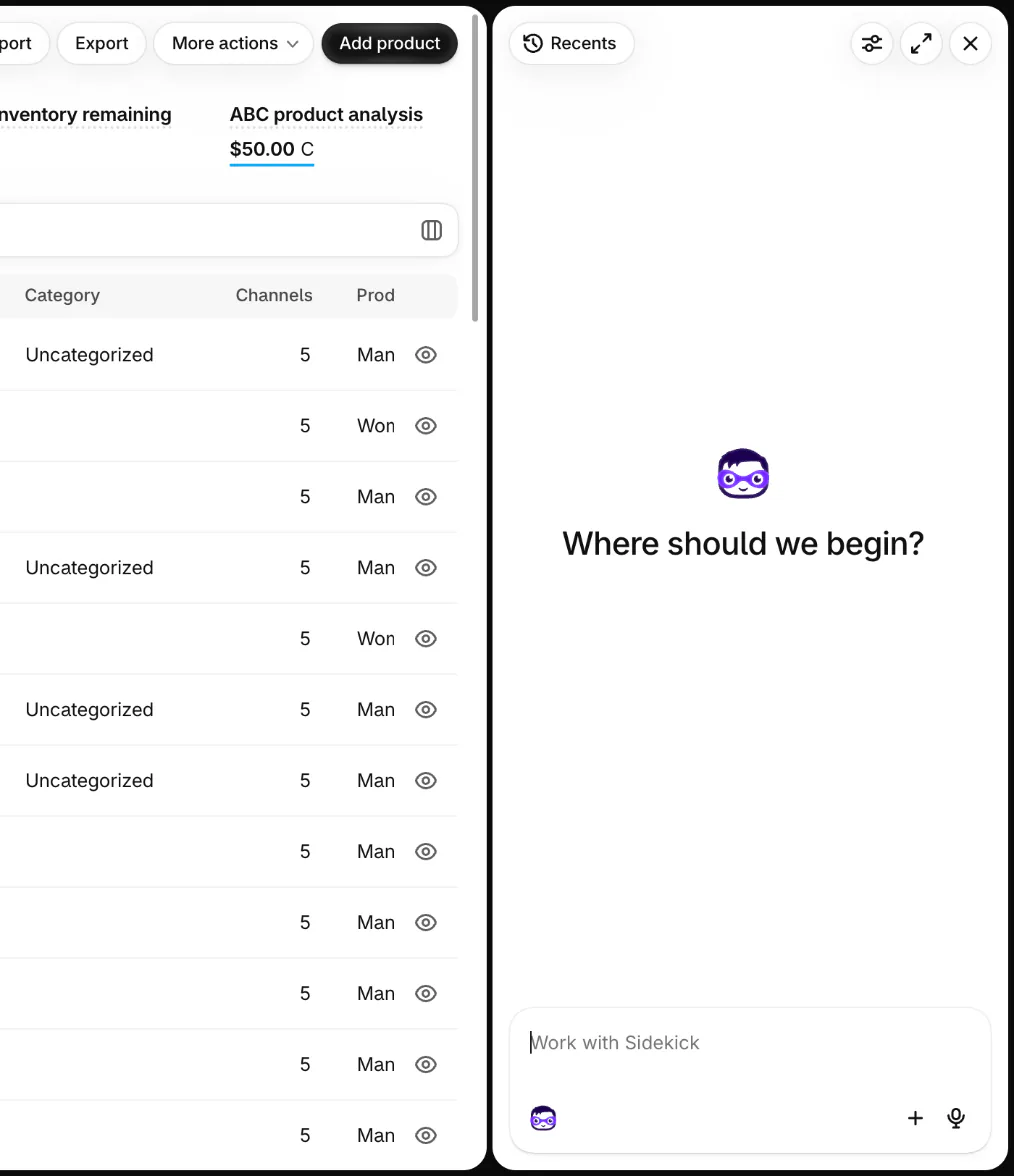
Click the Sidekick field, the box that reads "Work with Sidekick" on almost any admin page, and Sidekick opens in a panel beside the page you're on. On your Home page, the same box sits in the middle of the page.
It reads the page you're on. Ask a question from Analytics, and it can use that page's numbers in its answer. A new chat starts empty, under the question "Where should we begin?" When an admin search finds nothing, the highlighted top line of the results reads "Ask Sidekick", and choosing it sends your search to Sidekick.
On a phone, tap the Sidekick icon in the Shopify app, and the chat stays on screen as you move through your store. In a phone's browser, it opens over part of the page.
What can Sidekick do in your admin today?
Sidekick answers questions from your store's data, fills in admin forms, writes text, makes images and builds automations, and every change waits for your review. The table is as of November 11, 2026. Three of its requests come from Shopify's Help Center.
| Job | Ask it something like | What you get |
|---|---|---|
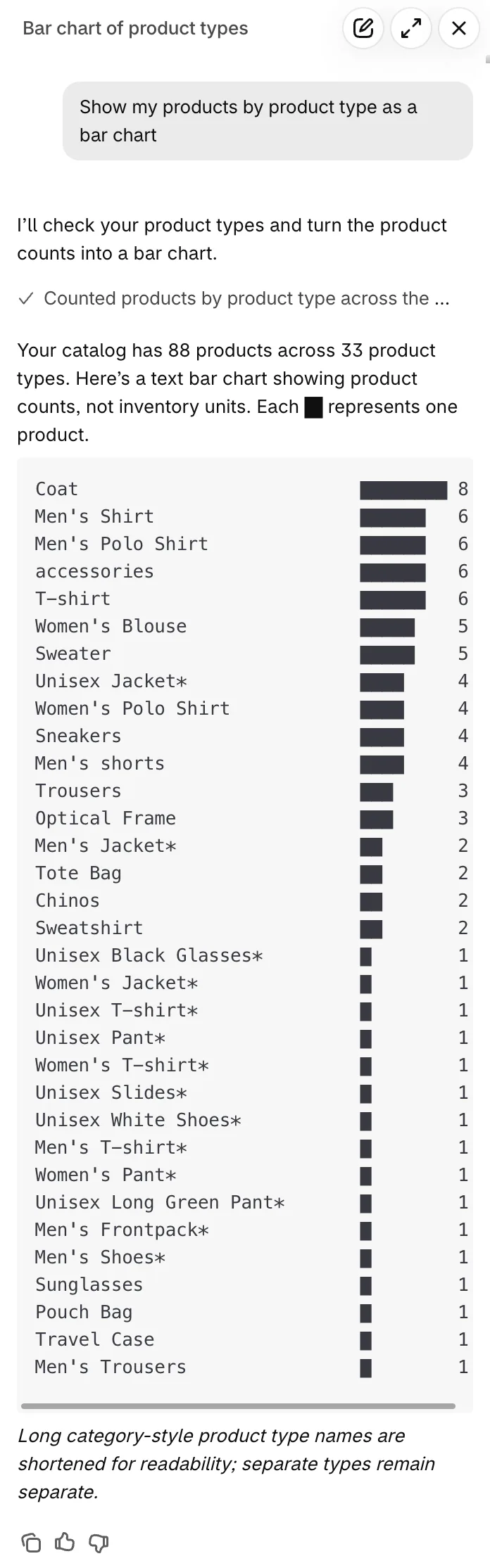
| A sales report | "Chart my daily sales for the last 90 days as a line chart" | A chart in the chat, sometimes typed out in text, and a link to explore the numbers in Analytics |
| A payout question | "Why was my last payout lower than I expected?" | The payout set against its charges, refunds, fees and reserved funds, if you use Shopify Payments |
| Bulk product edits | "Add the tag winter to every product in my Coats collection" | A Store changes card to review and publish, up to 50 changes at a time |
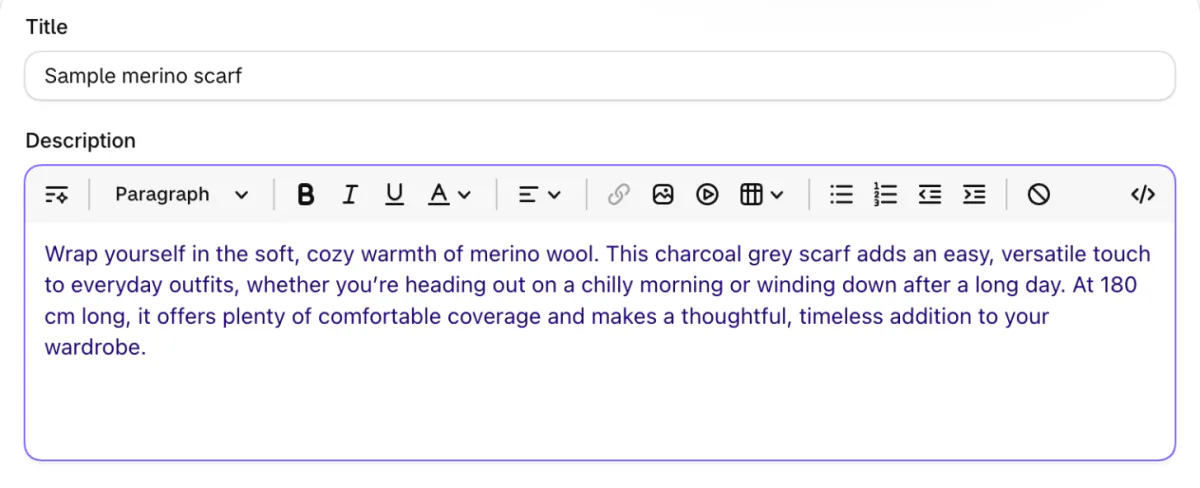
| Product copy | "Write a 50-word description for this scarf" | Text written into the description box, for you to check before you save |
| An image | "Make a banner for my winter sale: a wool scarf on a wooden table" | An image that joins your files only when you click Save to files |
| An automation | "Tag every order over $200 as VIP" | A Shopify Flow workflow that stays off until you turn it on |
| Your theme's look | "Make my store feel more retro" | Theme editor changes that apply only when you save |
| A small admin tool | "Build an app that shows which products to reorder" | A custom app inside your admin, on the Basic plan and up, built from a computer |
Your Home page can also show Sidekick suggestions, formerly called Pulse: up to 5 cards, each with an action. Pick one, and Sidekick opens a chat with a to-do list for that change. The cards show only for some stores with recent sales, only to the owner or staff with admin access, and only with Shopify Network Intelligence switched on.
Sidekick can also find apps for a goal you describe, listing each one's App Store rating and whether it's Built for Shopify, then start the install from the chat. For questions outside your store, it searches the web and cites the sources it used.
How do Sidekick's changes reach your live store?
Nothing goes live until you approve it: fields Sidekick fills are highlighted in purple, and bigger edits wait on a Store changes card. On a form, such as a new product or a discount, check each purple field before you click Save. An order edit waits until you click Update order.
Bulk edits collect on the "Store changes" card, a box in the chat that counts each kind of change. Click Start review, then click Looks good to step through up to 3 examples. In the table that follows, turn on "Show original" to see each old value beside the new one. Click Publish all changes to send them live.
Shopify's Help Center lists these steps, read November 11, 2026. The card and its Start review and Discard buttons were checked in the Shopify admin the same day.
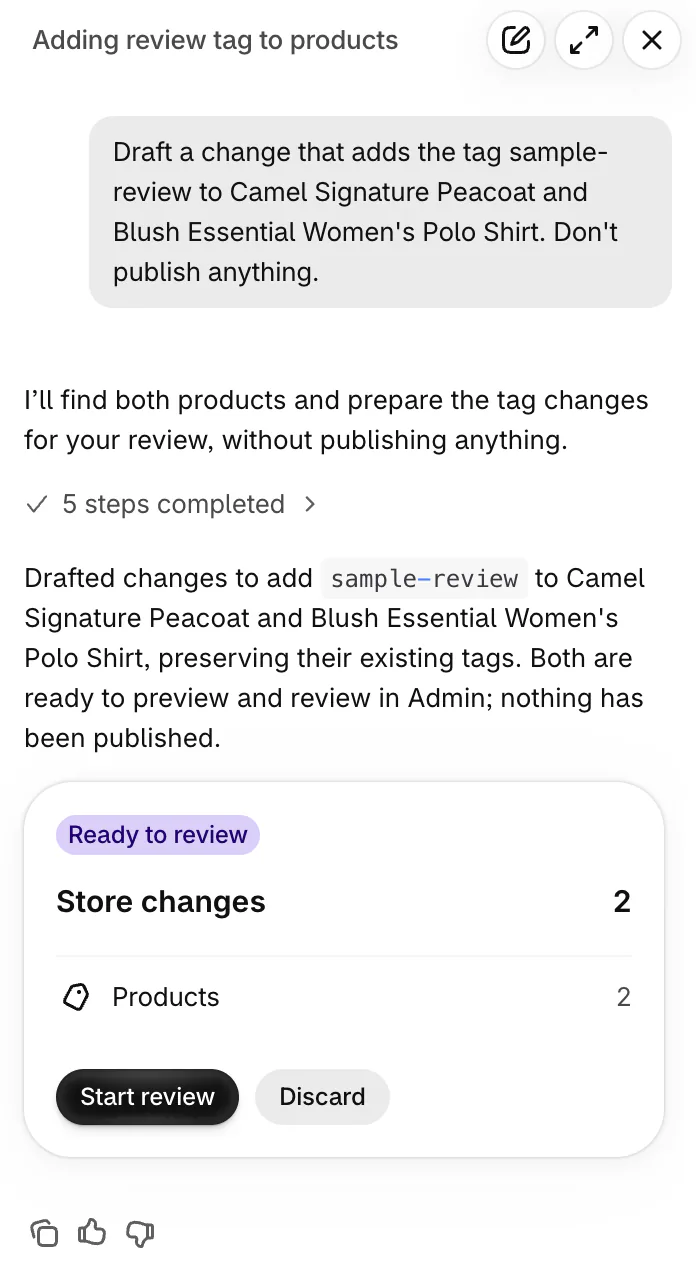
A set holds up to 50 changes, and Sidekick asks you to publish or discard those before it drafts more. Drafts expire 10 days after the set's last update. Once published, a change has no automatic undo, so you ask Sidekick to change the values back and review again. If the item changed again after you published, even that may not fully reverse the change.
The card isn't in the Shopify app, so review it on a computer or in a phone's browser. To drop a draft, click Discard on the card, then Discard again when Shopify asks "Discard draft changes?" Your live store stays as it is.
What can't Sidekick do?
Sidekick can't talk to your customers, show you other stores' private data, or change your live store without your approval, and it can sound sure while it's wrong. Shopify's Help Center says it can't:
- Chat with your customers or answer their support messages.
- Share private data from other Shopify stores with you.
- Edit images inside your theme or your product list.
- Change your privacy policy. You edit it under Settings, then Policies.
- Change your checkout settings directly. In the checkout and accounts editor, it answers questions and links you to the spot where you make the change.
- Release a payout reserve, lift an account hold or change your payout details. It can still explain a payout and your chargeback rate.
Say Sidekick tells you Shopify Payments is switched off while payouts keep reaching your bank. Ask which admin page that answer comes from, then open the page and check it yourself. Shopify warns that written text can add product benefits you never listed, and that AI tools "can make mistakes", so read anything Sidekick writes before you save.
Is Sidekick free, and what changes by plan?
Sidekick comes with your Shopify plan at no extra cost, but its features and usage limits vary by plan. Plan prices are in our Shopify pricing guide.
- Custom apps. Building one needs the Basic, Grow, Advanced or Shopify Plus plan and a computer's browser. The hourly and weekly limits on building free up as time passes, not on a set date.
- Images. Your plan sets a monthly limit that everyone in your store shares, reset at the start of each calendar month.
- Staff. Each staff member gets only what their admin permissions allow. Someone who can't view Shopify Payments gets no Payments answers from Sidekick either.
What happened to Shopify Magic?
Shopify Magic was what Shopify called its built-in AI tools: the writing tools now run as Sidekick, and the rest sit inside the admin pages they serve. On November 11, 2026, Shopify's old Magic page and its old AI page both led to the Sidekick page.
The Generate text icon appears in product descriptions, blog posts, store pages, Shopify Messaging emails and the theme editor. In a product description, click it, describe the text you want and click Generate. The text waits in a preview until you click Add to place it, or Discard to drop it. The rest of Shopify's built-in AI, as its Help Center lists it, includes:
- A plain color background for an image, in the file editor.
- A free theme designed from a description of your business.
- A suggested product category, drawn from your product details.
- The Inbox agent and suggested replies in Shopify Inbox, for chats with shoppers.
For apps that bring AI to search, email or chat, see Shopify AI tools sorted by job.
How do you get better answers from Sidekick?
Name the data, the date range and the format you want, and point Sidekick at a product, order, customer or collection by typing @ and its name. "How are sales?" gets a general reply. "Compare my sales this month to last month by product type, as a table" gets the one you need.
Before a change to several fields, add Shopify's own tip to the request: "Show me a before-and-after table before you change anything." To reuse a request, ask Sidekick to make it a skill, a saved instruction it follows. You can keep up to 50, and they work only in chats with memory on. There is no skills menu, so ask "List my skills" to see them.
Sidekick remembers your chats for about 3 months, plus roughly the last 12 hours of what you did in the admin. For a clean start, open a new chat and switch off Memory in its settings before your first message. Once you send one, memory stays on for that chat.
To delete a chat, click "Recents", the list of past chats, at the top of a new chat. Open the menu beside the chat you want gone and click Delete. Shopify says this removes it from your history and from Sidekick's memory.
FAQ
Questions, answered
-

14-day free trial
Explore Sledge on your store before you decide to commit.
-

No credit card required
Start improving your store with no upfront commitment.
-

Setup in minutes
Get Sledge running without a lengthy setup process.
-

Built to grow sales
Turn shopper behavior into actions that help you sell more.
Is Shopify Sidekick free?
Yes. Shopify says Sidekick is included with your Shopify plan, so there is nothing extra to pay or install. Features and usage limits still vary by plan. Building custom admin apps needs the Basic, Grow, Advanced or Shopify Plus plan, and image generation has a monthly limit shared by everyone who works in your store.
Can you turn off Shopify Sidekick?
Not entirely: Shopify's Help Center describes no setting that removes Sidekick from your admin. You can close its panel, turn off memory before the first message of a new chat, and dismiss suggestion cards on your Home page. Sidekick changes nothing in your live store until you approve the change, so leaving it unused is safe.
Does Sidekick work in the Shopify app on your phone?
Yes. In the Shopify app, tap the Sidekick icon on most screens, and the chat follows you from Orders to Products and Analytics. Reviewing a Store changes card needs a phone's browser or a computer. Building a custom app and writing product descriptions with Generate text need a computer. On Apple Watch, Sidekick answers questions but changes nothing.
What languages does Sidekick speak?
Sidekick adapts to your store's language settings and can help in multiple languages, Shopify's Sidekick page says. Shopify's count in May 2025 was 20 languages. In voice mode, Sidekick detects the language you speak and replies in it. Product description writing works in every language Shopify supports.
Can Sidekick see other stores' data or talk to your customers?
Sidekick can't share private information or data from other Shopify stores with you, and it can't talk to your customers or answer their support chats. It sees what your own staff account can see: Shopify says each staff member uses Sidekick within their admin permissions, so a staff member without Payments access gets no Payments answers.
Does Sidekick work with the apps you've installed?
Only with apps that have added support for Sidekick. Before Sidekick uses one in a conversation, it asks you. Choose "Yes" for that request, or "Yes, and don't ask again" for that app. Sidekick can also suggest apps from the Shopify App Store for a goal you describe and start the install from the chat.
Sidekick answers what you ask. Who flags what you never asked?
Sledge writes no product copy and makes no images. It runs your store's search, filters, bundles and cart drawer, free for 14 days. Growth Intelligence turns on when you pick a paid plan. It reads your orders and searches on a schedule, without being asked, and lists the fixes it finds. The Sledge admin adds them up to one dollar figure, labeled Est. potential.

