
A Shopify meta description is the line of text Google can show below your page's title in search results. Edit it under "Search engine listing" on any product, collection, page or blog post, and under Online Store, then Preferences, for your home page. Shopify advises about 160 characters. Google may still show other words from the page.
You search your store's name and the line under it is your password page, or the start of a product description cut off mid-word. Google wrote that line from what it found. A meta description offers it a better line, and a searcher a reason to click.
What is a meta description in Shopify?
It's the summary under the blue title in a Google result, and Shopify labels its box "Meta description". It doesn't lift your ranking: Google said in 2009 that it uses the description for snippets, the short previews under each result, and not for ranking. What it can change is whether a searcher picks your result over the next one. Shopify's guide adds that the same text can show up when someone shares the link.
Where do you edit the meta description in Shopify?
In five places: products, collections, pages and blog posts each have a Search engine listing section with a pencil, and the home page's box sits in Preferences.
| Page | Where to go in your admin | What to open |
|---|---|---|
| Product | Products, then the product | Search engine listing, then the pencil |
| Collection | Products, then Collections, then the collection | Search engine listing, then the pencil |
| Page | Online Store, then Pages, then the page | Search engine listing, then the pencil |
| Blog post | Content, then Blog posts, then the post | Search engine listing, then the pencil |
| Home page | Online Store, then Preferences | Social sharing image and SEO |
On the Preferences page, look for "Social sharing image and SEO", the section that holds the home page's title and description. The same section sets the picture people see when someone shares your home page.
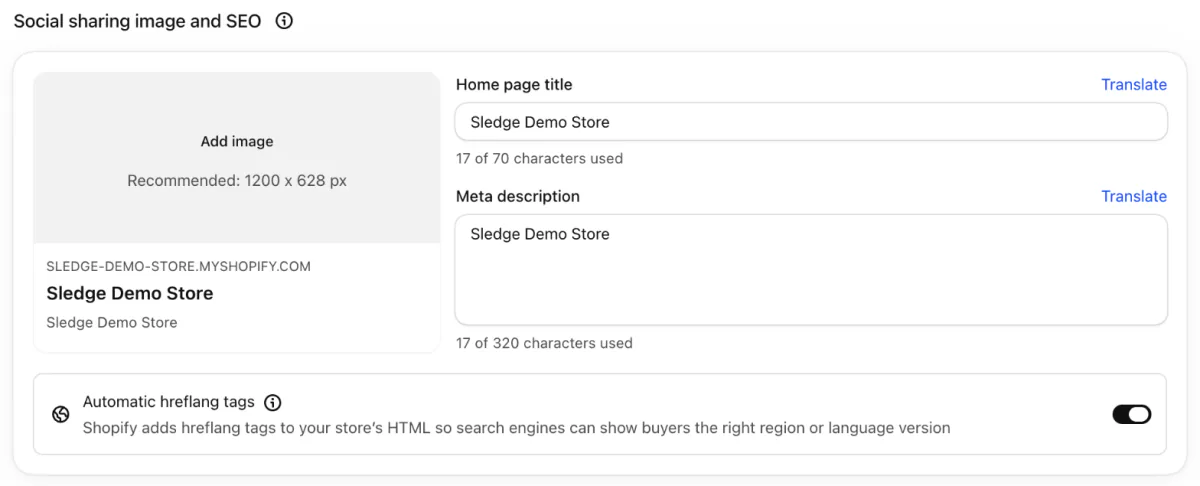
The steps for a product:
- In your Shopify admin, open Products and click the product you want to change.
- Scroll to "Search engine listing", the section that holds the title and description you offer Google, and click its pencil.
- Type about 160 characters in the Meta description box.
- Read the preview above the boxes. It shows the store name, the address, the title and your description roughly as a search result would.
- Save the product. The section has no Save button of its own.
These steps follow Shopify's Help Center, read November 10, 2026.
Above the Meta description box, "Page title" sets the blue link. Below it, "URL handle" is the last part of the page's web address, and changing it calls for a redirect, covered in Shopify URL redirects.
What does Shopify show if you leave it blank?
On a product, Shopify uses the product description instead, according to its Help Center.
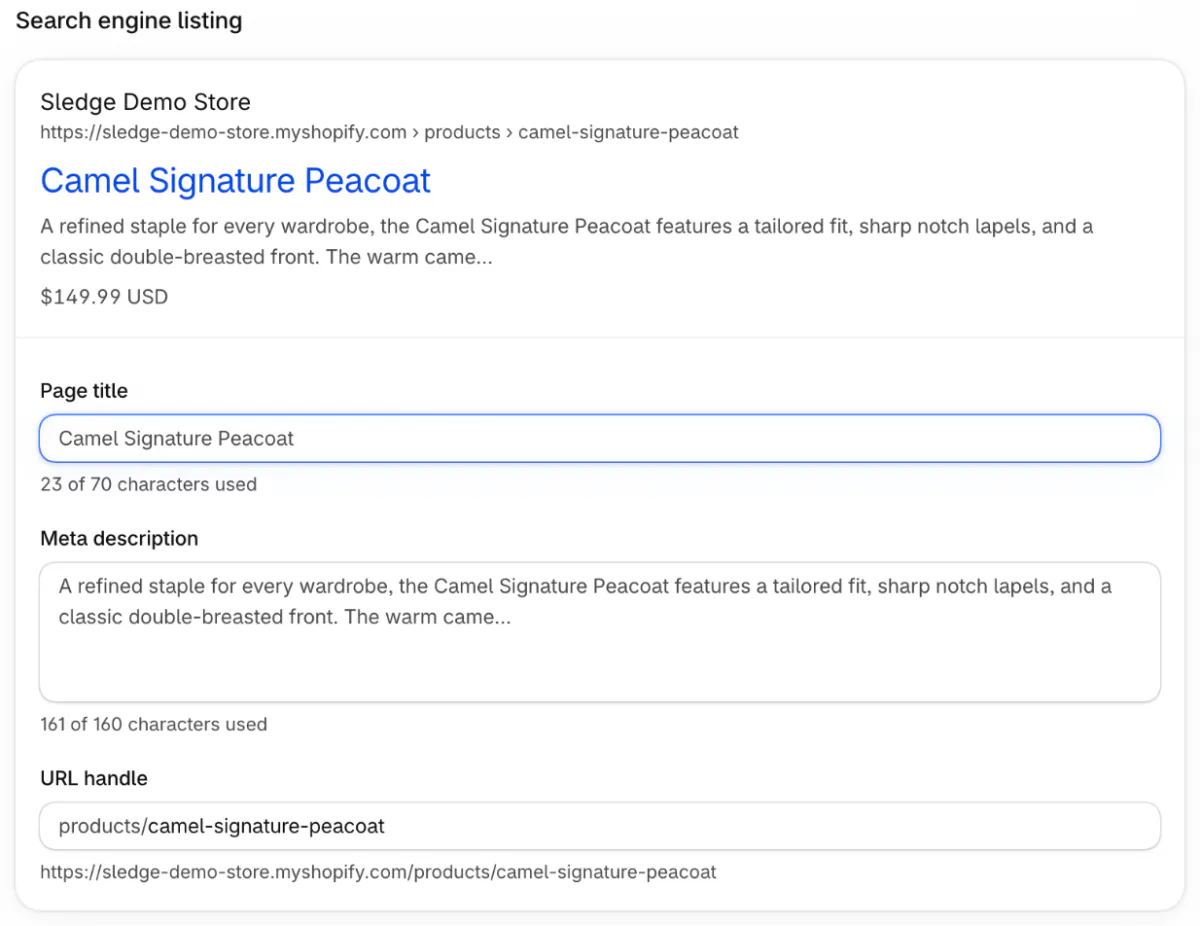
So the listing opens on whatever your product copy says first, and stops where the space runs out. Google may also pick a line of its own from the page. Write one yourself, starting with the pages people find you by.
How long should a Shopify meta description be?
About 160 characters, with the reason to click in the first sentence. Google sets no limit and cuts the snippet to fit the screen, so a phone shows less.
Shopify's own numbers disagree. Its SEO help page recommends 160. A product's box counts up to 160, yet the home page's counts to 320. The Help Center's steps give 160 for pages and 320 for products, collections and blog posts. Go by 160.
Length makes little difference to whether Google swaps your words. A 2020 Ahrefs study found Google rewrote 61.46% of the too-long descriptions it checked and 63.69% of the rest.
How do you write a meta description that gets the click?
Say what the page sells, the detail a shopper compares, and why to buy it from you. Three rules keep it working:
- One per page. Google calls identical descriptions across a site unhelpful, so never copy one across products.
- Sentences, not a keyword list. Google says a string of keywords is less likely to show as a snippet.
- No old promotions. Shopify's guide warns that an old promotion stops matching the page.
| Page | Sample description | Characters |
|---|---|---|
| Product | Merino crew sweater in 8 colors, sizes XS to XXL. Machine washable on a wool cycle. Free US shipping over $75 and returns within 30 days. | 137 |
| Collection | 40 women's winter coats in wool, down and recycled fill, sizes XS to 3X. Filter by length and warmth. Free returns within 30 days. | 130 |
| Home page | Knitwear made in Portugal from merino and recycled wool: sweaters, cardigans and scarves for men and women. Free US shipping on orders over $75. | 144 |
| Blog post | How to wash a merino sweater by hand or in the machine without shrinking it: water temperature, soap and drying, in five steps. | 127 |
Samples for a made-up knitwear store, counted with spaces.
The three shop samples name what's for sale, a fact a shopper weighs, then a reason to buy here. The blog post's sample answers the question its reader typed.
Why does Google show a different description?
Google builds most snippets from the page itself and uses yours when it reads as the better summary for that search. So two searches can show two different lines for the same page. The Ahrefs study compared descriptions with Google's desktop results for 20,000 keywords and found 62.78% rewritten.
Four things to check, none of which needs code:
- Your store is still private. Google then reaches only the password page, and may show its login line. Going public is the first job in the Shopify SEO checklist.
- Google hasn't come back yet. In Search Console, paste the page's address into URL Inspection and click Request indexing. Ask once: Google says a crawl can take a few days to a few weeks, and asking again won't speed it up.
- Your description doesn't match the page, or reads like a keyword list.
- The search matched other words on the page. A different search may show yours.
Once those four check out, your part is done. What Google prints from there is Google's choice.
Which pages need a new description first?
The ones Google already shows often and people rarely click. In Search Console, open Performance, then the Pages tab. Sort by impressions, the times a page appeared in results, and look for a low click-through rate, the share of those that became clicks. Google's help page for the report defines each number.
Shopify's guide points at best sellers and collection pages first. Change a handful, give Google time to crawl them again, then compare the same report. To see which pages your visits start on, use the first check of the Shopify store audit.
Can you edit meta descriptions in bulk in Shopify?
Yes for products, through the product import file, a spreadsheet of your products that you export from Shopify, edit and import back. Its column for this is "SEO description", which takes up to 320 characters per product.
Shopify's bulk editor adds fields to its table through a Columns button, so check whether it lists the SEO description before you reach for the file.
Sidekick, the assistant built into your admin, can draft a product's page title and meta description for you to review before you save. Autopilot's SEO suggestions, which Shopify is rolling out gradually, wait for your approval before anything changes. Whatever drafts your descriptions, keep each one different.
FAQ
Questions, answered
-

14-day free trial
Explore Sledge on your store before you decide to commit.
-

No credit card required
Start improving your store with no upfront commitment.
-

Setup in minutes
Get Sledge running without a lengthy setup process.
-

Built to grow sales
Turn shopper behavior into actions that help you sell more.
Where is the meta description in Shopify?
Open the product, collection, page or blog post, find Search engine listing and click its pencil. Type in the Meta description box, check the preview above it, then save. Your home page's description is in Online Store, then Preferences, under Social sharing image and SEO. Each page has its own.
How many characters should a Shopify meta description be?
Shopify advises about 160 characters. Google sets no limit but cuts the snippet to fit the screen, so a phone shows less. Shopify's own counters disagree, counting to 160 under a product's box and 320 under the home page's, so go by 160. Put what the page sells and the reason to click first.
Why is Google not showing my Shopify meta description?
Google builds most snippets from the page and uses your description when it judges it the better summary for that search. A 2020 Ahrefs study of 20,000 keywords found Google rewrote 62.78% of the descriptions it checked. Make sure your store is public, request indexing in Search Console, and make the description match the page.
What happens if I leave the meta description blank in Shopify?
On a product, Shopify uses the product description instead, according to its Help Center. Your listing then opens on your product copy and stops where the space runs out. Google may also write its own line from the page. Write one for your best sellers and top collections first.
Does the meta description help my Shopify store rank?
Not directly. Google said in 2009 that it uses the description for snippets but not for ranking. It can still change whether a searcher clicks your result or the one under it. Search Console shows clicks, impressions and click-through rate for each page, so you can see whether a new description helped.
Is the SEO description the same as the meta description in Shopify?
Yes. Shopify's product import file names the meta description's column SEO description. It holds the text in a product's Search engine listing, up to 320 characters per product. It differs from the product description, the copy shoppers read on the page, which Shopify uses when the SEO description is blank.
Your description earned the click. Where did the visit end?
Sledge doesn't write meta descriptions or change what Google shows. Try it free for 14 days and Sledge Analytics shows where visits end without a sale, page by page, and which site a visit came from. Growth Intelligence turns on when you pick a paid plan, and its suggested fixes add up to one dollar figure, labeled Est. potential.

