

To hire a Shopify expert, search Shopify's Partner Directory, which replaced the Experts Marketplace in 2023. Filter by service, location and years as a partner, contact two or three, and ask each for a fixed quote. Give access through a collaborator request code, never your password. Some jobs need no expert at all.
Say an email lands from a "Shopify expert" offering to grow your sales for a cut. Or a freelancer asks for your store login before you've agreed a price. Before you answer either, know where Shopify sends you to hire help, and what to hand over first.
Where do you find a Shopify expert?
Start in Shopify's Partner Directory, which replaced the Experts Marketplace in 2023.
The old marketplace closed in December 2023, and its Experts address now opens the directory. Shopify's own blog still carries 2020 posts about it, so older guides may disagree. The people you hire there are Shopify Partners, the name for the agencies and freelancers Shopify lists.
Search by name, or browse by service or by Partner tier. Then narrow the list with filters, each of which answers one question:
| What you need | Where in the directory |
|---|---|
| Someone in your country | Primary location, a list of countries. A profile shows the city. |
| Someone who has worked with stores like yours | Industries |
| Someone whose clients sell to your shoppers' countries | Markets |
| SEO, blog or sales channel help | Marketing, then Specialities, the filter that lists what a Partner does |
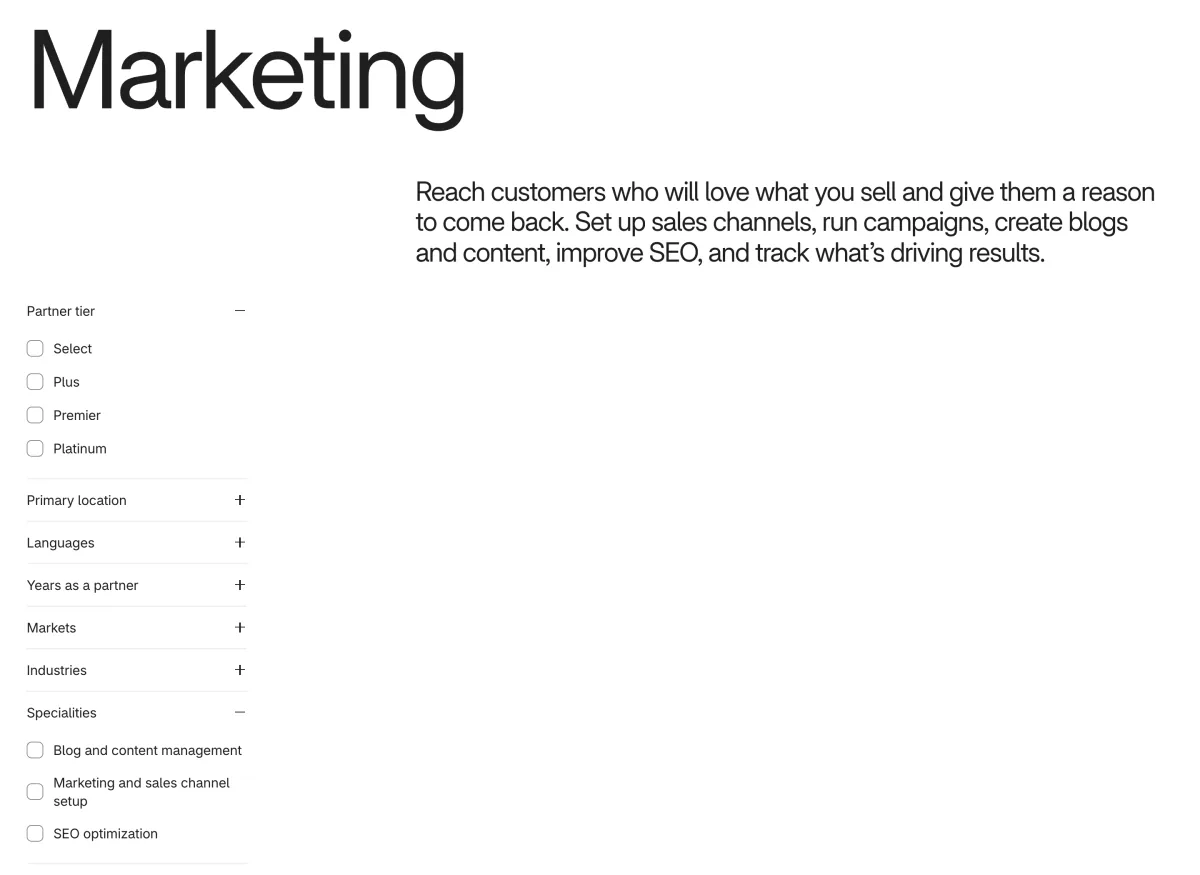
A freelancer you find on a marketplace outside Shopify is a different route with its own rules. The steps below still apply to either.
What kind of expert does your job need?
Write the job in one sentence first, then pick the one service group it sits in.
"Make my collection pages load faster" gives a Partner something to quote. "Improve my store" does not. Shopify sorts its Partners into six service groups:
| Service group | Pick it for |
|---|---|
| Store building | A new store, product setup or a theme change |
| Marketing | Blog, sales channels and SEO |
| Migrations | Moving from another platform |
| Channel expansion | Digital products, dropshipping, other countries and currencies, retail and wholesale |
| Integrations | Connecting accounting or warehouse software |
| Custom app development | Checkout and customer account changes, and custom-built apps. This is developer work, priced in time and risk, and it can break when your theme updates. |
SEO and content experts sit in Marketing. For a free first pass at SEO, work through the Shopify SEO checklist before you pay anyone.
How do you check a Shopify expert before you hire?
Read the profile, then ask for a fixed quote in writing.
A profile shows a Partner since date, the team size and the active projects. It also lists the industries, markets and services Shopify draws from the last four years of its own data.
As of November 2026, Shopify sorts Partners into Select, Plus, Premier and Platinum tiers by experience and the size of the stores they work with. Select, Plus and Premier retire on 1 January 2027, when Shopify moves to Silver, Gold, Platinum and Diamond. Either way, a tier says how big the stores are, not whether the Partner is good at your job.
To write to a Partner, click Contact on their profile. Shopify asks for your store link, your budget, your timeline and a description of the problem, so have all four ready. Send the same message to two or three Partners, then ask each:
- Which live store did you do this job for?
- What exactly will you change, and what won't you touch?
- Is it a fixed price, and what is the cap?
- Will you work on a copy of my theme, and who owns what you make?
- How will we both see that it worked?
Walk away at any of these:
- A message that calls itself "Shopify expert" and offers to grow your sales for a cut. Anyone can write that title.
- A request for your login or password up front.
- A promised search ranking or sales figure.
- No live store to look at.
- A price with no written scope.
Shopify says it isn't directly responsible for problems with freelancers or agencies. A Partner that breaks Shopify's rules can be reported on its Report a Partner violation form. Start with one small paid task before you give anyone a bigger one.
A one-afternoon store audit tells you what to put in the brief. The CRO guide adds three questions for anyone who promises more orders.
How do you give an expert access without sharing your password?
Give them a request code, never your login.
Shopify calls an outsider you let in a collaborator. On a single store, only the owner or an Administrator sees their requests, and the steps are the same for every expert you hire:
- In Settings, open Users, the list of everyone with access, then Security. On a store that isn't in an organization, the item reads Users & permissions.
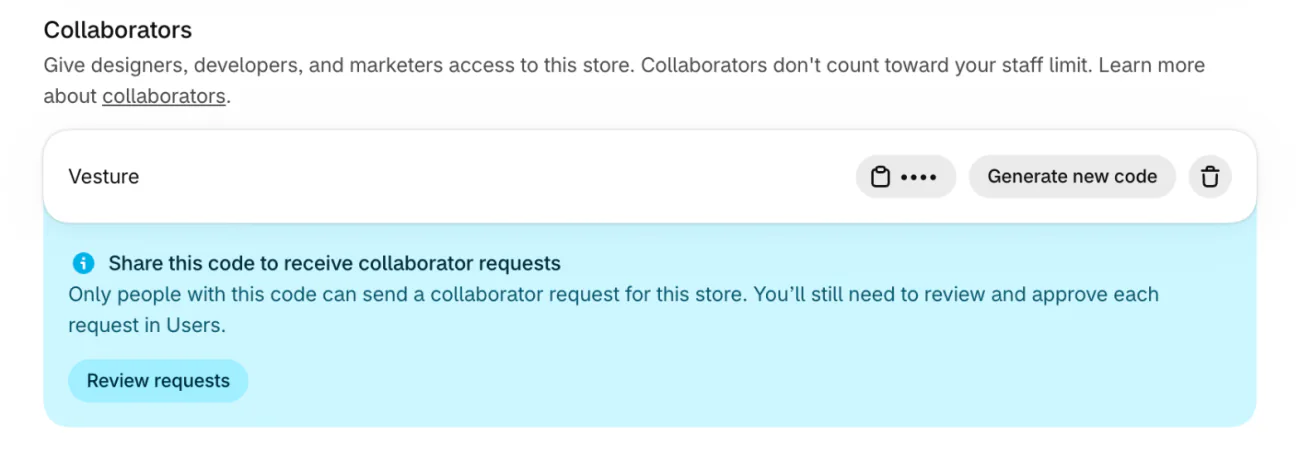
- Click the 4-digit code to copy it, and send it to the person you chose. The Collaborators card sits at the foot of that page.
- They request access from their Partner account. You get an email and a notice in Shopify Home.
- Click Review requests under the code and open the request. Check how long they've been a Partner, roughly how many collaborations are active and where the request was sent from. Refuse one you didn't expect.
- Under Roles, the permissions on the request, keep only what the job needs, then click Accept request.
- When the work ends, open their name and remove them. Shopify says you can't undo it, and they have to ask again.
- The person must sign in with a passkey or two-step authentication.
- Access ends on its own after 90 days without a login.
- "Generate new code" cancels any code you handed out earlier.
- Collaborators don't count toward your user limit.
A shared password still works for them after the job, until you change it. A collaborator you remove has to ask again.
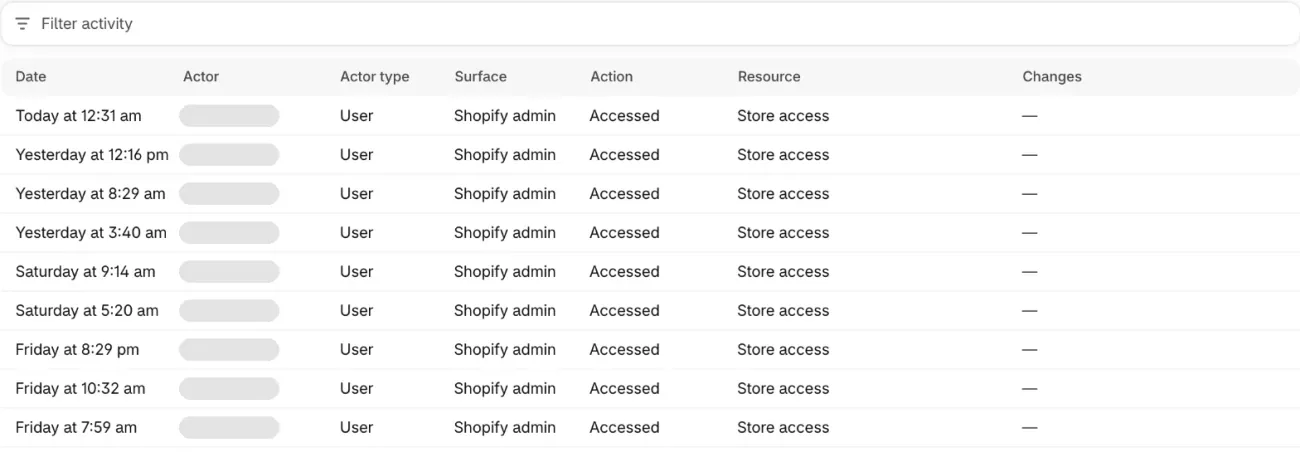
To see what changed and who did it, open Settings, then General, then Store activity log under Resources. It records changes made by you, your staff, apps and channels, each with the name of the person, app or channel. Filter activity narrows it by Actor and Date range.
What does a Shopify expert cost?
Ask for a fixed quote, because published hourly rates vary widely and measure different things.
One agency's 2026 guide says $50 to $250 or more an hour. A freelance marketplace's third-quarter 2026 data, across 734 Shopify contracts, puts its senior developers' pay at a $35 median worldwide and $58 in the US. That is what a developer earns on a contract, not a price quoted to you. Both sell the work, and neither number comes from Shopify.
A Partner bills you directly, so the charge doesn't show on your Shopify bill. Ask for the price through the Contact button on their profile, and get these in the quote:
- The exact changes.
- A fixed price or an hour cap.
- What is out of scope.
- Payment once you've checked the work.
Which jobs can you do without hiring anyone?
Many day-to-day store jobs are clicks in an admin, so try one before you pay anyone.
| Job | Where to start |
|---|---|
| Find what slows your store | The speed report, in how to improve store speed without a developer |
| Check the whole store | Eight checks in an afternoon, in the store audit |
| Titles and descriptions for search engines | The SEO checklist |
| A task walked through step by step | Shopify's Sidekick |
| A login, payment or plan problem | Shopify Support |
Four more jobs that people pay for are settings in Sledge's own admin:
- Search that reads past a typo in a product title or brand, plus a Synonyms setting for other words shoppers type.
- Which products come first in a collection or in search, with the Boost, Pin, Hide and Demote rules in merchandising.
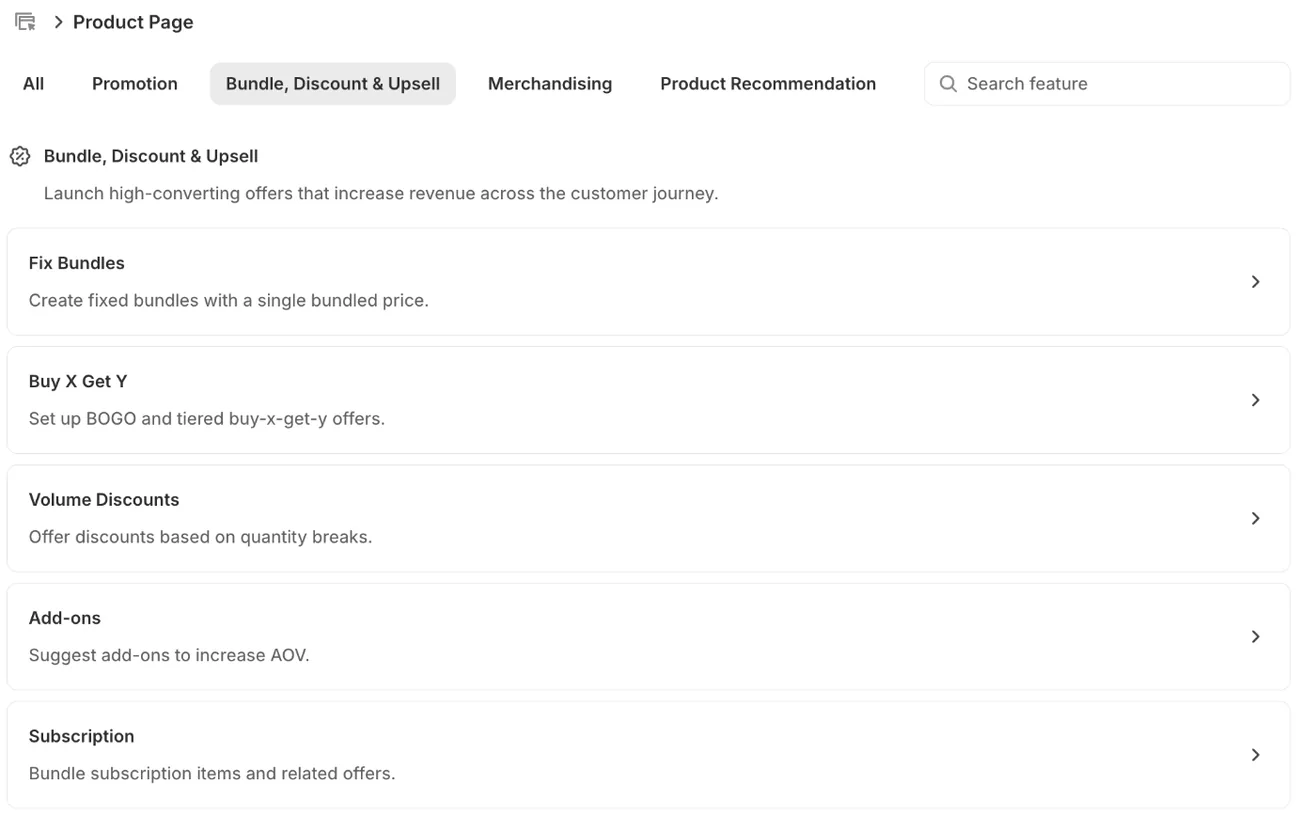
- A bundle price or a quantity deal on the product page, from the Fix Bundles, Buy X Get Y, Volume Discounts and Add-ons cards, as in bundles.
- A sale timer, with Global Countdown or Product Countdown in promotions.
Sledge needs no developer and never edits your theme files.
Hire help for moving from another platform, checkout or customer account changes, connecting accounting or warehouse software, or a custom design. To learn a job yourself first, see where to learn Shopify now.
FAQ
Questions, answered
-

14-day free trial
Explore Sledge on your store before you decide to commit.
-

No credit card required
Start improving your store with no upfront commitment.
-

Setup in minutes
Get Sledge running without a lengthy setup process.
-

Built to grow sales
Turn shopper behavior into actions that help you sell more.
Does the Shopify Experts Marketplace still exist?
No. Shopify replaced it with the Partner Directory in October 2023, and the old marketplace closed that December. The old Experts address now opens the directory. Guides that still call it the Experts Marketplace are out of date, including some 2020 posts on Shopify's own blog.
How much does it cost to hire a Shopify expert?
It depends on the job, so ask for a fixed quote. One agency's 2026 guide says $50 to $250 or more an hour, while a freelance marketplace's third-quarter 2026 data puts its senior Shopify developers' pay at a $35 median. A Partner bills you directly, so the charge doesn't show on your Shopify bill.
Is it safe to give a Shopify expert access to my store?
Yes, if you use a collaborator request instead of your password. In Settings, open Users, then Security, copy the 4-digit code and share it with the expert. When their request arrives, approve only the permissions the job needs. Access expires after 90 days without a login, and you can remove it at any time.
How do I find a Shopify expert in London or Los Angeles?
Open the Partner Directory and set Primary location to the United Kingdom or the United States. That filter works by country, so read each profile for its city. You can also filter by Markets, the countries a Partner's clients sell in. Most of the work happens online, so ask about time zones too.
How do I find a Shopify expert for SEO or marketing?
Open Marketing in the Partner Directory and use the Specialities filter: SEO optimization, Blog and content management, or Marketing and sales channel setup. Ask to see a live store where they did the same job. Walk away from anyone who promises a search ranking or a sales figure, because nobody can guarantee either.
Do I need a Shopify expert to run my store?
Often not. Shopify's reports and Help Center, plus a few apps, cover store audits, speed checks, search, offers and timers without code. Hire help for moving from another platform, checkout or customer account changes, connecting accounting or warehouse software, or a custom design. Start with one small paid task before a bigger one.
Do search, filters or offers need an expert?
Sledge doesn't find, vet or manage experts, and it doesn't rebuild your theme. It's a Shopify app whose search reads past a typo in a title or brand, and whose filters, boosts, bundles and countdowns you set up in its own admin, with no developer needed. Try it free for 14 days. Growth Intelligence turns on when you pick a paid plan, and its suggested fixes add up to one dollar figure, labeled Est. potential.

