

To improve your Shopify store speed, start with the speed report already in your admin. Under Online Store, Shopify grades how fast pages load, how quickly they react to a tap and how much they jump, from real visits: Good, Moderate or Poor. Fix the theme, apps and tracking tags Shopify says weigh most, before images, fonts and the homepage.
You ran your homepage through a speed test and the phone score read 34 out of 100. You shrank the photos and deleted two apps. It still says 34. Every guide you open is written for a developer. Most of the fixes Shopify suggests are settings you can click.
Where do you check your Shopify store speed?
Shopify rates your store speed from real visits, at the top of the Themes page in Online Store. The performance summary there grades three things over the last 30 days, each as Good, Moderate or Poor. Its "LCP P75" rating covers loading: how long the biggest picture or block of text takes to appear. The other two rate how fast a page reacts to a tap and how much its layout jumps.
Good means 3 in 4 visits show the main content within 2.5 seconds, react within 200 milliseconds and barely move. Poor starts past 4 seconds to load or half a second to react.
Click a rating to see it over time. Shopify marks changes such as app installs and theme updates on that chart, so the week a new app went in shows up there. For loading times by page type or by page, open Analytics, then Reports, and type "contentful" in the Search reports box. A store behind a password page gets no data.
That 34 comes from a test, not from your shoppers. Google's PageSpeed Insights loads your page once on a simulated mid-range phone over a mobile network. Shopify's ratings come from real visits, so trust them first. Don't chase 100 either. In Shopify's words, "There's no such thing as a perfect speed score."
In a 2022 study of 20 websites by the agency Portent, e-commerce sites that loaded in 1 second converted 2.5 times as often as sites that took 5 seconds.
Which speed tips can you skip on Shopify?
Many speed guides were written for any website. Shopify already does five of their tips on every store, its Help Center says:
- servers around the world, run by Cloudflare, that hold copies of your store near your shoppers
- browsers told to keep saved copies of your files for a year, the longest they allow
- pages compressed before they're sent
- theme files trimmed down for you
- photos compressed and often sent in a newer format
Skip any tip that tells you to add a CDN, turn on caching or compress your files. What's left is yours: the theme, the apps and what each page carries.
Is your theme slowing your store?
Shopify names your theme first among the things that slow a store. Shopify says its free themes are built for speed, the Horizon family among them. Our list of the best Shopify themes shows the share of stores on each one passing Google's speed checks.
Update it
In Online Store, on the Themes page, look at your current theme's version number. When an update is out, a notice replaces it. Click the notice, then "Add to draft themes", which saves the new version as a draft copy, then Review, then Publish. Changes you made in the theme editor carry over, Shopify's update guide says.
Shopify's older vintage themes get no updates, and neither does a theme from outside the Theme Store. If yours is one and its ratings stay Poor, Shopify suggests moving to a theme built for speed.
Switch off animations you don't need
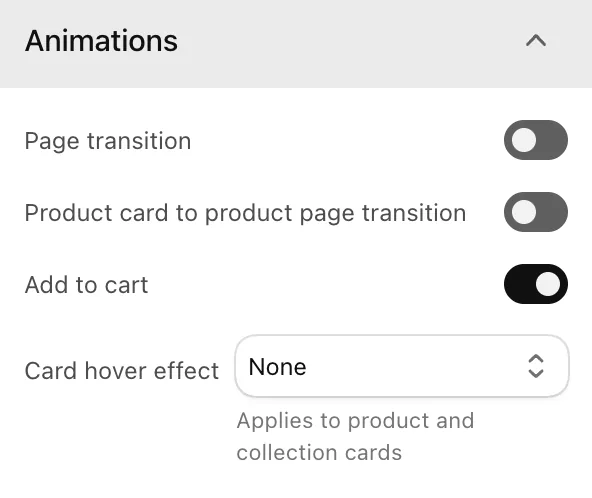
Shopify says animations can slow pages, so compare your ratings before and after you switch them off. In Horizon, click Edit theme, then the gear icon for Theme settings, and open Animations. It has three switches: "Page transition", "Product card to product page transition" and "Add to cart". A new copy of Horizon has only "Add to cart" on, so check that the other two are still off.
Do apps slow down your Shopify store?
They can. Shopify lists apps right after the theme. Its advice is to keep only the apps that bring in enough to make up for any speed they cost.
Uninstall the ones you don't use under Settings, then Apps. Some apps leave code behind in your theme after they go, so read the app's listing or click Get support there first.
Then open the theme editor and click the App embeds icon. App embeds are the parts an app adds outside your page sections: a floating chat bubble, an overlay, or tracking you can't see. Each one has its own switch, so turn off the ones you don't use, then Save. Tracking tags added by hand for an ad campaign that has ended sit outside App embeds. Shopify says to remove any you no longer need, so ask whoever added them.
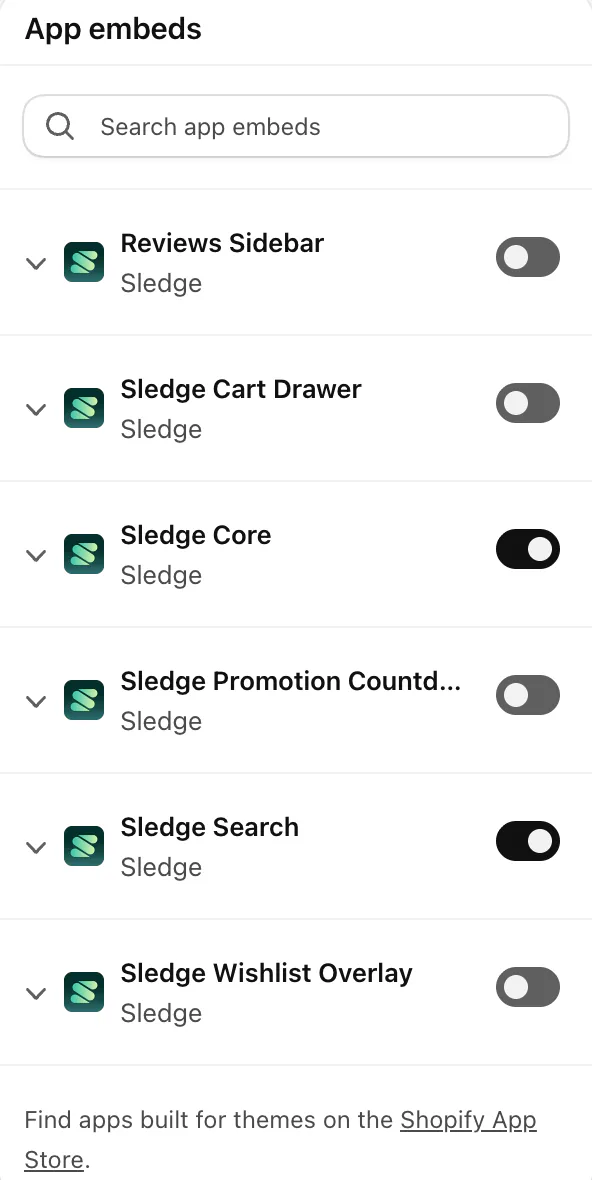
To find which app is the heavy one, see how to tell if apps slow your store. If separate apps run your search, filters, bundles and cart drawer, Sledge does those jobs as one app, so fewer apps put code on your pages.
How do you make images load faster on Shopify?
Show fewer large photos. Shopify already sends each one resized for the screen, in the best format that shopper's browser takes. It does this together with your theme, so converting files yourself adds nothing.
Showing fewer is Shopify's own advice for a slow page full of large photos. For square product photos, Shopify says 2048 x 2048 px usually displays best.
For every slot's size, see Shopify product image sizes. Homepage pictures have their own: Shopify banner sizes.
Do fonts slow down a Shopify store?
Each font you pick, unless it's a system font, is one more file every shopper's browser has to download. System fonts are already on the shopper's phone or computer, which is why Shopify suggests them.
In Horizon, open Theme settings, then Typography, to find four font pickers: Body, Subheading, Heading and Accent. Use the same font in two of them, or pick a system font in the font picker. The catch: the font a shopper sees then depends on their phone or computer, so your store won't look the same everywhere.
Do too many sections slow down your Shopify homepage?
Your homepage has a scrolling bar, a video, two carousels, a chat bubble and a pop-up for every new sale. Shopify warns that too many sections slow a page, and it names carousels, videos and social media feeds among the features that can.
Open the homepage in the theme editor and ask of each section whether it sells. Delete the ones that don't, or hide one with the eye icon by its name if you may want it back, then Save.
A homepage video is Shopify's own example: if shoppers watch it but the page reads Poor, weigh whether it earns its cost in speed. A pop-up that pushes the page down counts against the third rating, the one for a jumping layout. Off the homepage, a big collection has a fix of its own: show fewer products at a time.
When should you pay someone to improve your Shopify store speed?
When a rating stays Poor after these clicks, the rest takes a developer's change to your theme. On a free Shopify theme, start with Shopify Support, which may help with basic fixes. On a paid theme, ask its developer. After that, Shopify's Partner Directory lists partners who take on speed work, each with a price range for its services.
You get a theme that holds back what a shopper can't see yet, and the leftovers of old apps removed. It costs a specialist's fee, plus a recheck after each theme update. The risk is the next update: it can drop the edits, and Shopify then shows "Theme added: code edits could not be included".
How do you know a speed fix worked?
Change one thing at a time, note the day, and compare that rating's chart before and after. Shopify's numbers can run up to 36 hours behind, and if your store gets few visits its chart swings from day to day, so switch the report to weekly. Shopify also says not to worry when a few days or pages read Moderate while the overall rating is Good.
| Fix | Where you click | Cost |
|---|---|---|
| Read the speed report | Online Store, then the Themes page | Free |
| Update the theme | The update notice by the version number, then Add to draft themes | Free |
| Switch off animations | Theme settings, then Animations, in Horizon | Free |
| Remove apps and app embeds | Settings, then Apps, and the App embeds icon | Free, and it can shrink your app bill |
| Show fewer large photos | Product pages and homepage sections | Free |
| Use fewer fonts | Theme settings, then Typography | Free |
| Trim homepage sections | The theme editor's eye icon or Delete | Free |
Checked November 4, 2026, in the Shopify Help Center and on Horizon 3.5.1 and 4.3.0.
FAQ
Questions, answered
-

14-day free trial
Explore Sledge on your store before you decide to commit.
-

No credit card required
Start improving your store with no upfront commitment.
-

Setup in minutes
Get Sledge running without a lengthy setup process.
-

Built to grow sales
Turn shopper behavior into actions that help you sell more.
What is a good Shopify store speed?
Aim for Good on all three ratings in Shopify's performance summary: the main content shows within 2.5 seconds, the page reacts to a tap within 200 milliseconds, and the layout barely moves, at 0.1 or less. The rating reflects 3 in 4 visits, so a few slow ones don't sink it. Google reads the same three measures.
How do I check my Shopify store speed?
In your Shopify admin, open Online Store. The performance summary at the top of the Themes page rates loading, response and stability from 30 days of real visits. Click a rating to see it over time, or search Analytics, then Reports, for results by page. Google's PageSpeed Insights gives a second reading.
Why is my PageSpeed Insights score low when Shopify says Good?
They measure different things. Shopify reads real visits from Chrome, Edge, Opera, Samsung Internet and Firefox. The big PageSpeed number is a test that loads your page once on a simulated mid-range phone over a mobile network. Trust the real-visit ratings first, and don't chase 100: Shopify says there's no such thing as a perfect speed score.
Do Shopify speed apps work?
Test one like any other app. Shopify says many fixes that outside speed tools suggest already run on every store, such as compression, caching and modern image formats, or don't apply to Shopify at all. Read your performance summary before you install it and again once enough visits come in, and keep it only if the ratings move.
Should I hire someone to speed up my Shopify store?
Do the free clicks first: update the theme, switch off animations and app embeds you don't need, and trim the homepage. If a rating stays Poor, Shopify Support may help with basic fixes on Shopify's free themes. On a paid theme, ask its developer. Shopify's Partner Directory also lists partners for speed work, each with a price range for its services.
Speed checked. Now, where do shoppers stop?
Try Sledge free for 14 days, with search, filters, bundles and the cart drawer in one app. Growth Intelligence turns on when you pick a paid plan. It can flag when too few product page views turn into cart adds, and it totals what its fixes could add in one dollar figure, labeled "Est. potential".

