Shopify Flow templates are ready-made automations. You install one from Apps, then Flow, then Browse templates, change a few values and click Turn on workflow. Each starts with an event, such as a new order, usually checks a rule and then does a task, such as adding a tag. Flow itself is free on Basic and up.
Say three or four orders a day choose express delivery, and someone on your team finds them by scrolling the order list. A Flow template can tag each one as it comes in, so a single filter lists them.
What are Shopify Flow templates, and what do they cost?
A template is a workflow Shopify already built, with placeholder values, and Flow itself costs nothing on Basic and up. Flow calls the starting event a "trigger", the rule a "condition" and the task an "action".
Shopify's templates have no price of their own, but what they use can. A template that sends marketing email through Shopify Messaging counts toward 10,000 free emails a month. A template that posts to Slack or adds a row to Google Sheets needs that account connected on Flow's Settings page. Shopify says the library holds hundreds of templates. The tables below cover orders, customers and fulfillment, and the rest link out.
How do you find and install a Flow template?
Open Apps, then Flow, then Browse templates, and nothing runs until you click Turn on workflow.
- Open Apps in your Shopify admin, then click Flow.
- Click Browse templates. It sits beside Create workflow on an empty Workflows page, and beside Select a trigger inside Create workflow.
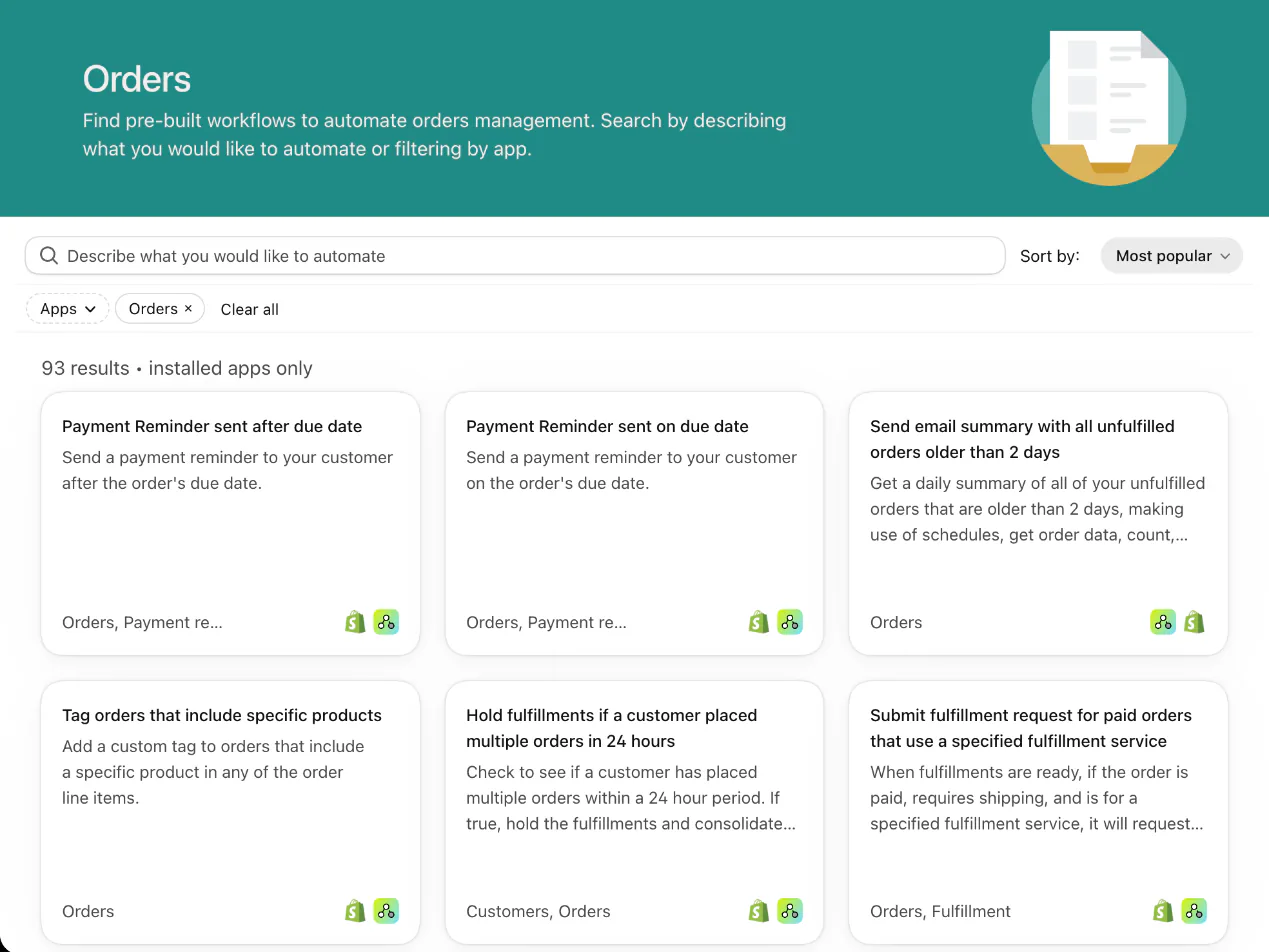
- Pick a group under Categories, such as Orders or Customers, or type the job into the box that reads Describe what you would like to automate. The count above the cards ends in installed apps only, so a template for an app you have not installed may not show.
- Open a card to preview the workflow. A card has no button of its own.
- In the preview, click Install, then change the blanks: the tags it adds, any app it connects, and the address in any Send internal email step, the step that emails your team. That address holds a placeholder such as youremail@example.com, and some templates leave it empty. The email comes from your store's sender address.
- Run a test if you like, since a test changes nothing in your store, then click Turn on workflow.
Template names on this page are as Flow's gallery printed them on November 20, 2026, and Shopify's Help Center lists more. Names change, so if one is missing, search a few words of it.
Which Flow templates tag and flag orders?
These add a tag or email you, and change nothing a shopper sees. A tag is a label on an order, and the Orders page can filter by it, so one filter lists every tagged order.
| Template | What it does | Edit first |
|---|---|---|
| Tag orders by their shipping method | Tags every order based on the delivery option the shopper picked | Nothing to fill in, but check the tags in the preview |
| Tag orders paid with gift card | Tags an order that was paid with a gift card, in full or in part | The tag name |
| Get notified about irregularly large order quantities | Emails you, and tags the order For review, when it has more than 10 items or one item has more than 20 units, unless it is tagged Wholesale | The 10 and 20 limits, the tags and the email address |
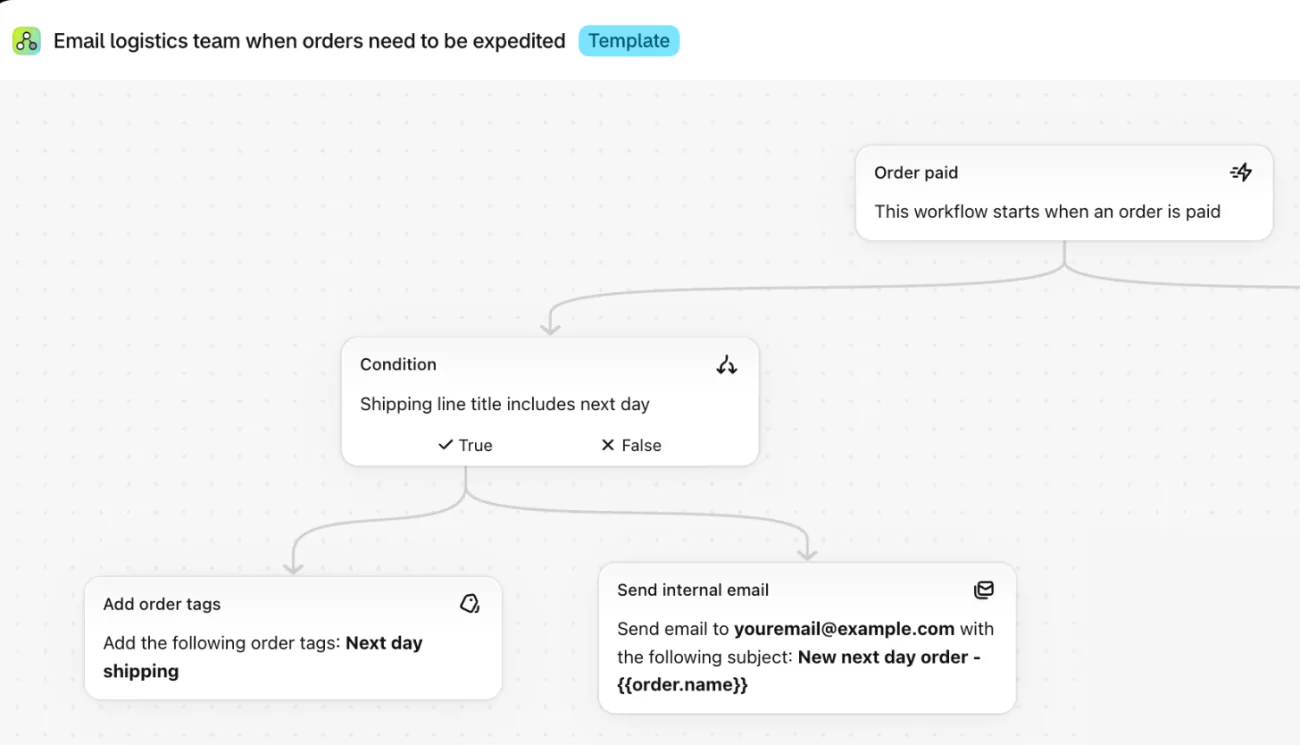
| Email logistics team when orders need to be expedited | Emails your logistics team, and tags the order, when a paid order's shipping option includes next day or 2 day | The email address, the words it looks for in the shipping option's name, and the tags |
| Get notified when specific discount code is used | Emails you each time one code is used | The placeholder code and the email address |
| Get notified about large discounts on new orders | Emails you, and tags the order, when a new order carries a large discount | What counts as large (the preview starts at 100), the tag and the email address |
Flow handles orders and draft orders separately, so these templates do not reach a draft order, one you create by hand in the admin, until it becomes an order.
Which Flow templates tag customers and first orders?
Three templates tag by lifetime spend, by school email and by a customer's first order, so a VIP or a student is easy to find.
| Template | What it does | Edit first |
|---|---|---|
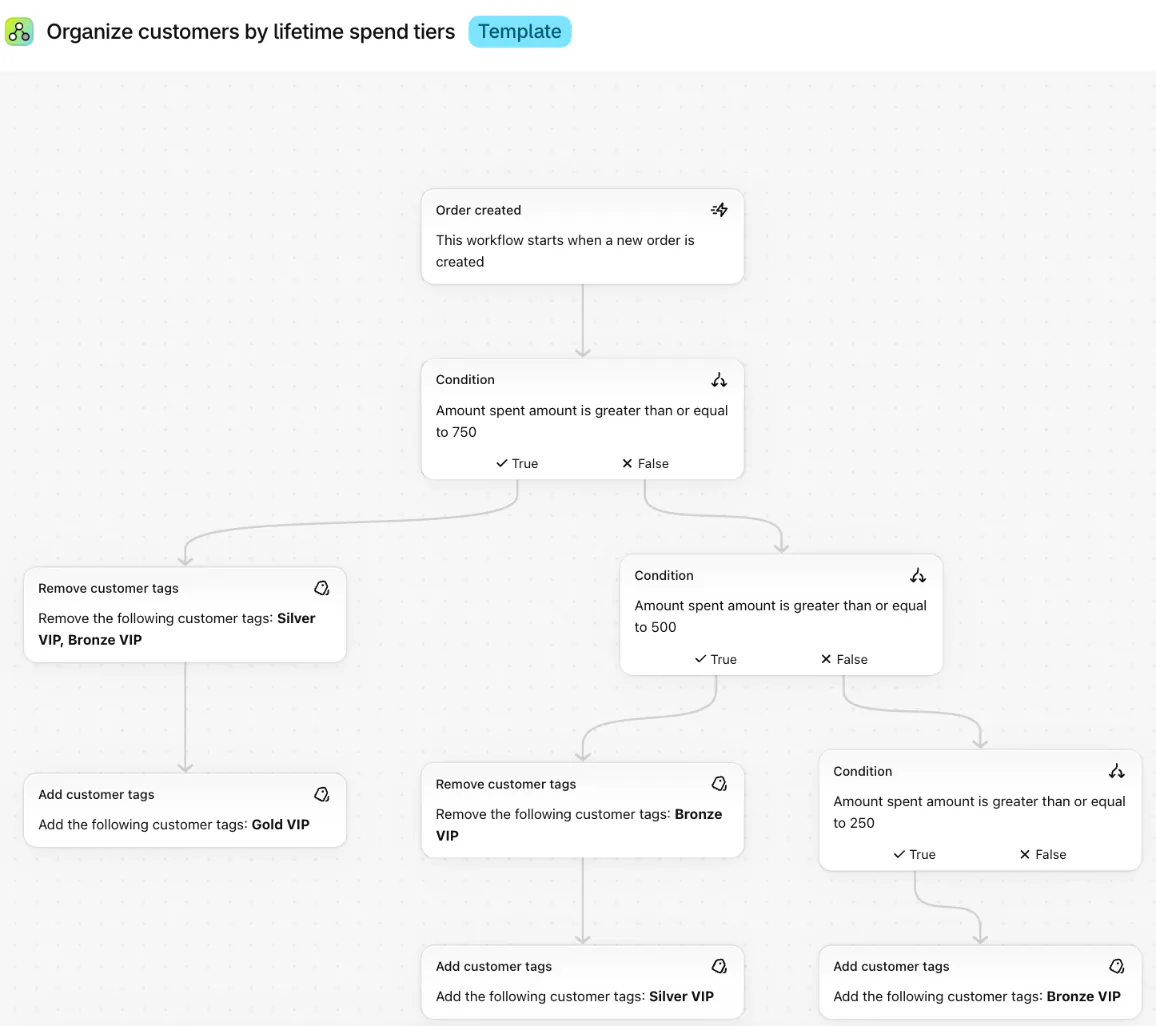
| Organize customers by lifetime spend tiers | Tags a customer Gold, Silver or Bronze VIP by what they have spent in total, each time they place an order | The three spend levels, shown as plain numbers (750, 500 and 250), and the tag names |
| Tag customers eligible for educational discount based on email address | Tags a new customer whose email ends in .edu, so you can offer them a student discount | The email ending, which is .edu in the preview, and the tag |
| Tag a customer's first order | Tags the order a customer places for the first time, for example so your team can slip a thank-you note into that parcel | The tag |
The spend tiers template needs no app. Shopify's Help Center lists a separate template, "Track and reward customers based on lifetime spend", that also hands out loyalty points through a loyalty app. Open a preview and look for a step that asks for an app before you install it.
Which Flow templates request or hold fulfillment?
A hold stops an order from shipping and a request starts it, so test both first.
| Template | What it does | Edit first |
|---|---|---|
| Submit fulfillment request for paid orders that use a specified fulfillment service | Asks the fulfillment service you name to ship an order that is paid and needs shipping, once its fulfillment is ready | The fulfillment service |
| Hold fulfillments if a customer placed multiple orders in 24 hours | Checks whether a customer placed several orders within 24 hours and, if so, holds their fulfillments so they can ship together | The hold reason, and the 24 hours, which sits in the order lookup step beside a tip from Shopify on changing it |
A held order waits until the hold is removed.
What does Flow offer for stock, risk, cart emails and sale dates?
Flow has templates for low stock, sold-out products and risky orders, can change the wait on the abandoned checkout email, and can run a task at a set time for sale dates.
| Job | What Flow does | Read more |
|---|---|---|
| Low stock | "Get notified by email when product variant inventory is low" emails you when a size or color drops to a level you set | Shopify inventory management, inventory reports |
| Sold out | "Publish and unpublish products based on inventory level" hides a product from shoppers and shows it again as its stock changes | Hiding a product |
| Risky orders | "Capture payment if order is not high fraud risk" and "Cancel high-risk orders" read the risk level Shopify already shows on an order. The first needs manual capture, which charges the card after checkout instead of at it, and the second cancels and refunds the order | Shopify chargebacks |
| Cart emails | The abandoned checkout automation in Shopify Messaging has an Edit workflow button, which opens that email's workflow in Flow, where you can change the wait | Abandoned cart emails |
| Sale dates | Flow can run a task on a schedule you choose, such as removing products from a collection | Scheduling promotions |
| A job with no template | Describe it to Sidekick, Shopify's assistant, and on desktop it drafts a workflow that stays off until you turn it on | Shopify Sidekick |
| New reviews in Sledge | A trigger, not a template, covered in the next section | Getting more reviews |
Can Flow react to a new review in Sledge?
Sledge adds one trigger to Flow, and no template comes with it.
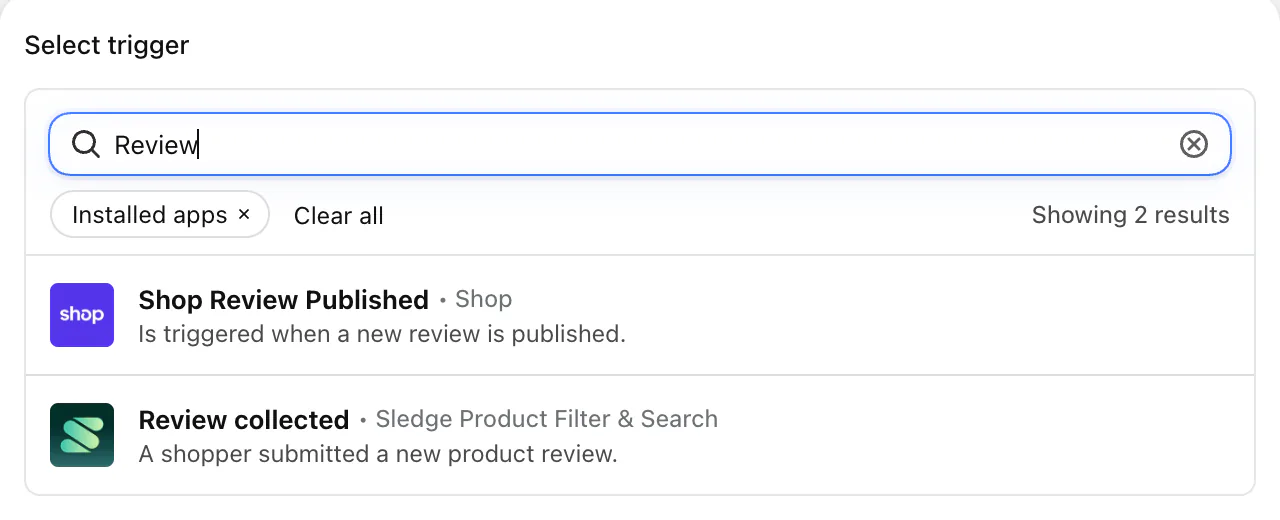
Sledge, a Shopify app for search, filters and reviews, adds one trigger to Flow's list: "Review collected". It starts a workflow each time a shopper submits a review in Sledge's review form, whether or not the review goes live on its own. It passes the rating, the title, the text, the product, the reviewer's email and whether the review was published automatically. A condition can check the rating, for example to email you about a low score. Click Create workflow, then Select a trigger, search for Review, and add a step such as Send internal email.
Reviews collected through Shopify's Shop channel have their own trigger, "Shop Review Published", which starts when a new review is published. The guide to getting more reviews has the full steps.
Which template is safest to try first?
A template that tags an order or emails you is the safest first try. Our pick is "Tag orders paid with gift card": it adds a tag, which is the one value to check, and it changes nothing a shopper sees. A hold delays a parcel and a cancel ends an order, and a shopper notices both. Turn those on only after a test. Flow's test run stops at the first step that would change something, so it cannot tag, hold or cancel anything.
FAQ
Questions, answered
-

14-day free trial
Explore Sledge on your store before you decide to commit.
-

No credit card required
Start improving your store with no upfront commitment.
-

Setup in minutes
Get Sledge running without a lengthy setup process.
-

Built to grow sales
Turn shopper behavior into actions that help you sell more.
Are Shopify Flow templates free?
Flow is free for Basic, Grow, Advanced and Plus stores, and Shopify's templates have no price of their own. What a template uses can cost money. Shopify Messaging gives you 10,000 free emails a month, then charges $1 USD per 1,000. A service you connect, such as Slack, keeps its own plan.
Where do I find Flow templates in Shopify?
Open Apps, then Flow, and click Browse templates. You can also click Create workflow, where Browse templates sits beside Select a trigger. Pick a group such as Orders or Customers, or describe the job in the search box. Open a card to preview it, and nothing installs until you click Install.
How do I edit a Flow template before I turn it on?
Click Install, then open each step. Check the tags, since a template may add one you do not want. Replace the placeholder in any Send internal email step, such as youremail@example.com. Connect any app it uses, run a test, and then click Turn on workflow. A test changes nothing in your store.
Why can't I turn on a Flow template?
Two common things can block a template. The workflow may use an app that is not installed or connected. Or your staff role may lack the permission for one of its steps, such as Edit customers for a step that tags customers. Shopify's October 2026 update says staff need each step's permission to test or turn on a workflow.
What are the limits of Flow templates?
A template is a starting point, and not every job has one. Shopify says the library holds hundreds, and you can build the rest from a blank workflow. Workflows run as soon as possible, which is not always instantly. Orders and draft orders are handled separately, and Flow keeps each run for 14 days.
Does Sledge work with Shopify Flow?
Sledge adds one Flow trigger, Review collected, which starts a workflow for each new review a shopper submits in Sledge's review form. It has no Flow template or action of its own. So Flow can email your team about a new review, but a workflow has no Sledge step to run in return.
Flow works after the order. Where does your store lose sales before it?
Sledge doesn't build Flow workflows or include templates. It adds one Flow trigger, Review collected. The rest of Sledge works before the order, with search, filters, bundles and a cart drawer. Try it free for 14 days. Growth Intelligence turns on when you pick a paid plan, and its suggested fixes add up to one dollar figure, labeled Est. potential.