
Shopify inventory management is built into the admin at no extra cost. Switch on Inventory tracked, and Shopify counts each size and color at each location, stops online sales at zero unless you allow overselling, and logs every change. Stocky closed on August 31, 2026, so stock counts, transfers and purchase orders run from the admin too.
The last denim jacket sells online at 9 p.m., then again at your shop counter the next morning. One buyer now gets a refund and an apology. The admin can show you why, once you know which number to trust and which sales can slip past zero.
What does Shopify inventory management include?
Shopify's admin tracks stock and runs stock counts, transfers, purchase orders and inventory reports. Shopify's own feature list marks forecasting, low-stock alerts and back-in-stock alerts as not built in. The list sits under "Included with Shopify" on Shopify's inventory page.
| Job | In Shopify | Where |
|---|---|---|
| Track each size, color and location | Built in | Products, then Inventory |
| Count stock and approve the count | Built in | Products, then Inventory, then Stock counts |
| Move stock between locations | Built in | Products, then Transfers |
| Order from suppliers | Built in, sent as a PDF | Products, then Purchase orders |
| Inventory reports | Built in | Analytics, then Reports |
| Low-stock alert | Shopify Flow, free on Basic and up | A Flow template |
| Forecasting | Not built in | An app |
| Back-in-stock alert | Not built in | An app |
Each location, set under Settings, then Locations, keeps its own count. Starter allows 2 active locations; Basic, Grow and Advanced allow 10; Shopify Plus allows 200. Locations run by an app, such as a dropshipping app or a fulfillment service, don't count toward the limit. Shopify doesn't forecast demand, though one report estimates the days left before a product will sell out.
How do you turn on inventory tracking in Shopify?
Inventory tracked is the switch that makes Shopify count a product, and each size and color keeps its own number at each location.
- In your Shopify admin, go to Products and open the product, or one of its sizes or colors.
- In the Inventory card, switch on "Inventory tracked". A new product has it on already.
- Type how many units you hold at each location in the Quantity column.
- Leave "Sell when out of stock" at Off unless you take orders for stock you don't have yet. Clicking it opens one checkbox, "Continue selling when out of stock".
- Click Save.
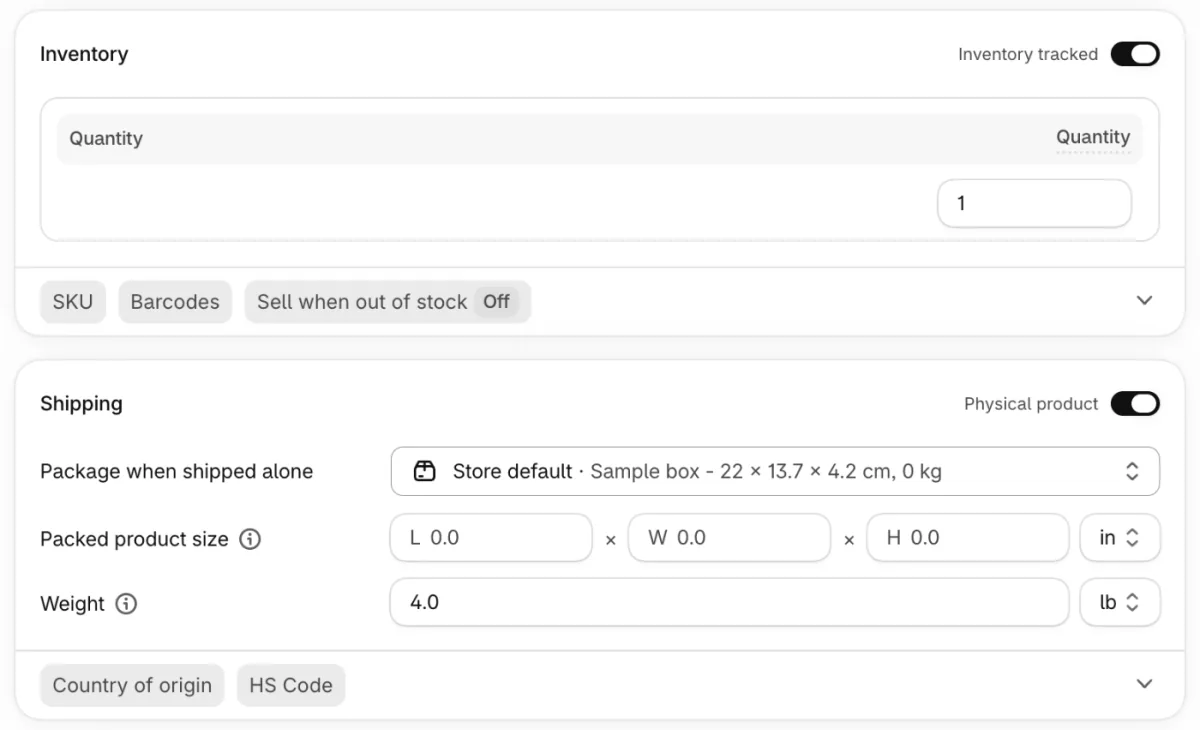
Off is Shopify's default: at zero, shoppers can't add the item to their cart. Overselling suits quick restocks, pre-orders and made-to-order items. Digital products, services and gift cards may not need tracking at all.
A hoodie in three sizes and two colors gets six counts at each location, one per size and color. To fill in many products at once, use the bulk editor or import a CSV spreadsheet.
What do Available, Committed and On hand mean?
Available is what Shopify will sell; On hand is everything on your shelf, including units sold but not yet shipped. Shopify splits every count into five states:
- Available: what you can sell right now.
- Committed: units in orders you haven't fulfilled, held in a draft order, or in a transfer marked ready to ship.
- Unavailable: units set aside, such as damaged stock or stock in quality control.
- On hand: Committed, Unavailable and Available added together.
- Incoming: stock on its way from a transfer or a purchase order.
Say 20 tees sit at your one location. Three are in orders you haven't fulfilled, and two are damaged, so 15 are Available and all 20 are On hand. A box of 24 from your supplier shows as Incoming until you receive it.
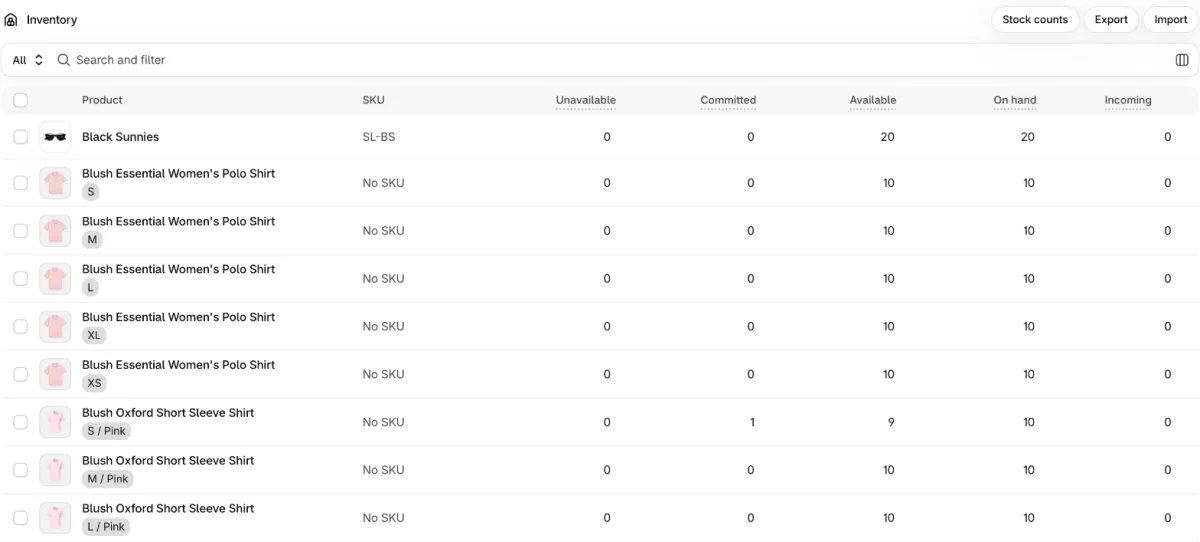
All five states sit side by side under Products, then Inventory. If On hand looks too high after a busy day, orders are usually waiting to ship: sold units stay there, as Committed, until you fulfill them. Unavailable also has a Safety stock label for units you hold back on purpose, and safety stock covers how many to keep.
Why does Shopify oversell, or say sold out when you have stock?
Shopify stops online sales at zero by default, so an oversold item usually means overselling was switched on or a counter sale went past zero. A false sold out usually means stock sits at the wrong location, or an app writes the count. Four causes and their fixes:
- Overselling is on for that size. "Continue selling when out of stock" is ticked. Untick it, unless the item is a pre-order or made to order.
- A counter sale went past zero. Shopify POS ignores that setting, so staff can keep selling at zero and below after a warning. Ask them to stop at the warning.
- Stock sits at the wrong location. If the location that fulfills online orders reads zero, your store says sold out, even when a location that doesn't fulfill online orders holds stock. Move the stock with a transfer, or let the location that holds it fulfill online orders.
- An app writes the count. A dropshipping app's products can show sold out when its location has no shipping rates. Check the app's sync and its rates.
To keep sold-out products off a collection, add the automated condition "Inventory stock is greater than 0", as Shopify collections explains. To keep them in view but lower, push them to the bottom.
How do you count, adjust and move stock?
Change one quantity on the Inventory page, run a full count with Stock counts, and move stock under Transfers; Shopify logs who made each change.
On the Inventory page, click a quantity to change it. "Set to" replaces it with an exact number. "Adjust by" adds or removes units, and "Add reason" records why, such as Count, Received, Damaged, or Theft or loss. Nothing changes until you click Save.
Each product keeps 180 days of history: the date, the change, and who made it, whether a staff member, an app or a sales channel. Older changes live in the Inventory adjustment changes report.
For a full count, click the "Stock counts" button on the Inventory page, then Create count. Pick a location and the products. Staff count with a barcode scanner or by hand, and a manager can review the count before any number changes. You create counts on a computer, and staff at a POS Pro location can count in POS.
To move stock, go to Products, then Transfers, and click Create transfer. A transfer moves units between your locations, or to and from a supplier. The units show as Incoming until you receive them, in full or in part.
How do you reorder stock now that Stocky is gone?
Purchase orders and transfers in the admin replaced Stocky, but you send each order as a PDF yourself and keep your own reorder levels. Shopify took Stocky off the App Store on February 2, 2026 and closed it on August 31, 2026. Its old purchase orders and stocktakes don't move into Shopify, and its supplier list can't be exported.
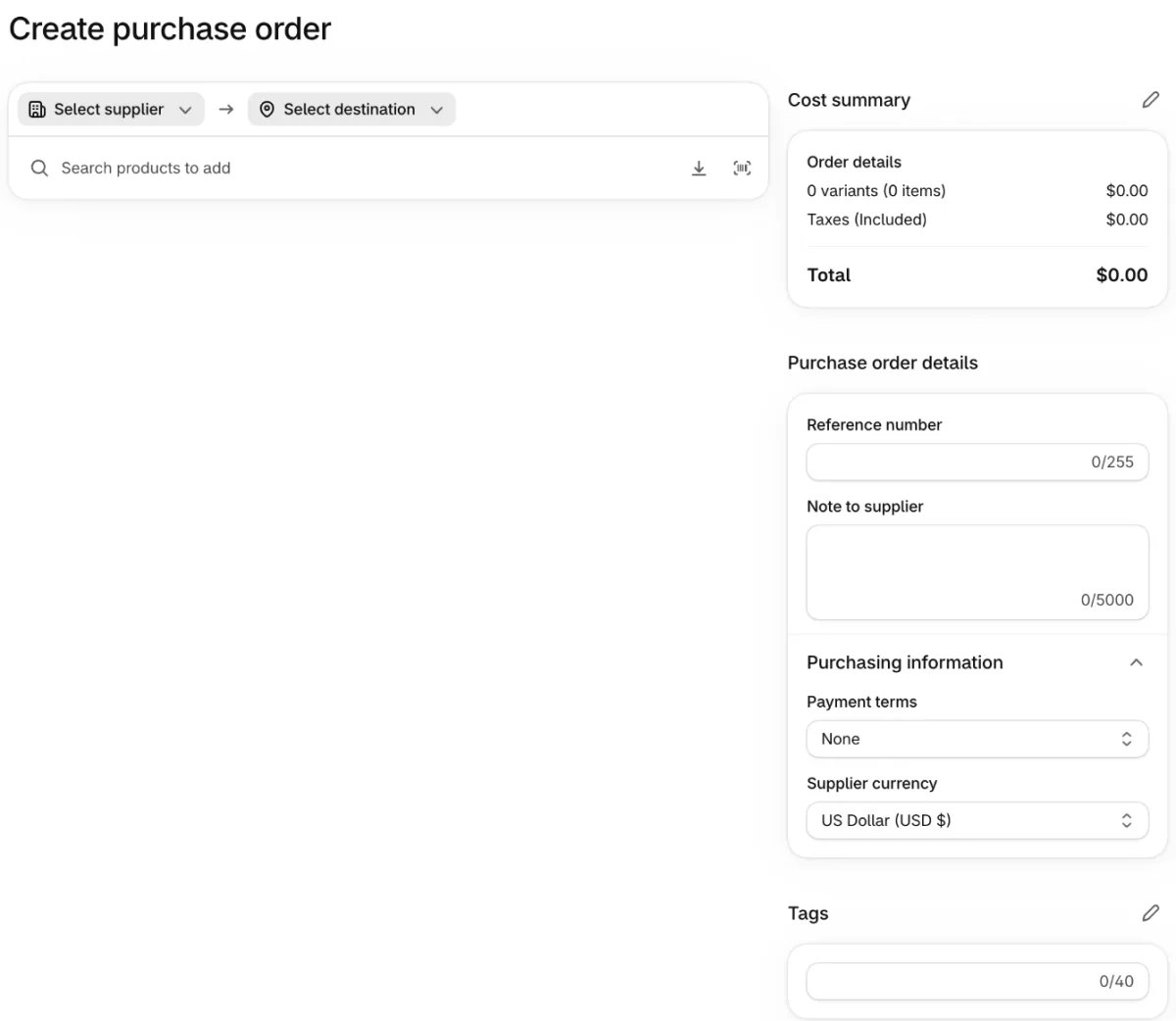
A reorder starts under Products, then Purchase orders: click "Create purchase order". Pick a supplier, add products with quantities and costs, set payment terms such as Net 30 or Payment on receipt, and save it as a draft. What is a purchase order covers the rest: sending the PDF, then "Mark as ordered", which can't be undone.
When the boxes arrive, receive them on the transfer linked to that order, and the units move from Incoming to Available.
There is no reorder-point box, so Shopify's guide suggests a custom field for a minimum and maximum level. Sidekick, Shopify's admin assistant, can answer "What should I reorder?" from your sales and draft the order for you to check, Shopify says.
How do you know when to reorder?
Shopify Flow's free low-stock template and the Inventory remaining per product report tell you what to reorder before it sells out.
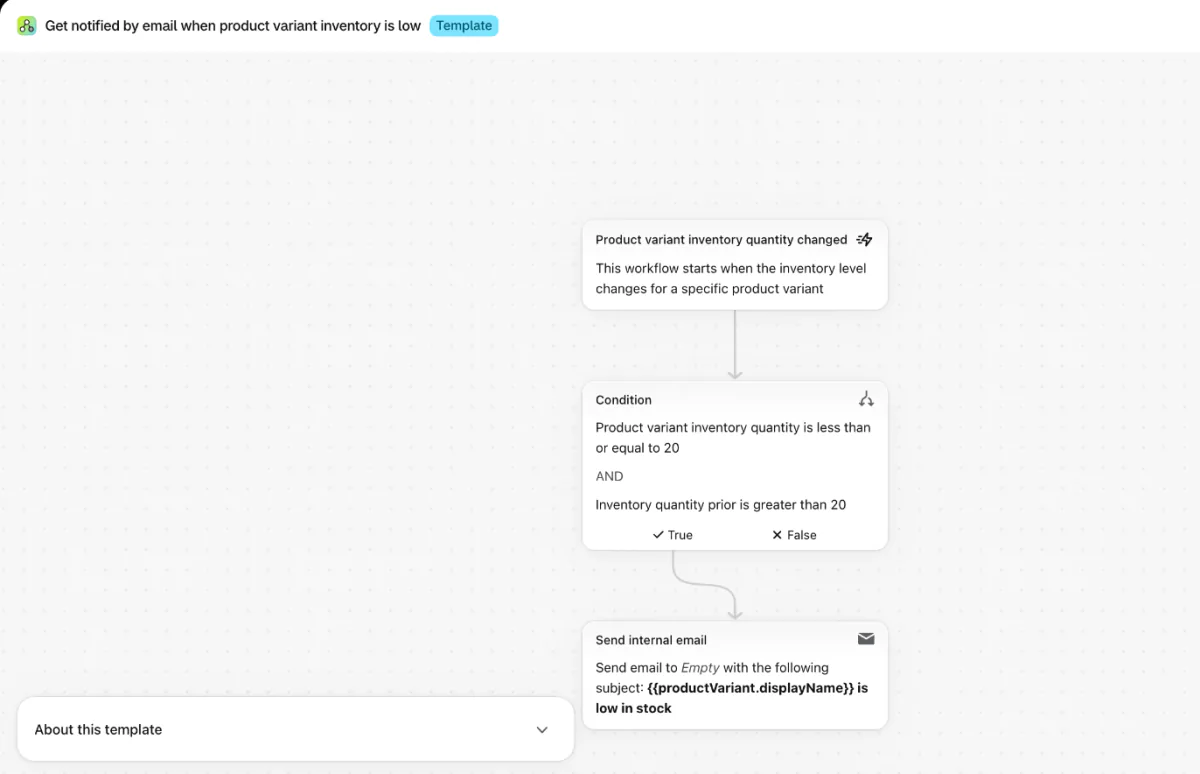
Flow is a free Shopify app on the Basic, Grow, Advanced and Plus plans. Its template "Get notified by email when product variant inventory is low" emails you when a size or color drops to 20 or fewer, a level you can change. It fires once when stock crosses that level, not on every sale. The email step, "Send internal email", starts with no address, so add yours before you turn the workflow on.
For the reports, open Analytics, then Reports, and set the Category filter to Inventory. Three of them answer reorder questions:
- Inventory remaining per product divides what's left by the average sold per day over the last 28 days. Say a hoodie sells 4 a day and 36 are left: it shows about 9 days. If your supplier needs 14 days, you are already late.
- ABC product analysis ranks products by revenue, so you know which to keep in stock first.
- Products by sell-through rate shows what share of your stock sold, and a low rate is the first sign of dead stock.
Since October 1, 2026, these reports measure stock by On hand instead of Available, so they can read higher than before. Dates before that still show Available, and the data goes back only to October 1, 2023. How early to reorder comes from your safety stock, and how fast your stock sells through is your inventory turnover ratio.
When do you need an inventory app?
Add an inventory app for the jobs Shopify doesn't do: forecasting, automatic restocking, back-in-stock sign-ups, syncing a sales channel Shopify doesn't connect to, and moving stock between shelves inside one location. Shopify's App Store groups the inventory tools under inventory optimization.
What do shoppers see when a product sells out?
By default, your store says sold out and shoppers can't add the product to their cart. Sledge is a Shopify app for search, filters and merchandising that can change what they see, and it leaves your stock counts alone. On the Accelerate and Ultimate plans, Sledge Back in Stock can show a sign-up form on a sold-out product's page, its card in collections, search results and instant search, and it emails the shoppers who signed up when the product is back. Its "Subscribed products" tab, the list of products people wait for, shows the number of subscribers beside the Available quantity.
A Sledge pre-order, available on every plan, keeps a product selling while stock is on its way. It switches on Continue selling when out of stock for that product, and closing the campaign switches back only what Sledge changed. In Sledge's product list settings, "Move Sold Products to the end of product listing" keeps sold-out products after the ones you can ship, on the collection and search pages Sledge shows.
FAQ
Questions, answered
-

14-day free trial
Explore Sledge on your store before you decide to commit.
-

No credit card required
Start improving your store with no upfront commitment.
-

Setup in minutes
Get Sledge running without a lengthy setup process.
-

Built to grow sales
Turn shopper behavior into actions that help you sell more.
Does Shopify have inventory management built in?
Yes, at no extra cost. Shopify tracks each size, color and location, and runs stock counts, transfers, purchase orders and inventory reports from Products and Analytics in your admin. Shopify's own feature list marks forecasting, low-stock alerts and back-in-stock alerts as not built in. Its free Flow app sends low-stock alerts on Basic and up.
Is Stocky still available?
No. Stocky closed on August 31, 2026, after Shopify took it off the App Store on February 2, 2026. Shopify promised read-only access to export your data for at least 90 days after the shutdown. Old purchase orders and stocktakes don't move into the admin, and your supplier list can't be exported.
Why doesn't my Shopify stock go down after an order?
It does, in another column. An order moves units from Available to Committed, and they leave On hand only when you fulfill it. If Available still looks too high, check whether that size or color has Inventory tracked switched off, or whether an app writes your stock counts.
Can Shopify send a low-stock alert?
Not from the admin itself, but Shopify Flow can. Its template named Get notified by email when product variant inventory is low emails you when a size or color drops to or below the level you set, once per drop rather than on every sale. Flow is a free Shopify app on the Basic, Grow, Advanced and Plus plans.
Does Shopify POS share inventory with the online store?
Yes. Shopify POS and your online store sell from the same stock at each location, and a counter sale updates the count right away. One difference matters: POS ignores Continue selling when out of stock, so staff can sell past zero after a warning. Ask them to stop at that warning on your last units.
How do you automate inventory management in Shopify?
Shopify Flow, free on Basic and up, runs the routine jobs from ready-made templates: a low-stock alert, hiding a product when it sells out and showing it again on restock, or a collection of low-stock products. Sidekick, Shopify's admin assistant, can suggest what to reorder and draft the purchase order or transfer for you to check.
A best seller runs low on a Tuesday. Who tells you?
Sledge doesn't count, move or reorder stock: you do all three in Shopify. On every paid plan, the Signals tab in Sledge Analytics flags a best seller running low and a sold-out product shoppers keep opening, and Back in Stock sign-ups start on Accelerate. Try Sledge free for 14 days. Growth Intelligence turns on when you pick a paid plan, and its suggested fixes add up to one dollar figure, labeled Est. potential.

