

Yes. Shopify's multi-currency tools work on every plan, and with Shopify Payments shoppers see prices and pay in their own currency. In your admin, open Markets, click a market, add its currency and save. If your store is in the US, converting costs 1.5%. Elsewhere it costs 2%, and automatic rates add it to the shopper's price.
A shopper in Stockholm opens your $50 sunglasses, works out the kronor in her head and leaves. Another sees euros on the product page and dollars at checkout, and wonders what else changed. Shopify can price each of them in their own currency, for a fee, and a few settings decide what they pay and what you keep.
Does Shopify support multiple currencies?
Yes, on every plan: a market picks the currency each country sees, and Shopify Payments takes the payment in it. Enterprise-level stores can use Adyen instead. Shopify's list of accepted currencies runs to 130. Shopify Payments is not open in every country, so check Shopify's list of countries first.
With any other payment provider, checkout bills in your store's currency and the shopper's bank may add a fee. Shopify's pages disagree on whether local prices still show, so test one market before you rely on it. Shopify's own table sorts the methods inside Shopify Payments:
- Fully supported: card checkout, Shop Pay and local methods such as Klarna and Bancontact.
- Supported, without checkout restrictions: Apple Pay, Google Pay and PayPal Express.
- Converted to your store currency: Amazon Pay and every method the table does not list.
How do you set up multi-currency on Shopify?
Open Markets, click a market, add a currency and save: the market then shows that currency to shoppers in its countries.
- Turn on Shopify Payments. In Settings, open Payments and follow the prompts. Without it, a market cannot charge shoppers in their own currency.
- Open Markets and pick a market. Click one, or click "Create market", name it and add countries under "Includes", the countries it covers. A market goes live only for countries with shipping rates.
- Add the currency. Under "Customized", click the currency on the Currency row, or the plus next to Currency if none is set yet, and choose the currency in the box that opens. Pick "Dynamic" or "Manual" under "Exchange rate (FX)", the rate prices convert at. Choose a "Price rounding" option, click "Done", then "Save". On a market with several countries, "Use local currencies" gives each country its own currency.
- Make the market Active. In the "Name" card, set the menu beside the market's name to "Active". Shopify says a Draft market does not sell, and only shoppers in an active market's countries can check out.
- Check the selector and test. Shoppers need a country selector. Then place a test order in each market with a test card number.
Labels read in the Shopify admin and steps checked against Shopify's Help Center, both on November 6, 2026.
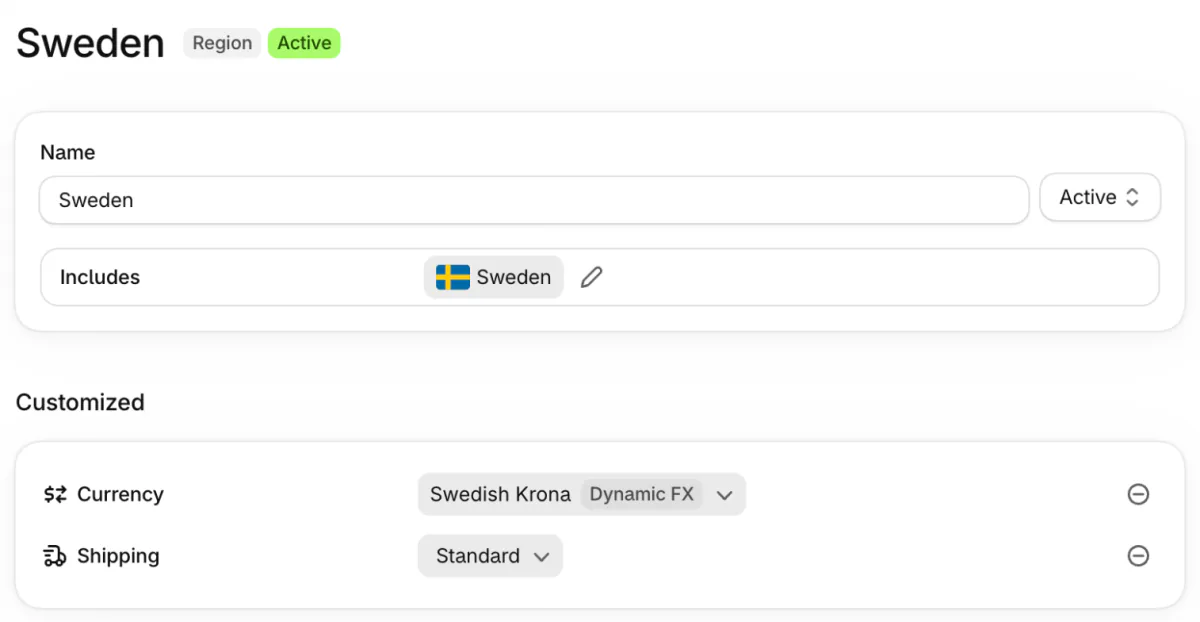
Some guides still send you to Settings, then Markets. Markets now has its own item in the admin menu.
What does the currency conversion fee cost?
Shopify Payments charges 1.5% to convert a payment if your store is in the US and 2% in every other country it serves. On automatic rates, Shopify adds the fee to the shopper's price.
Say a shopper in Sweden buys your $50 sunglasses. On the day we checked, Shopify converted $50 to 493.63 kr, added a 2% fee of 9.87 kr and rounded up to 504 kr. The shopper pays 504 kr, and the fee inside that price helps offset what Shopify charges you. Our test store sits outside the US, so its screen shows 2%.
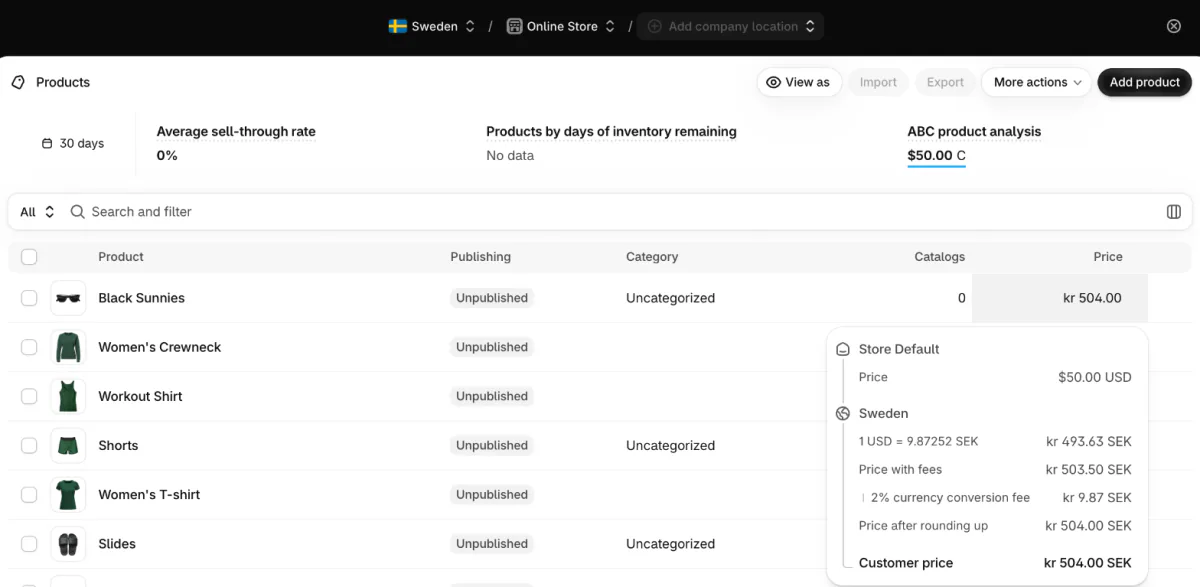
- Manual rates. The fee is not added to the price, so Shopify takes it from your payout.
- Refunds. The shopper gets back the currency they paid in, and Shopify converts the refund at that day's rate, so you can gain or lose money. It does not return the conversion fee or the card fee.
- The April 2026 change. Since April 6, 2026, Shopify works the fee out on the full order amount, so the stated rate is the rate you pay.
- The shopper's bank. It may add its own foreign-purchase fee, which Shopify does not control.
Shopify's other fees are in our Shopify review, and Shopify's fees page lists each case.
Should you use dynamic or manual exchange rates?
Use Dynamic unless a price must not move, because Manual fixes the price and leaves the exchange risk with you. Dynamic follows the market rate Shopify sets at the time of each purchase, and builds the conversion fee into the price. With Manual you type a rate for that market, and shoppers see steady prices.
Say you set 0.92 euros to the dollar and the market moves to 0.95. A 92 euro order is now worth $96.84, not $100, so you have given away $3.16. Shopify says it is on you to keep a manual rate current.
How does Shopify round converted prices?
Rounding is set per market, works only on Shopify Payments stores and rounds up to a step Shopify picks for the currency, so you cannot choose an ending such as .99. Click the currency on a market's Currency row and a box opens. Its "Price rounding" offers "Round up to the nearest kr 1.00 SEK" for kronor, or "Do not round prices".
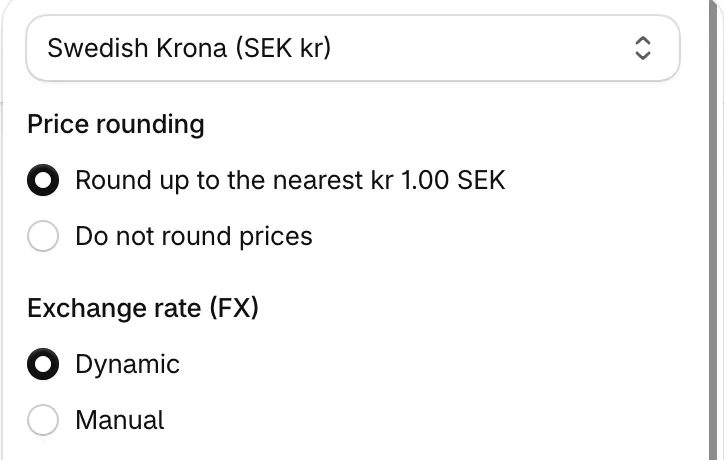
Rounding also covers shipping rates, and skips gift cards.
To see the result, go to Products, click "View as", pick a country and open a price to read its "Price after rounding up". For a price that must be exact, such as 49 euros, open Catalogs under Markets and set that product's price in the catalog the market uses, the list of products and prices it sells. A fixed price overrides a manual rate, and it carries the same exchange risk.
Why does checkout show a different currency?
Checkout changes currency when the payment method cannot charge in the shopper's currency, or when the order ships to another country. Four things can cause it:
- Another payment provider. Only stores with Shopify Payments or Adyen as the main provider can charge in local currencies. On any other, checkout bills in your store currency.
- A currency app. Some apps change only the display, so checkout reverts to your store currency.
- A gift shipped abroad. The shopper types an address in another country, and on stores with one-page checkout Shopify switches the order to that country's currency. This applies to physical goods only.
- A method Shopify does not support. Amazon Pay, for one, converts to your store currency.
Place a test order in each market before you rely on it. Shopify says its test payment gateway can simulate international orders, so you do not need a live card.
How do shoppers pick their currency?
Shoppers pick a country in a selector, or Shopify sends them to the right market from their location. Most themes have a selector: in the theme editor, open the header or footer and turn on the country selector setting. Under Online Store, Preferences, the "Automatic redirection" section has a "Country/region" switch, which sends shoppers to their market by location.
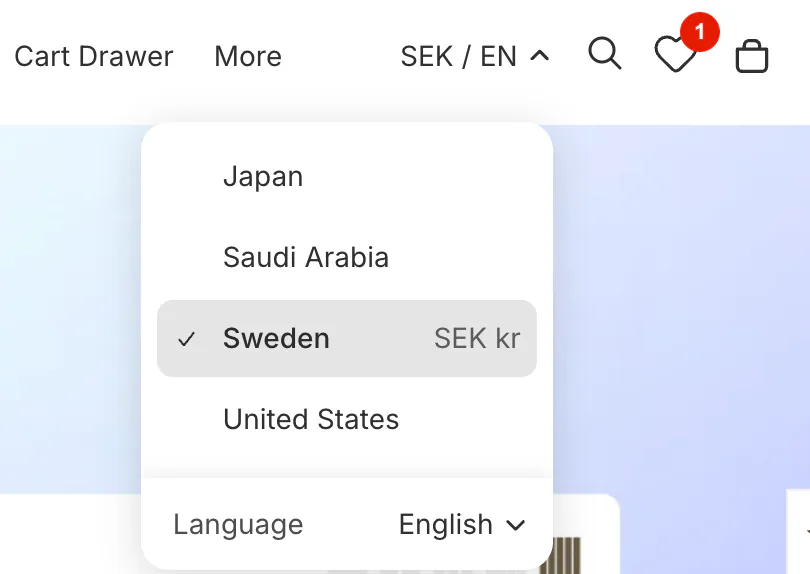
Location is not always right, so keep the selector on as well. Shopify's Geolocation app closed on March 24, 2025, so guides that name it are out of date.
What else changes when you sell in more currencies?
- Discounts. A percentage off is the same in every currency. A fixed amount off, such as $10, is set in your store currency and converted at checkout, so it shifts with the rate. Free-shipping minimums convert the same way.
- Gift cards. A card in your store currency can be spent in any currency. Our gift card guide covers the rest.
- Reports. They show your store currency only.
- Payouts. You are paid in one currency unless you are on Advanced or Plus and add Multi-Currency Payouts, which adds a fee.
- Filters. Shopify's price filter does not show to shoppers in another currency, as the product listing page guide notes.
- Apps. Anything that shows a price needs a test. Shopify marks apps that do not support multiple currencies under Settings, then Apps, and asks you to remove them before you turn currencies on.
FAQ
Questions, answered
-

14-day free trial
Explore Sledge on your store before you decide to commit.
-

No credit card required
Start improving your store with no upfront commitment.
-

Setup in minutes
Get Sledge running without a lengthy setup process.
-

Built to grow sales
Turn shopper behavior into actions that help you sell more.
Does Shopify support multiple currencies?
Yes. Shopify Payments or Adyen can charge shoppers in their own currency, and Markets sets which currency each country sees, on every plan. Shopify's list of accepted currencies runs to 130. With any other payment provider, shoppers are charged in your store's currency, and their bank may add a fee.
Can I sell in multiple currencies without Shopify Payments?
Not fully. Only Shopify Payments or Adyen can charge in the shopper's currency. With another provider, or with a currency app that only changes the display, checkout bills in your store's currency and the shopper's bank may add a fee. Shopify's pages disagree on whether local prices still show, so test one market first.
How much is Shopify's currency conversion fee?
It is 1.5% if your store is in the US and 2% in every other country Shopify Payments serves. On automatic rates Shopify adds it to the shopper's price. On manual rates it comes out of your payout. Refunds do not return it. Since April 6, 2026, it is worked out on the full order amount.
How do I add a currency selector to Shopify?
Most themes include one. In the theme editor, open the header or footer and turn on its country selector setting. If your theme has none, ask the theme's maker. Shopify's Geolocation app closed in March 2025, so it is no longer an option. Keep a selector visible even with automatic redirection on, because location can be wrong.
Can I get paid in more than one currency on Shopify?
Only with Multi-Currency Payouts, which needs the Advanced or Plus plan and a bank account for each extra payout currency. Other plans sell in many currencies but are paid in one, and each payout currency outside your home one adds a fee. Your region's rates are in Shopify's Help Center.
Selling in more currencies? Find the next fix.
Sledge doesn't set your markets, exchange rates, fees or rounding. It runs your store's search, filters and offers instead, with a 14-day free trial. Growth Intelligence turns on when you pick a paid plan. It reads your orders and searches, suggests what to fix next, and sums those fixes up as a single total in your store's currency, labeled Est. potential.

