
Retargeting ads show your products to people who already visited your store and left without buying. Meta and Google run them, using the visits their tracking notes. In Shopify you switch that tracking on in a sales channel, then build the ad in Meta or Google. They work harder when the page behind the ad repeats its promise.
Say 1,000 shoppers visit your store this month and 20 buy. A retargeting ad shows one of the rest the sneaker they opened, with "15% off, ends Sunday". They tap it and land on a product page that mentions no sale. They leave again, and you paid for the click.
What are retargeting ads, and is remarketing the same thing?
Retargeting ads are paid ads that show your products to people who already visited your store and left. A shopper opens a sneaker, closes the tab, and sees that sneaker in their feed a day later.
Shopify's blog splits two words. Retargeting is paid ads to visitors, tracked by cookies, and remarketing is email or text to past customers. The same post adds that the two words are often used as one. Google Ads calls its visitor ads remarketing and now labels them "your data".
Here, retargeting means ads. The email side is in abandoned cart email and browse abandonment email. Ads work from the visit and email needs an address on file, so a first-time visitor with no address gets no email but can still see an ad.
How do retargeting ads work on a Shopify store?
Meta's or Google's tracking notes each visit, puts the shopper in a group, and the ad follows that group. When a shopper opens that sneaker, Meta's tracking tool, the pixel, notes the visit.
Shopify's help says Facebook then builds an audience, a group of visitors who were active on your store in the last 30 days. It shows them a carousel of the products they viewed or added to the cart. Shopify's help calls these dynamic retargeting ads, and Meta's own help now names them Advantage+ catalog ads.
Google keeps the same kind of group. You pick how long people stay in it, 30 days by default and up to 540 days. Google's help says to match that length to how long shoppers take to decide, and a new group can take 48 to 72 hours to fill. Google also sets a minimum group size, so a store with a few visits a day may wait.
Then decide which group each ad is for. Three groups are a good start:
- Viewed a product, did not add it. Show that product again, with a reason to come back, such as a review or "in stock".
- Added to the cart, did not buy. The same items work, because the shopper already chose them.
- Already bought. Keep these shoppers out of the ad for what they bought, so they stop seeing a product they own. Google lets you exclude a group of your own visitors.
How do you set up retargeting ads from Shopify?
You turn on the tracking in a Shopify sales channel, then build the ad in Meta or Google. Start with Meta:
- In your Shopify admin, open Sales channels, then Facebook & Instagram. Shopify says the channel is free to use with all plans, subject to store eligibility.
- Click Settings, then Share data settings, the screen that sets what your store tells Meta about visitors. Switch on the "Enable data-sharing" toggle.
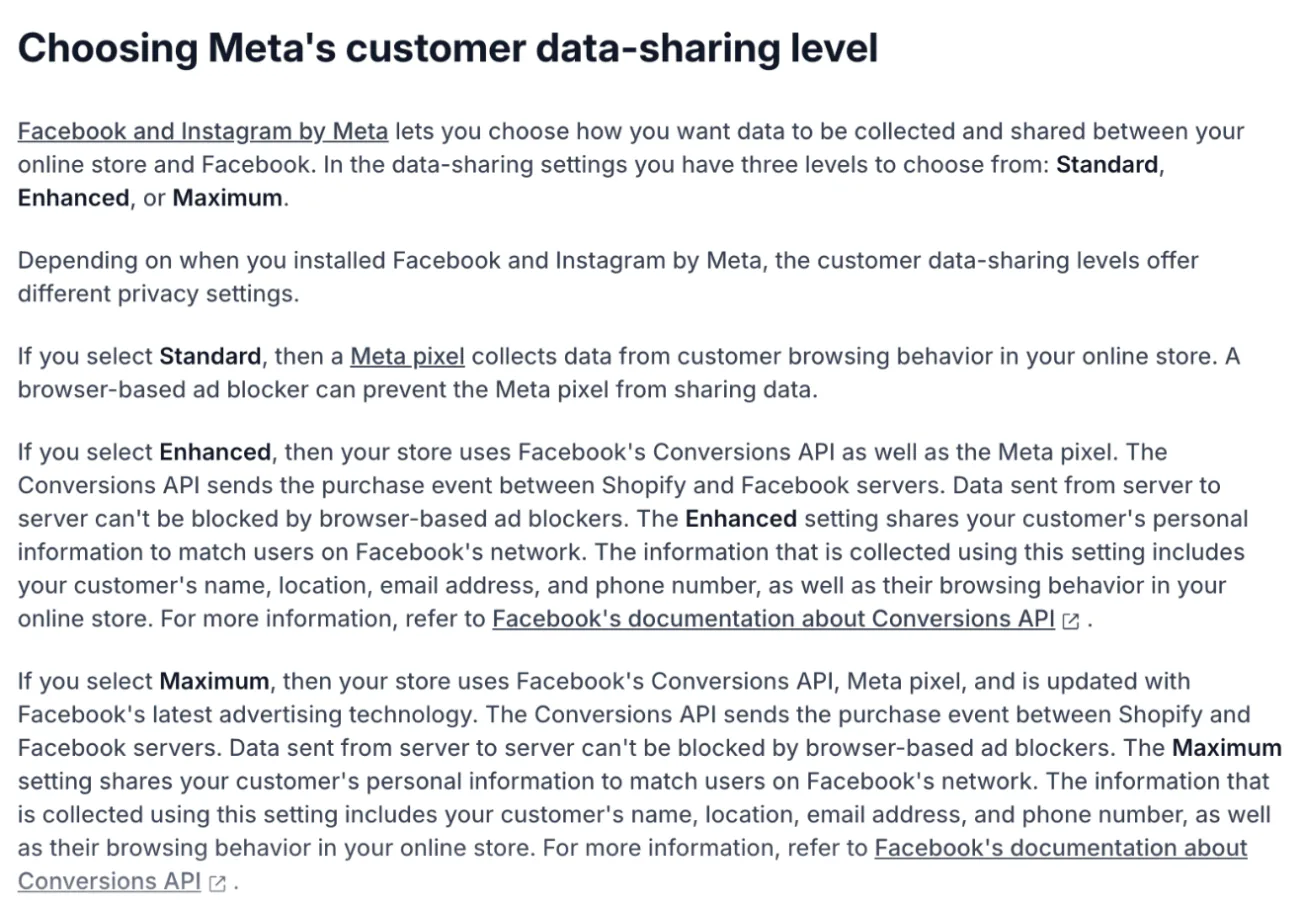
- Pick a level. Standard shares browsing only, while Enhanced and Maximum add name, location, email and phone. Shopify's help says the choice is yours, so tell shoppers how you share data in your privacy policy.
- Pick your Meta tracking from the list, or click Create new, then Confirm. If a developer once added Meta's tracking to your theme by hand, ask for it to be removed, or each visit may count twice.
- Build the ad in Meta's Ads Manager as an Advantage+ catalog ad. It needs your products synced to Facebook and your store out of private mode. The group fills as visits come in, so give it a few days.
Google works in three steps:
- Install the Google & YouTube channel. It is open to certain countries and currencies only.
- Inside the channel, connect your Google Ads account. That gives you conversion measurements for your ads.
- In Google Ads, make a group of website visitors and aim a campaign at it. Google builds that group from tracking on your store, so open the group a few days later and check that it fills.
Rather not build ads yourself? Shopify's Autopilot, under Growth, recommends marketing actions, including Meta ads, and you approve each one. Shop Campaigns is a separate Shopify ads program that can reengage lapsed customers and charges only when a customer converts. Autopilot's help points to plan eligibility and pricing per channel, so check the requirements of each before you rely on it.
Tracking visitors can need their consent. Settings, then Customer privacy, has a Cookie banner, and Shopify's help says compliance stays with you. This isn't legal advice.
How do you make your landing page match the ad?
A retargeting ad promises something, and the page it opens must show that thing on its first screen. The shopper came back for the sneaker at 15% off. A page that shows neither wastes the click.
For Search ads, Google scores the page behind the ad. Its Quality Score includes "landing page experience", how relevant and useful the page is to people who click. The page designs themselves are in landing page examples. Each promise needs something different on the page:
| What the ad promised | What the page must show | How to do or check it |
|---|---|---|
| A product | That product's own page, in stock | Link the ad to the product, not the homepage. If it sold out, Sledge's Back in Stock takes an email for its return, on Accelerate and up. |
| A sale or a price | The same sale on the first screen | Shopify's discount sets the price. A Sledge Banner shows the sale on the Collection Page, Search Page, Instant Search or Cart Drawer, to shoppers on that page whatever brought them there. |
| A deadline, like "ends Sunday" | A timer that ends when the ad does | Add Sledge's Global Countdown across the store, or a Product Countdown on chosen products, and set Active dates to the ad's dates. |
| A working link | A page that opens | In Sledge Analytics, open Journey, then a visitor and one of their visits. Under "Session details", "Referrer" names where the visit came from and "UTM parameters" shows the tags the ad's link carries. "Landed on a broken link" flags a dead address. |
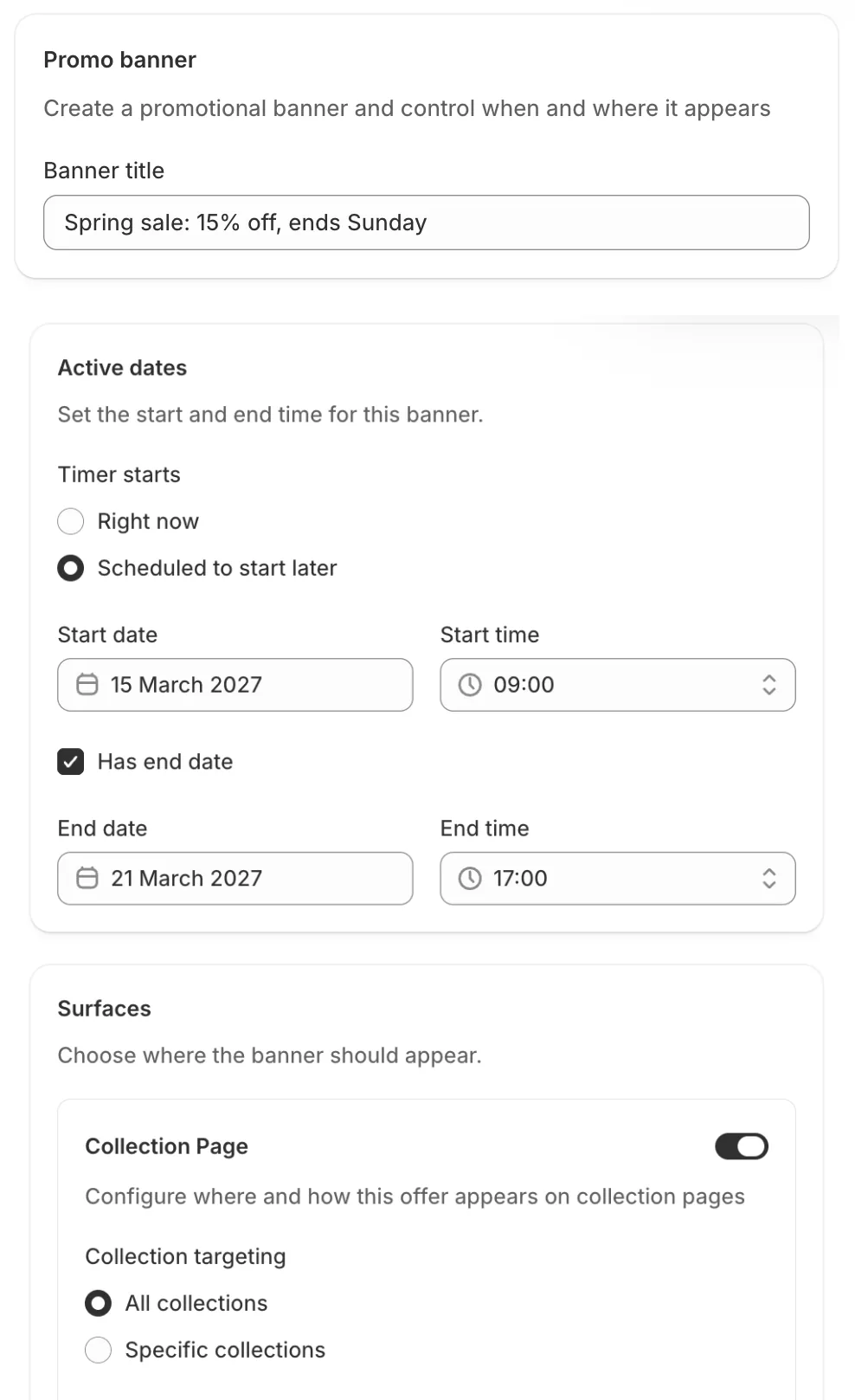
Banners and both countdowns are part of Sledge's promotions on every paid plan. In the banner form, type the Banner title and, under Surfaces, switch on where it should show. Under Active dates, choose "Scheduled to start later" to set a Start date, and tick "Has end date" to set an End date.
Shopify's own sale banner route works too. A banner does not know which visitor came from an ad, so it shows the sale to every shopper on that page.
The last row's visit view in Sledge Analytics shows whether ad visits reach the page you meant, and Shopify customer journey walks through reading one.
Sledge does not run the ads or read their cost. It shows what a visit from an ad did once it landed, when the ad's link carries tags.
How do you tell if retargeting is working?
Judge the ads by ROAS against your break-even, and expect each platform's report to differ from Shopify's. In Shopify, open Growth, then Attribution, and stay on the Performance view. Its "Attribution model" starts on Last non-direct click, and Shopify offers five: Last non-direct click, Last click, First click, Any click and Linear.
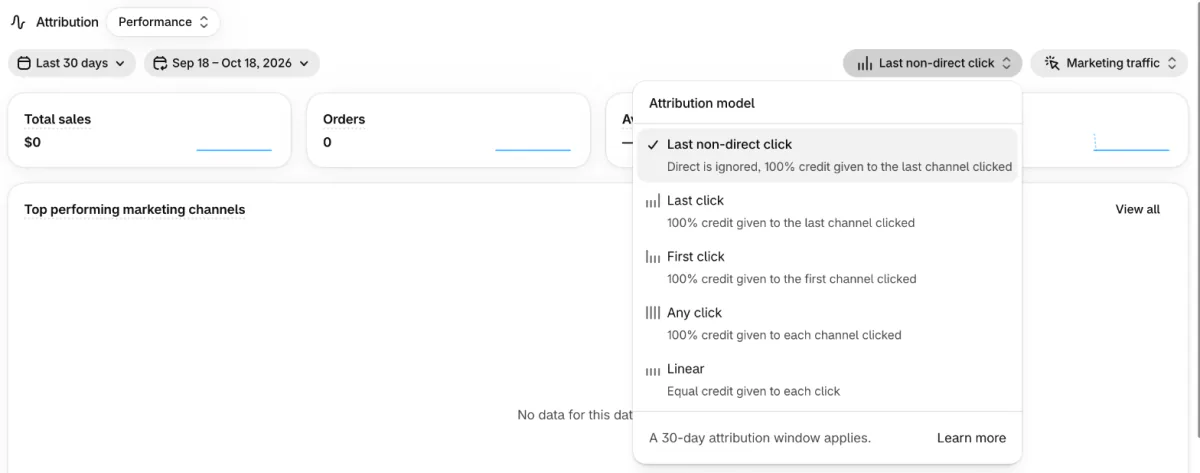
Meta, Google and Shopify can each count the same order. Shopify's help says the Any click model gives full credit to every channel a customer clicked, so it can reconcile what each channel reports. A gap between the reports is not always a broken tool.
For ad costs, open Analytics, then Reports, then "Performance by marketing channel". A dash in the spend columns means the ad platform sent no cost, which is not the same as zero. Read ROAS against your break-even, and see customer acquisition cost for the second number. Start with a small daily budget until the numbers settle.
If clicks are high and orders are low, look at the page before the ad. The sales funnel shows which step loses shoppers.
FAQ
Questions, answered
-

14-day free trial
Explore Sledge on your store before you decide to commit.
-

No credit card required
Start improving your store with no upfront commitment.
-

Setup in minutes
Get Sledge running without a lengthy setup process.
-

Built to grow sales
Turn shopper behavior into actions that help you sell more.
What are retargeting ads?
Retargeting ads are paid ads shown to people who already visited your store and left without buying. They usually show the products the shopper viewed or added to the cart. Meta and Google run them from the visits their tracking notes. In Shopify, you switch that tracking on in a sales channel, then build the ad in Meta or Google.
Is retargeting the same as remarketing?
Often yes, because most guides use the two words as one. Shopify's blog splits them: retargeting is paid ads to visitors, tracked by cookies, and remarketing is email or text to past customers. Google Ads calls its visitor ads remarketing and now labels them "your data". Check which meaning a guide uses.
How do I set up retargeting ads on Shopify?
For Meta, open Sales channels, then Facebook & Instagram, then Settings, then Share data settings. Switch on customer data-sharing, pick a level and your Meta tracking, and confirm. Then build the ad in Meta's Ads Manager. For Google, install the Google & YouTube channel, connect Google Ads, and build the visitor group and campaign in Google Ads.
Are Google Shopping ads retargeting?
No. Google builds Shopping ads from the product details you sync to Google Merchant Center, and they show a photo, title, price and store name. Retargeting builds a group from past visitors and shows them ads. Google lists both, and its dynamic remarketing shows ads with products a person viewed.
Do retargeting ads need a cookie banner?
Retargeting depends on tracking visitors, and some regions require consent first. Shopify's Settings, then Customer privacy, includes a Cookie banner, and Shopify's help says you stay responsible for your own compliance. This isn't legal advice, so check the rules where your shoppers live and keep your privacy policy current.
Does Sledge run retargeting ads?
No. Sledge doesn't run ads, build audiences or connect to Meta or Google. It works on the page the ad lands on: banners and countdowns that repeat your offer on every paid plan, and Back in Stock emails on Accelerate and up. Its visit view shows where a visit came from.
Does the page behind your ad keep its promise?
Sledge doesn't run ads, build audiences or connect to Meta or Google. On the page an ad lands on, it shows your sale as a banner or countdown on every paid plan, and on Accelerate and up its Back in Stock emails shoppers when a sold-out product returns. Try it free for 14 days. Growth Intelligence turns on when you pick a paid plan, and its suggested fixes add up to one dollar figure, labeled Est. potential.

