
A shipping label printer prints 4 x 6 inch sticky labels with heat, so it needs no ink. The five printers on Shopify's tested list cost $199.99 to $499 in the US. Choose one by the labels it takes, from about 5 to 19 cents each, and by how it connects to the computer or phone you print from.
Ten orders sit packed by the door, and every label is a sheet of paper to trim and tape. One label printer online costs under $100. Another costs $499, and Shopify's own list starts near $200. At 300 parcels a month, a year of labels can cost more than the printer, and where you print from rules some models out.
Do you need a shipping label printer?
Not to start: Shopify can print every label on Letter or A4 paper for a desktop printer. Fix the sheet to the box with packing tape or a plastic sleeve, as Shopify's Help Center describes. Shopify's hardware store also sells sticker sheets for inkjet and laser printers, 100 labels for $25, two to a sheet.
A label printer earns its place once trimming and taping slow your packing down. Its labels come off a roll or a folded stack, sticky and cut to size. Buying and printing the label itself is in how to make a shipping label in Shopify.
What is a thermal label printer, and how is it different from inkjet?
A direct thermal printer heats a label whose coating turns black, so it needs only labels, where an inkjet also needs ink. Zebra, which makes two of the printers on Shopify's list, says too much heat or light can darken these labels until the barcode won't scan. They last long enough for a parcel. Labels meant to last for years use thermal transfer, which melts a ribbon onto the label, and Rollo's printers can't print those.
| Direct thermal label printer | Inkjet or laser printer | |
|---|---|---|
| Prints on | Sticky 4 x 6 labels, on a roll or a folded stack | Letter or A4 paper, or sticker sheets |
| Supplies | Labels only | Ink or toner, plus paper or sheets |
| Shopify's paper option | Thermal | Letter or A4 |
| Label cost at Shopify's hardware store | 5 to 19 cents | 25 cents on sticker sheets |
| Prints in | Black only | Color too |
Label prices from Shopify's US hardware store, read November 11, 2026.
What size labels does a shipping label printer use?
4 x 6 inches, the size Shopify calls Thermal (100 x 150 mm, or A6) on its print page. A 4 x 6 label printer takes labels up to about 4 inches wide. Rollo's printers accept any width from 1.57 to 4.1 inches, so the same printer can print 2 x 1 inch barcode stickers. Shopify's Help Center says the Brother QL isn't recommended for barcode labels.
Labels come in two forms. Fanfold is a stack of folded labels, and on a Rollo it sits behind the printer and feeds into a slot at the back. A roll sits on a spindle inside the printer, or behind it. Rollo says both work in its printers, and DYMO and Brother printers load rolls.
Can you use any brand of labels in a label printer?
On some printers, yes, and on others only the maker's own, which sets what each parcel's label costs you.
- Rollo says any brand of direct thermal label in a supported size works.
- The Zebra 4 x 6 roll on Shopify's hardware store fits most 4 x 6 direct thermal printers, in the store's words.
- Shopify's own guide to label printers says the DYMO LabelWriter 5XL needs DYMO-branded rolls.
- Brother warns that non-genuine labels may damage the QL-1110NWB, and that using them may not be covered by its warranty.
- Zebra's ZSB printers take only Zebra labels, in four sizes, per Shopify's Help Center.
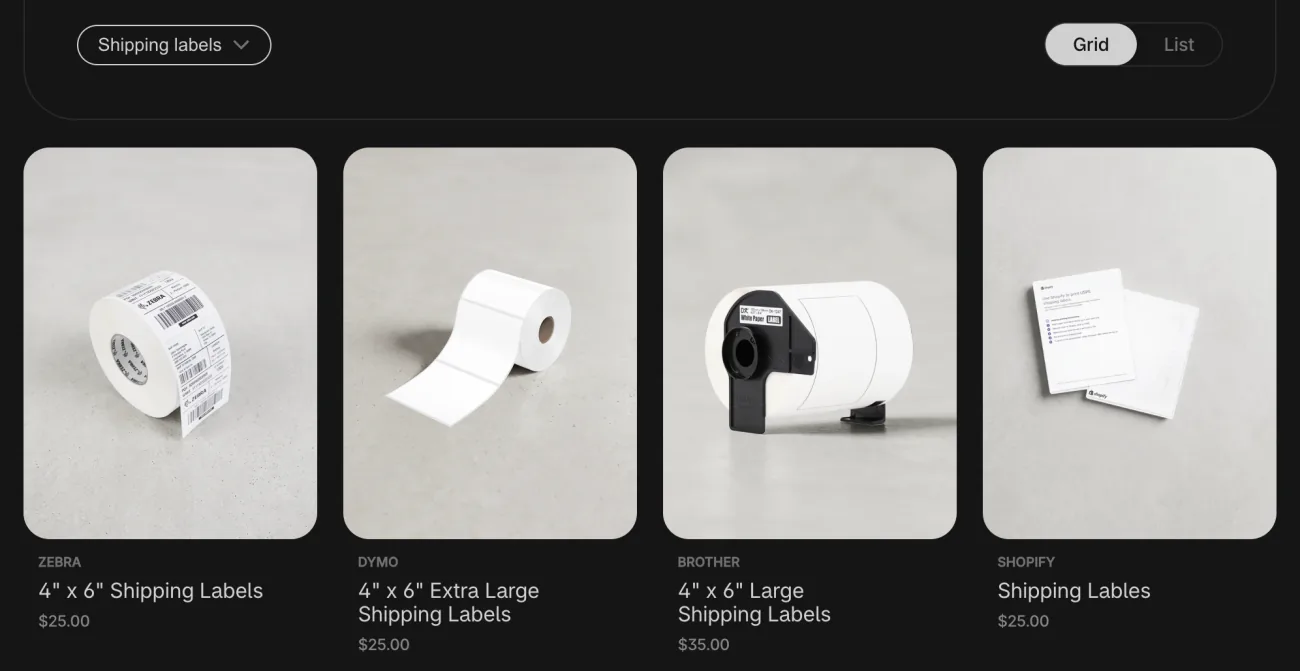
| Labels | Fits | In the pack | Price | Per label | A year at 300 parcels a month |
|---|---|---|---|---|---|
| Zebra 4 x 6 roll | Most 4 x 6 direct thermal printers | 475 | $25 | 5.3 cents | $200 |
| DYMO 4 x 6 roll | DYMO LabelWriter printers | 220 | $25 | 11.4 cents | $425 |
| Brother 4.07 x 6.4 roll | Brother QL-1110NWB | 180 | $35 | 19.4 cents | $700 |
| Shopify sticker sheets | Inkjet and laser printers | 100 | $25 | 25 cents | $900 |
Shopify's US hardware store, read November 11, 2026. The last column is an example: 3,600 labels a year, bought in whole packs.
Should a label printer connect by USB, Bluetooth or Wi-Fi?
Pick the connection for where you print: one computer, a packing table several people share, or a phone. USB ties the printer to one computer, which suits a single packing desk. At a shared table, a printer on a network cable or Wi-Fi can print from more than one computer.
On a phone, the Shopify app prints through your phone's own print menu, so the printer has to be one your phone can find. Shopify lists the Zebra ZD220 and ZD421 for Windows and Mac only, and its Help Center says neither prints from an iOS or Android tablet. The Brother QL connects by USB, network cable, Bluetooth or Wi-Fi, and prints from an iPhone or iPad. Phone steps are in the shipping label guide's FAQ.
Some low-cost Bluetooth label printers print from a phone only through their maker's app, and Shopify's own guide flags that on its budget pick. Each label then means saving the file, opening the app and printing from there.
Rollo's wireless model, the X1040, prints over Wi-Fi and AirPrint from an iPhone, iPad or Android phone, for $279.99 on Rollo's site. It isn't on Shopify's tested list. Its USB sibling, the X1038, is.
Which label printers does Shopify support?
Shopify lists five label printers, tested to print the shipping labels you buy from it, and points you to them for best results. Another 4 x 6 printer can still print a Shopify label, once its paper size is set to 4 x 6.
| Printer | Connects by | From a phone or tablet | Labels | US price |
|---|---|---|---|---|
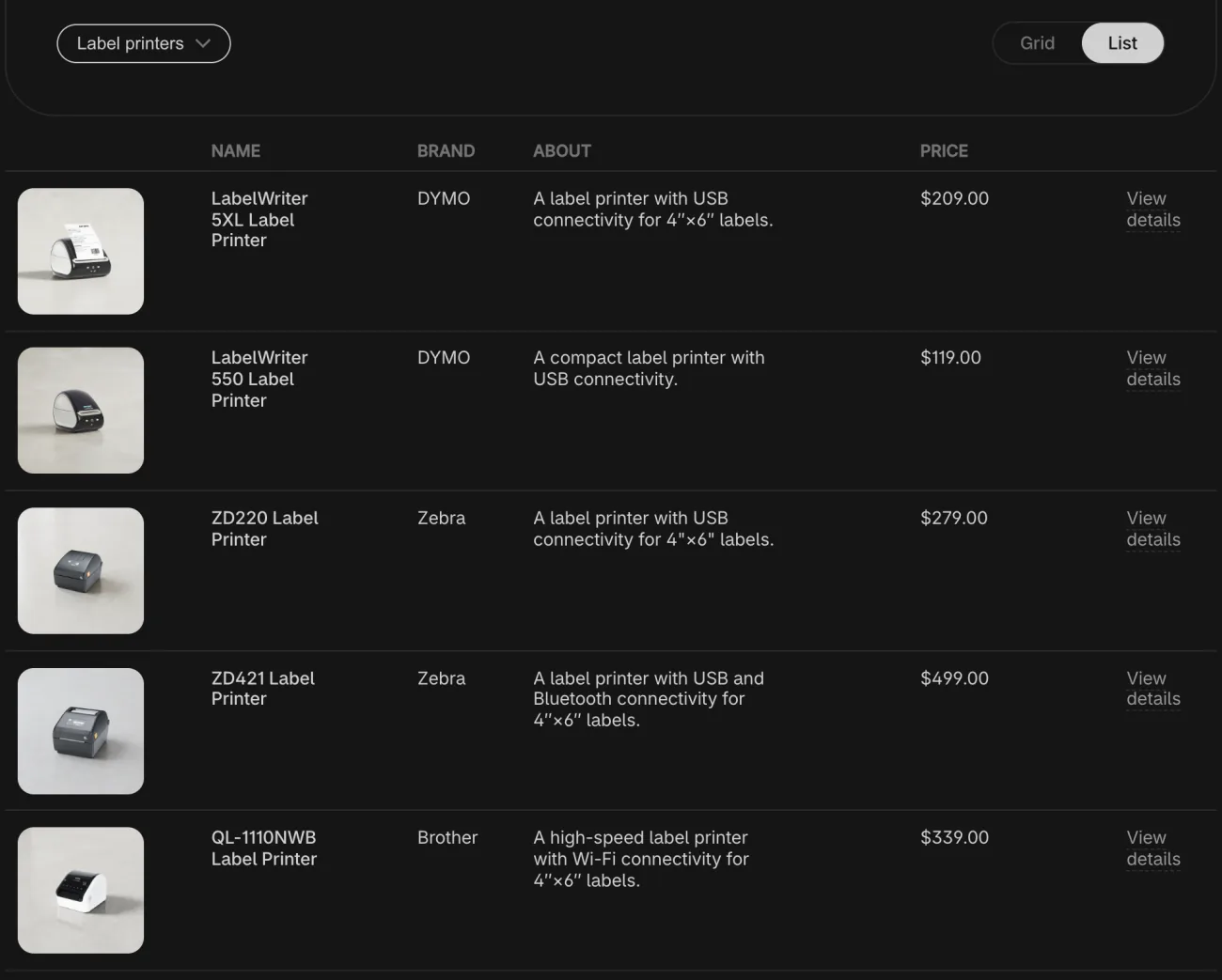
| Brother QL-1110NWB | USB, network cable, Bluetooth, Wi-Fi | Yes, iOS and Android; from Shopify POS, POS Pro only | Brother DK rolls | $339, Shopify hardware store |
| DYMO LabelWriter 5XL | USB or network cable | Not listed: Windows and Mac | DYMO rolls | $209, Shopify hardware store |
| Rollo X1038 | USB | Shopify lists phones and its POS Go; Rollo says it needs a computer | Any direct thermal, 1.57 to 4.1 inches wide | $199.99, Rollo |
| Zebra ZD220 | USB | Not listed: Windows and Mac, and not from an iOS or Android tablet | Direct thermal labels | $279, Shopify hardware store |
| Zebra ZD421 | USB, Wi-Fi, Bluetooth on Windows | Not listed: Windows and Mac, and not from an iOS or Android tablet | Direct thermal labels | $499, Shopify hardware store |
Shopify's Help Center and the makers' pages, read November 11, 2026. Rows in alphabetical order.
Shopify's US hardware store sells five label printers. Four of them are on the tested list; the Rollo X1038, the list's fifth, sells on Rollo's own site instead. The store's fifth is the DYMO LabelWriter 550 at $119, the one model whose description in the store doesn't mention 4 x 6 labels.
Shopify's Help Center also has setup guides for the DYMO LabelWriter 4XL, Wireless and 550 series, the Zebra ZSB series and, in the UK and Ireland, a Bixolon. Outside the US, Shopify's list points to its Canadian store for four of the five, to its UK, Irish and New Zealand stores for the ZD220, and to its Australian store for the Brother. The Brother's page on the US store lists free shipping and free returns within 30 days.
Which shipping label printer fits your small business?
The one that matches how many parcels you send and where you pack them. Under 50 labels a day, speed won't decide it: Shopify's guide says almost any desktop direct thermal printer keeps up.
- A few parcels a week: the desktop printer you own, with tape or sticker sheets.
- Every day, from one desk: a USB 4 x 6 thermal printer that takes labels from more than one maker.
- From a phone, a market stall or a shared table: a Wi-Fi printer your phone can find.
- Barcode stickers too: one that takes narrow labels, such as 2 x 1 inch.
For sharpness, Shopify's guide gives 203 dpi as the baseline for shipping labels, and 300 dpi or more for small text and compact barcodes.
FAQ
Questions, answered
-

14-day free trial
Explore Sledge on your store before you decide to commit.
-

No credit card required
Start improving your store with no upfront commitment.
-

Setup in minutes
Get Sledge running without a lengthy setup process.
-

Built to grow sales
Turn shopper behavior into actions that help you sell more.
What is the best shipping label printer for a small business?
The one that fits how you ship. For a few parcels a week, your desktop printer and tape work. For daily parcels from one desk, a USB 4 x 6 thermal printer fits. To print from a phone, pick a Wi-Fi printer your phone can find. Check which labels it takes, since they set your cost per label.
Can I use a regular printer for shipping labels?
Yes. Shopify can print any label on Letter or A4 paper for a desktop printer. Attach it with packing tape or a plastic sleeve, or print on sticker sheets: Shopify's hardware store sells 100 labels, two to a sheet, for $25. That is 25 cents a label, against 5 to 19 cents on the store's thermal rolls.
Do thermal label printers need ink?
No. A direct thermal printer heats a label whose coating turns black, so labels are the only supply you buy. Zebra says too much heat or light can darken the print until a barcode won't scan, and still calls direct thermal a good fit for shipping labels. Labels that must last for years use thermal transfer, which adds a ribbon.
What is a 4x6 label printer?
A label printer made for 4 x 6 inch labels, the size Shopify calls Thermal on its print page. It takes labels up to about 4 inches wide, on a roll or a folded stack. Some also print smaller labels: Rollo's printers take widths from 1.57 to 4.1 inches, such as 2 x 1 inch barcode stickers.
Does Shopify work with any label printer?
Shopify's list of supported printers names five, recommended for best results: the Brother QL-1110NWB, the DYMO LabelWriter 5XL, the Rollo X1038, and the Zebra ZD220 and ZD421. Another 4 x 6 printer can print a Shopify label too, once its paper size is set to 4 x 6. Some low-cost models print from a phone only through their maker's app, which adds steps.
Why does my label print small or cut off on a thermal printer?
The paper size in Shopify and in the printer don't match. Pick Thermal (4 x 6 inch) when you print, then choose 4 x 6 in the print window as well. Some printers need one more step in Shopify's setup guides: hold a Rollo's button until it beeps so it reads the label, and calibrate a Zebra again after switching to a new label size or type.
One label per parcel. Can the parcel hold two?
Sledge doesn't print labels, buy postage or connect to a printer. Its Volume Discounts offer puts quantity tiers on your product page, such as Buy 2+ at a discount you choose, so two pieces can leave in one box under one label. Try it free for 14 days. Growth Intelligence turns on when you pick a paid plan, and its suggested fixes add up to one dollar figure, labeled Est. potential.

