
A browse abandonment email goes to a shopper who looked at a product and left without adding it to the cart. Shopify Messaging has one, Convert abandoned product browse, but it reaches only marketing subscribers. Write it as a reminder, not a chase: mention their visit, answer one doubt, and save any discount for last.
Say 400 shoppers opened your best-selling jacket this week and 14 added it to the cart. The other 386 never get your cart email, because they never reached a cart.
What is a browse abandonment email?
A browse abandonment email goes to a shopper who looked at a product, added nothing to the cart and left. Shopify has three emails for a shopper who leaves, and this one covers the earliest step. The cart email follows someone who added an item, and the checkout email follows someone who started to pay.
Expect less from it than from a cart email. In Klaviyo's 2026 abandoned cart benchmark report, a browse abandonment flow averaged $2.08 in sales per recipient, against $6.77 for an abandoned cart flow.
Browse abandonment vs cart abandonment: what's the difference?
The difference is how far the shopper got: a browse email follows a product view, and a cart email follows an item in the cart.
| Browse abandonment email | Cart abandonment email | |
|---|---|---|
| What the shopper did | Opened a product, added nothing | Added an item, didn't start checkout |
| How close to buying | Still looking | Picked something |
| What the email does | Reminds and answers one doubt | Brings back the item they chose |
| A discount | Last, if at all | Your call, after the first email |
| Shopify's template | Convert abandoned product browse | Recover abandoned cart |
The cart and checkout emails, with their subject lines and templates, have their own page: abandoned cart email.
Does Shopify send a browse abandonment email?
Yes: Shopify's email app, Shopify Messaging, has a template called Convert abandoned product browse. You'll find it under "Recover site visitors", the templates for shoppers who leave without buying.
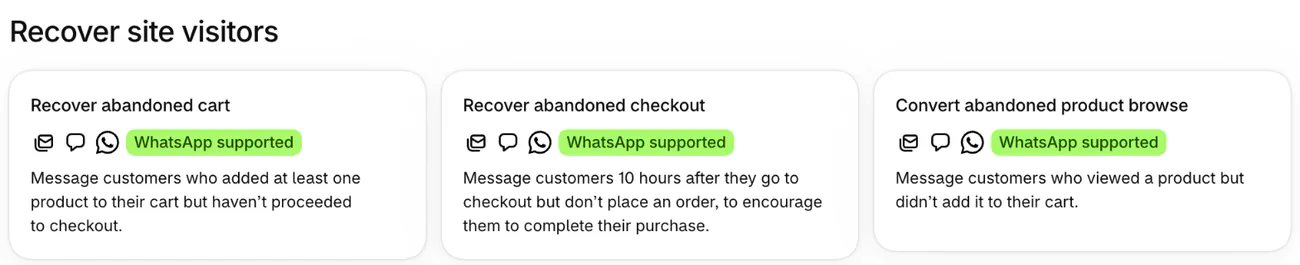
Who gets it is the catch. It goes only to marketing subscribers, so a first-time visitor with no email on file gets nothing. Shopify offers an all-customers setting only on the abandoned checkout email, not on this one. Shopify's template also skips anyone who got an abandoned checkout, cart or product browse email in the last 14 days. A bigger list widens the reach, and a sign-up form from one of the Shopify popup apps can grow it.
You need Basic or a higher Shopify plan. Every browse email counts toward the 10,000 emails Shopify Messaging sends free each calendar month, and each extra 1,000 costs $1.
Two other senders may already reach the same shoppers:
- The Shop app. If your store uses the Shop channel, Shop can send its own reminders to people with a Shop account about products they browsed on your store, even visitors you can't identify. You can't edit them. To stop them, open Sales channels, then Shop, then Settings, and turn off "Shop remarketing emails and push notifications".
- Autopilot. If you use Autopilot under Growth in your admin, it can suggest its own browse email. Compare it with yours before you approve, so nobody gets two.
How do you turn on Shopify's browse email?
Pick the template, write the email, send yourself a test, then turn it on.
- Open Apps in your Shopify admin, choose Messaging, click Automations, then Create automation.
- Choose Convert abandoned product browse, then pick Email in the dialog. A text message works too, once you set it up.
- Click Edit email and change the subject, the preview text and the words. Preview text is the line an inbox shows after the subject.
- Click Send test, add your own address and check the email on a phone.
- Click Turn on, and confirm with Turn on in the dialog.
To change when it sends, click the automation, then Edit workflow; its steps open in Shopify Flow, a free Shopify app. Shopify's help pages don't print this template's wait, so read its Wait step there before you plan around it.
A test shows you the email, and only a real visit shows whether Shopify sends it. Subscribe your own address through your store's sign-up form, open a product, and close the window without adding it to the cart.
What should a browse abandonment email say?
One email goes to every browser, whatever they viewed, so write words that fit any product in your store.
- Remind, don't chase. They added nothing, so never write "you left something in your cart".
- Answer one doubt, such as fit, delivery or returns. Your shipping rates and refund policy already hold the words.
- Leave out "only 3 left". The same email reaches shoppers who viewed different products, so it can't hold for every one of them.
- Hold back the discount. A code in the first email teaches browsers to wait for one.
- Keep the subject to 3 to 6 words, or below 50 characters, as Shopify's help suggests, so it reads on a phone.
Browse abandonment email examples to copy
These are sample emails for a made-up store that sells waxed canvas jackets. Swap in your own product type and policies. The browse template sends a single email, so start with the one that answers your shoppers' biggest doubt.
Example 1: the reminder
- Subject: Still thinking it over? (or: Your jacket is still here)
- Preview text: No rush. Here's where you left off.
- Body: You were looking at one of our jackets earlier. It's still here, with the size guide and care notes beside it.
- Button: Back to the shop
Example 2: the answer
- Subject: Fit, delivery, returns: sorted (or: Questions before you buy?)
- Preview text: Swap a size free for 60 days.
- Body: Not sure yet? Our jackets run true to size, delivery is free over $120, and you can swap a size for 60 days. Hit reply and a person answers.
- Button: See the details
Example 3: the nudge
- Subject: 15% off your first jacket (or: A small welcome, until Sunday)
- Preview text: Code [CODE] works until [date].
- Body: Here's 15% off your first order with code [CODE], until [date]. On a $140 jacket, that's $21 off.
- Button: Use my 15% off
Send Example 3 last, and only if you can leave out past buyers, since its code is for a first order. Set up the code before it sends, ending on the date the email prints. To send two or three of these, build them in Shopify Flow or an email app.
When should you send a browse abandonment email?
Send it within a day of the visit, and no more than once every 14 days. Email tools' own guides put the first send between one hour and a day after the visit. Shopify's template already keeps to the 14 days.
If you run a series, space it by days: the second email about two days after the first, the last about five days after that. Test one change at a time, and judge it by orders, not opens.
Is your browse abandonment email working?
Shopify's Automations page shows Reach, Sessions, Orders, Conversion rate and Sales, and clicking an automation's title shows its own. Reach is the number of emails sent. Sales divided by Reach is what an average email brings in. Set that beside Klaviyo's $2.08 as a rough yardstick, not a target.
FAQ
Questions, answered
-

14-day free trial
Explore Sledge on your store before you decide to commit.
-

No credit card required
Start improving your store with no upfront commitment.
-

Setup in minutes
Get Sledge running without a lengthy setup process.
-

Built to grow sales
Turn shopper behavior into actions that help you sell more.
What is the difference between browse abandonment and cart abandonment?
Browse abandonment is when a shopper views a product and adds nothing to the cart. Cart abandonment is when a shopper adds an item and leaves before checkout. The cart shopper is closer to buying, so that email can bring back the item they chose. A browse email should stay a light reminder.
Does Shopify have a browse abandonment email?
Yes. Shopify Messaging has a template called Convert abandoned product browse, for shoppers who view a product and leave without adding it to the cart. It goes only to marketing subscribers. You need Basic or a higher Shopify plan, and every browse email counts toward the 10,000 free emails Shopify gives you each calendar month.
Why isn't my browse abandonment email sending?
It goes only to marketing subscribers, so a visitor with no email on file gets nothing. Shopify's template also skips anyone who got an abandoned checkout, cart or browse email in the last 14 days. And while your store is on a free trial, Shopify sends tests to you but nothing to subscribers.
How many browse abandonment emails should you send?
Start with one. Shopify's template sends one, and it skips anyone who got an abandonment email in the last 14 days. Build a second in Shopify Flow or an email app only once the first brings in orders, and hold any code for the final one.
Is a browse abandonment email legal?
It can be. Shopify sends it only to marketing subscribers, so it reaches people who agreed to hear from you. Shopify's help says you are responsible for making your sign-up methods follow your region's laws. This isn't legal advice, so check the rules where your shoppers live.
The email can't reach every browser. What do they see when they come back?
Sledge doesn't send browse emails; Shopify Messaging keeps that job. Try Sledge free for 14 days and add a Recently Viewed row: when a shopper comes back in the same browser, it shows the products they looked at, with no email or sign-in. Growth Intelligence turns on when you pick a paid plan. It studies what shoppers search for and buy, then totals what its fixes could add in one dollar figure, labeled "Est. potential".

