To import customers to Shopify, go to Customers, click Import, add a CSV file of 15 MB or less and click Import customers. Only the Email column is required, and its cells can be blank. Passwords and order history can't be imported, and marketing consent comes from the columns you fill in.
Say 4,000 contacts move over from an old store and 600 already have profiles in yours. Tick overwrite and Shopify replaces those 600, import tags included. Mark someone who unsubscribed as yes and Shopify warns it can damage your sender reputation.
How do you import customers to Shopify with a CSV file?
Go to Customers, click Import, add your file and click Import customers. A CSV file is a spreadsheet saved as plain text.
- Start from the customer template on Shopify's Help Center page. Open it in a spreadsheet program and delete its two example customers, which Shopify adds if you import the template untouched.
- Give each customer one row, and keep the first row of headings as it is. Headings aren't case sensitive.
- Save the file as a CSV in UTF-8, the text encoding Shopify expects. Most spreadsheet programs offer it under Save As or Export, and the file can't exceed 15 MB.
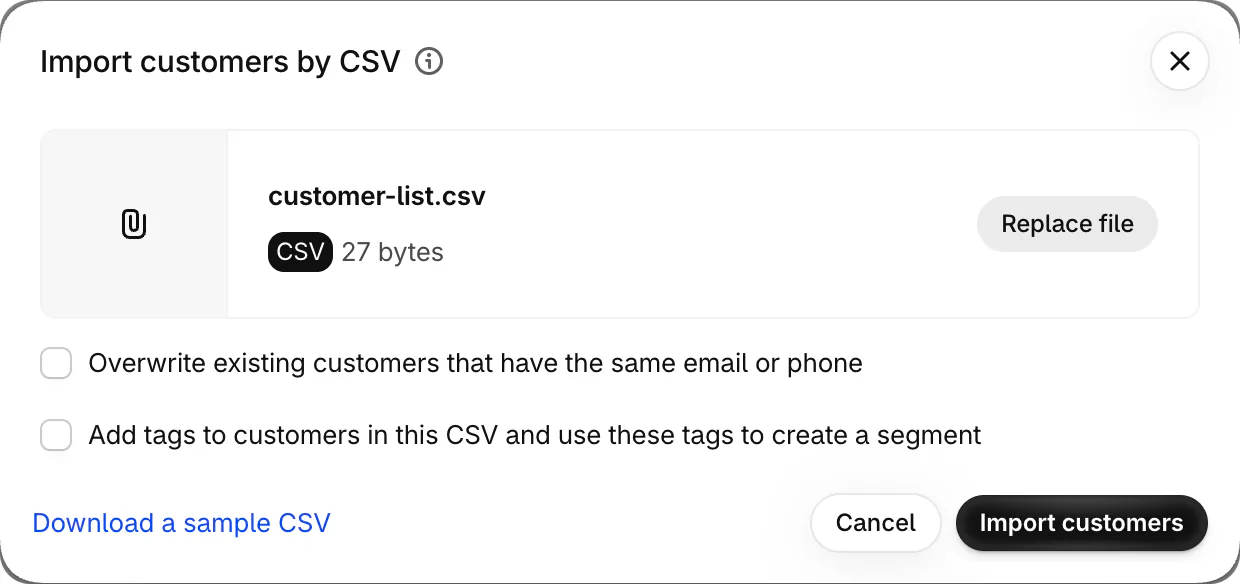
- Go to Customers, click Import, then click Add files in the window that opens, "Import customers by CSV," and pick your file.
- Decide on two optional tick boxes, both unticked when the window opens. "Overwrite existing customers that have the same email or phone" updates profiles you already have. The second, "Add tags to customers in this CSV and use these tags to create a segment," tags the customers it imports. Ticking it opens a "Find or create tags" box with one tag already in it, named after the date and time. Add your own beside it.
- Click Import customers, then wait for Shopify's email. It can take several hours.
- Open a few profiles and check their marketing status, and the tag if you ticked the tag box.
A product file goes through a different window, and how to import products to Shopify covers it.
From Shopify's Help Center page on importing and exporting customer lists and from the admin's Import window, both read November 23, 2026.
Which columns does the customer file need?
Only the Email column has to be there, and its cells can be blank. Shopify's template has 18 columns.
| Column in the file | What it holds | The catch |
|---|---|---|
| The customer's email address. | The one column that must be present. The next section covers what happens to a repeated address. | |
| First Name and Last Name | The customer's name. | The template lists them first, but Shopify marks only Email as required. |
| Phone and Default Address Phone | A number for the customer, and one for the address. | Overwrite matches on a phone number as well as on an email address. |
| The Default Address columns | Company, two address lines, city, province, country and zip code. | The country takes a two-letter code, and so does a US state or Canadian province. A wrong one gives an error. |
| The three marketing columns | Whether the customer agreed to email, SMS and WhatsApp marketing. | Only yes or no are accepted. The consent section has Shopify's guidance. |
| Tags | Labels for the customer, in one comma-separated list. | Tags aren't case sensitive. In a text editor, put quotation marks around the whole list. |
| Note and Tax Exempt | A note about the customer, and whether the customer is exempt from tax. | Tax Exempt takes only yes or no. |
| Total Spent and Total Orders | What the customer has spent and ordered. | They're in Shopify's column list but not in the template, and they aren't imported. |
Custom customer details, called "metafields" in the admin, can have a column of their own once the detail exists in your admin. Only six kinds work: yes or no, date, date and time, whole number, decimal and single-line text.
What happens when a customer is already in your store?
Tick the overwrite box to update customers you already have, and Shopify replaces all of a profile's data, import tags included. A match is the same email address or the same phone number.
Shopify says customers with a duplicate email address or phone number are skipped during an import and aren't tagged, and that only the last profile with a repeated address or number is imported. To import a file that holds duplicates, delete the emails and phone numbers from it first, then add them later or merge the profiles.
Shopify's page on customer lists doesn't say what a blank cell does when you overwrite. Import a file with a single row first, for a customer you can afford to change, and open the profile to see what happened.
To change a few fields on customers you already have, Shopify's bulk editor needs no file. Shopify says it may be easier for first and last names, tags, emails, email marketing status and custom details, while address lines, phone numbers and tax-exempt status need a profile edit or a file.
How do you mark who agreed to marketing in the file?
Each channel has its own column, and yes or no are the only entries Shopify accepts. The three are Accepts Email Marketing, Accepts SMS Marketing and Accepts WhatsApp Marketing.
Shopify says to fill each one from that channel's history on your old platform. For email, it says to enter no for anyone who unsubscribed, never opted in, marked your emails as spam or whose address bounced. An email opt-out doesn't remove someone's SMS or WhatsApp consent, so each column needs its own check.
Importing people as subscribers after they opted out, Shopify warns, can cause spam complaints and bounces that damage your sender reputation. It also cautions that marketing email should go only to customers who opted in, and that a bought list of addresses can hurt your reputation and deliverability.
The file has no columns for opens, clicks, bounces or spam complaints. Shopify suggests recording in the Tags column how recently each contact engaged, with one tag for the last 3 months, one for 3 to 12 months ago and one for over 12 months. Then build a segment for each tag.
This is Shopify's guidance, not legal advice. For Shopify's own email tool, see does Shopify have email marketing.
What does a customer import leave out, and what about passwords?
The file brings people, not history: no orders, no opens or clicks, and no passwords.
- Orders. A customer file imports customer details only. Total Spent and Total Orders aren't imported, and orders and spend on other stores or platforms can't be brought across.
- Engagement history. Opens, clicks and bounces from another marketing platform can't be imported.
- Passwords. Shopify says they are encrypted outside Shopify, so a file can't carry them.
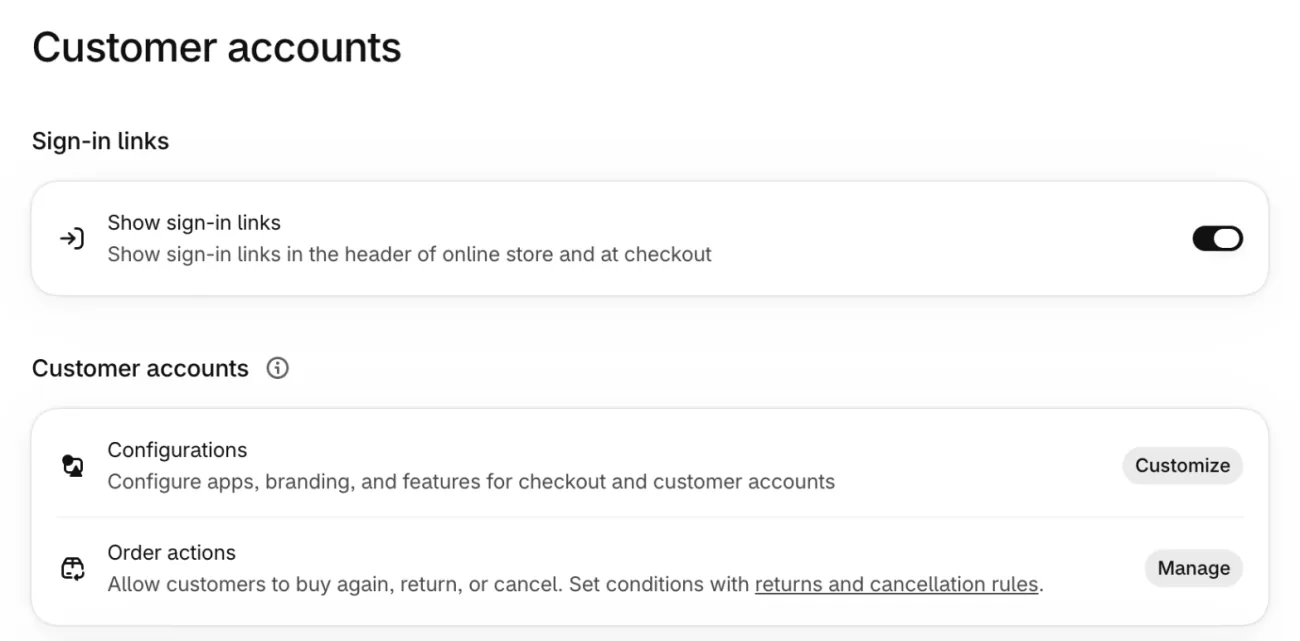
Shopify's import page says to invite customers to create new passwords. Shopify's customer accounts page adds that a customer who has a profile in your admin already has an account. With sign-in links on, that customer enters their email and receives a one-time 6-digit code instead of using a password. To turn the links on, open Settings, then Customer accounts, switch on "Show sign-in links" under Sign-in links and click Save. The switch puts a sign-in link in your store's header and at checkout.
On the older legacy customer accounts, which Shopify calls deprecated, invite each customer to create a new password.
A customer file can't carry orders. For what moves in a whole-store move, see how to migrate to Shopify, or the Squarespace and WooCommerce guides for those two platforms.
Wholesale buyers are set up as companies, and Shopify's page on companies points to a third-party app for importing them in bulk. Shopify B2B covers the setup.
Why did your customer import fail?
Most of the messages Shopify lists point to the file: headings, quotation marks, codes or the wrong format.
| Message Shopify shows | What to do |
|---|---|
| CSV file is bigger than 15 MB | Split the list into smaller files and import them one after another. |
| Only 1 CSV file can be uploaded at a time | An upload is already in progress. Wait until it is complete, then upload the next file. |
| Missing header or missing headers | Put back the heading the message names, spelled as it is in the template. |
| Some headers were not accepted | Remove extra letters, spaces or columns from the headings, or start again from the template. |
| Punctuation can't be used: illegal quoting in line 6 | Find the line the message names, swap curly quotes for straight ones, delete stray quotes and save as UTF-8 again. |
| Your CSV is in the wrong format | Open the file in a spreadsheet program and save it again as a UTF-8 CSV. |
| Your CSV file wasn't uploaded | Upload it again. |
| Country, region, state, or province is not valid | Use the two-letter code for the country, and for a US state or Canadian province. |
An upload can take several hours, and Shopify emails you when it ends or fails. If nothing arrives after several hours, check your Spam or Junk folder. If the import looks stuck and nothing was imported, contact Shopify Support.
Messages and meanings from Shopify's Help Center page on customer CSV import errors, read November 23, 2026.
How do you export customers, or edit the ones you have?
Customers, then Export, gives you a customer file to keep or reuse. In the Export window you choose the current page, all customers or the customers matching your filters. Up to 50 customers download at once, a longer list arrives by email, and the file is capped at 15 MB. Amazon vs Shopify has a screenshot of the Export window.
Shopify's export holds an ID for each customer and the import template has none, so if an exported file won't import, copy the rows you want into the template. To edit customers you already have without a file, use the bulk editor.
FAQ
Questions, answered
-

14-day free trial
Explore Sledge on your store before you decide to commit.
-

No credit card required
Start improving your store with no upfront commitment.
-

Setup in minutes
Get Sledge running without a lengthy setup process.
-

Built to grow sales
Turn shopper behavior into actions that help you sell more.
What is the size limit for a Shopify customer CSV?
A customer file can be up to 15 MB, according to Shopify's Help Center, read on Nov 23, 2026. For a larger list, save it as several smaller files and import them one after another, because Shopify runs one customer upload at a time. Some guides still say 1 MB, which is out of date.
Does importing customers overwrite the ones I already have?
Only if you tick "Overwrite existing customers that have the same email or phone" in the Import window. Shopify says a match is then replaced entirely, import tags included. It also says duplicates by email address or phone number are skipped and not tagged, and only the last profile with a repeated address or number is imported.
Do imported customers need a new password?
Passwords can't be imported, because Shopify says they are encrypted outside Shopify. With Shopify's customer accounts and sign-in links turned on, a customer who has a profile signs in with their email and a one-time 6-digit code, so no password is needed. Turn on Show sign-in links under Settings, then Customer accounts, so the link shows in your store.
How do you mark who agreed to marketing in a customer import?
Fill the Accepts Email Marketing, Accepts SMS Marketing and Accepts WhatsApp Marketing columns, each with yes or no. Shopify says to set each one from that channel's history on your old platform. For email, that means no for anyone who unsubscribed, never opted in, marked your email as spam or bounced. This is Shopify's guidance, not legal advice.
Does a customer import bring order history?
No. Shopify says a customer file imports customer details only. Its Total Spent and Total Orders columns aren't imported, and orders placed or money spent on other stores or platforms can't come across, because Shopify tracks only what customers order on your own store. Past opens and clicks from an email service can't be imported either.
How long does a Shopify customer import take?
Shopify says an upload can take several hours, and it emails you when the import finishes or fails. If no email arrives after several hours, check your Spam or Junk folder. If the import looks stuck and nothing was imported, contact Shopify Support. You can't start a second upload until the first one ends.
Customers in? Now see what shoppers do in your store.
Sledge doesn't import customers or send email campaigns. It works on what shoppers do in your store, with search, filters and offers where they browse and buy. Try it free for 14 days. Growth Intelligence turns on when you pick a paid plan, and its suggested fixes add up to one dollar figure, labeled Est. potential.