Just-in-time (JIT) inventory means holding little stock and ordering each batch so it arrives as the last units sell. It frees cash, but a late supplier leaves you sold out. In Shopify, you order under Purchase orders, follow the wait as Incoming, and reorder when the days of stock left reach your supplier's wait plus a cushion.
Say your best candle sells 4 a day and your supplier takes 14 days. You reorder when 20 are left. That is 5 days of stock against a 14-day wait, so the shelf sits empty for 9 days and up to 36 sales could go elsewhere.
What is just-in-time inventory?
Just-in-time inventory means ordering stock so each batch lands close to the day you will sell it, instead of holding months of it on a shelf. You will also see it written "just in time", or JIT for short. Milwaukee Tool's guide to the method, citing the University of Cambridge, traces it to Japanese factories of the early 1970s.
The opposite is just-in-case: extra units kept in case sales or deliveries surprise you. For an online store, the trade is cash against risk. Less money sits in stock, and a late batch means a sold-out product page.
How does a just-in-time reorder work in the Shopify admin?
Shopify gives you the parts of a just-in-time reorder, not a switch. Its own inventory feature list marks auto-restock and forecasting as not supported, so you decide when to reorder. There are five steps.
- Check that counting is on. Open the product under Products and find the Inventory card. "Inventory tracked", the switch that makes Shopify count the product's stock, should be on. A new product has it on.
- Read the days left. Open Analytics, then Reports, set the Category filter to Inventory and open "Products by days of inventory remaining", the days report for short. It divides each product's stock by the average sold a day, which Shopify's Help Center says is taken over the last 28 days.
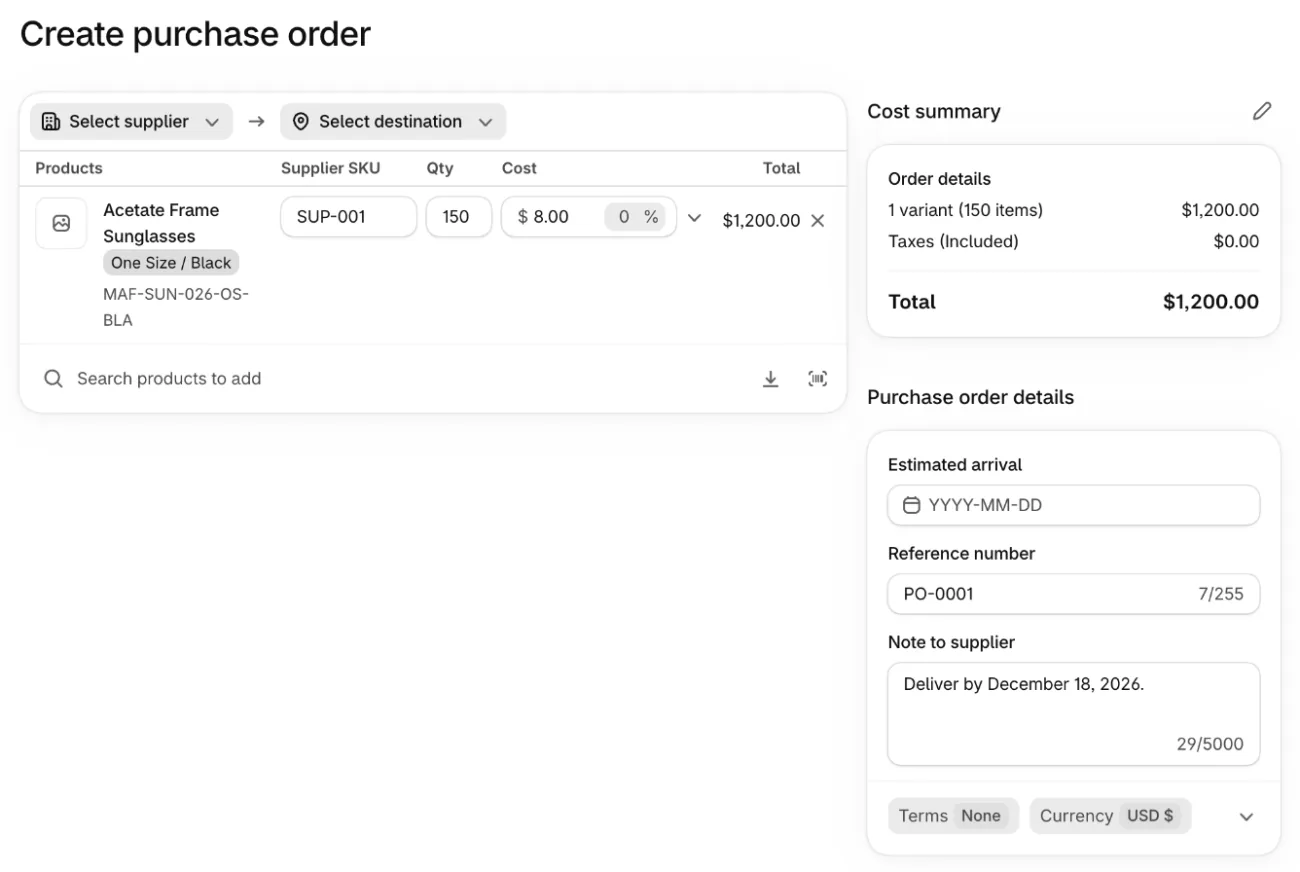
- Order the batch. Under Products, open Purchase orders and click "Create purchase order". Pick the supplier and the destination, add each product with its quantity and cost, and enter the date you expect the batch in "Estimated arrival". Click "Save as draft", export the order as a PDF for your supplier, and click "Mark as ordered" once they confirm. Shopify can't undo that mark. The purchase order template has the lines to fill in.
- Follow the wait. On the order, click "Create transfer", pick where the stock lands and save. On the transfer, click "Mark as in transit" and add an "Expected arrival" date. The units now show as Incoming, stock on its way that you can't sell yet. If you order on your supplier's own site, a transfer that names the supplier as its origin does the same job with no purchase order.
- Receive it. When the boxes arrive, click "Receive items" on the transfer and accept them. Accepted units move from Incoming to Available.
Counting stock and the low-stock email are in Shopify inventory management.
Steps from Shopify's Help Center pages on purchase orders, receiving from a purchase order and processing transfers, read November 24, 2026.
When should you reorder?
Reorder when the days of stock left drop to your supplier's wait plus a cushion.
In words, the reorder point is the units you sell a day, times the days your supplier takes, plus a cushion. Shopify's own reorder guide uses the same sum.
Say a candle sells 4 a day, your supplier takes 14 days from order to sellable, and you keep a cushion of 3 days of sales, which is 12 candles. 4 times 14 is 56, and 56 plus 12 is 68. Order when 68 are left.
The days report shows the same point as time: 68 candles at 4 a day read 17 days, the 14-day wait plus the 3-day cushion. So 17 is the number to watch. A reorder at 20 left reads 5 days: 12 days past the mark, with the shelf empty for 9.
Count the wait from your own orders, from the day you order to the day you can sell the stock. That is your lead time. Size the cushion from your slowest delivery, as safety stock explains. GMROI and weeks of supply shows the same stock in weeks.
Two cautions apply. The report averages recent sales, so a sale spike or a week at zero skews it. And since October 1, 2026, Shopify's inventory reports count On hand, which can be higher than Available, the units you can sell, so check the days figure against Available on your Inventory page.
Sledge doesn't count stock or set a reorder point. On a paid plan, the Signals tab in Sledge Analytics lists a "Best seller running low" row, with the units left and about how many days they last, once a best seller is down to about a week. Treat it as a last call, not your trigger. Shopify Flow, a free Shopify app on Basic and up, can email you at a stock level you set, as Shopify inventory management shows. That email is one of ten store jobs in ecommerce automation on Shopify.
Is just-in-time inventory right for your store?
It pays off when your sellers are steady and your supplier is quick, and it costs you when either one wobbles. Four questions decide it:
- Does your supplier deliver in days, or in a couple of weeks?
- Can you order small batches without a high minimum or a much higher price per unit?
- Are your sales steady enough to read from the last month? A new product has no pace yet, and the days report has no figure for a product with no sales.
- Would the cash you free be worth more than a week or two of a sold-out page on that product?
| Area | What you gain | What you risk |
|---|---|---|
| Cash | Say a candle costs $6 and sells 4 a day. A month's batch is 112 candles, $672. A week's batch is 28 candles, $168, so each order ties up $504 less, and your inventory carrying cost falls with it. | Four weekly orders instead of one, each with its own shipping and, because each is smaller, less room to bargain on the price per candle. |
| Stock that sits | Less storage and less dead stock to mark down. | None of its own. The risk is the late batch below. |
| A late batch | None. | Sold out until it lands. |
If any answer is no, keep a cushion on that product. That is where just-in-case stock belongs.
To see the cash a smaller order frees, give stock paid to suppliers its own row, as the cash flow table in the profit and loss template does.
Dropshipping is the same idea taken to its end, with the supplier holding all the stock. What is dropshipping? covers it.
What do you do when a supplier batch runs late?
Keep the product selling until the batch lands, or collect the shoppers who want it. You have three ways, and the first costs nothing.
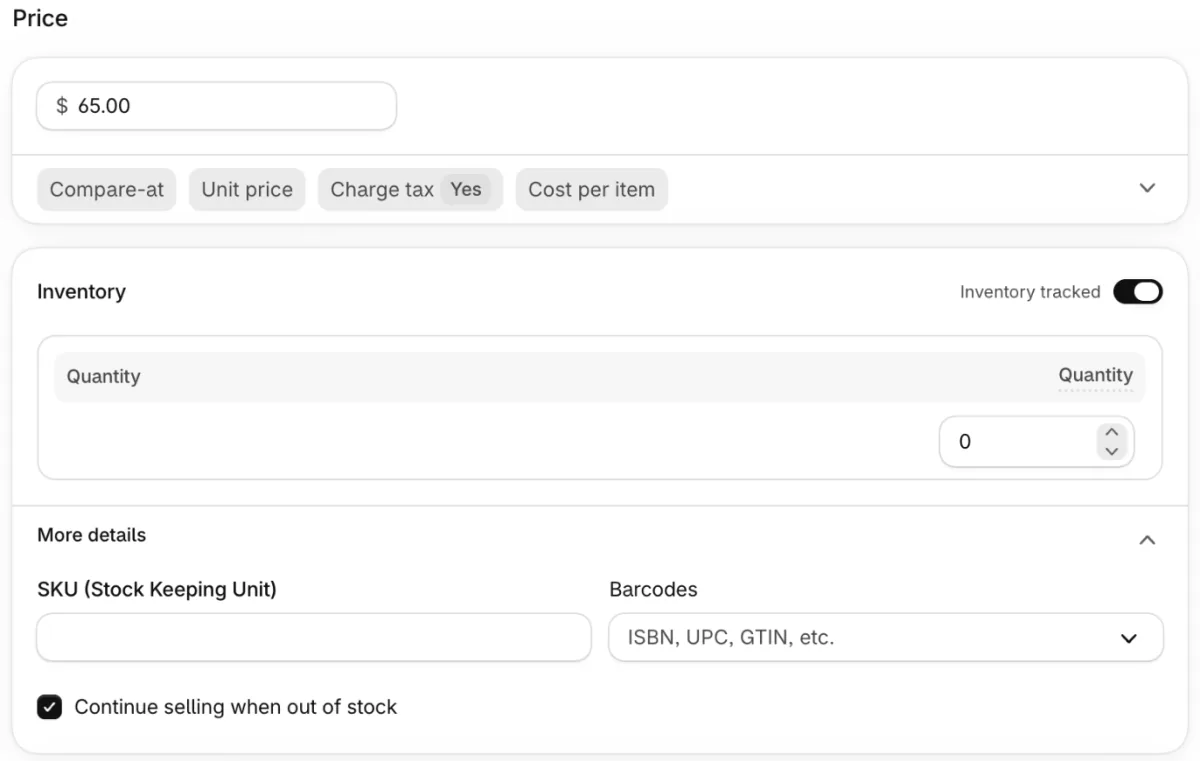
Keep selling at zero (free). Open the product, click "Sell when out of stock" in the Inventory card, and tick "Continue selling when out of stock", the box that keeps a product buyable at a quantity of 0. Every pay button still works. The product page looks like any in-stock page, so write the ship date in the description. Shopify POS ignores the tick. Untick it when the batch lands. Selling past zero like this is a backorder.
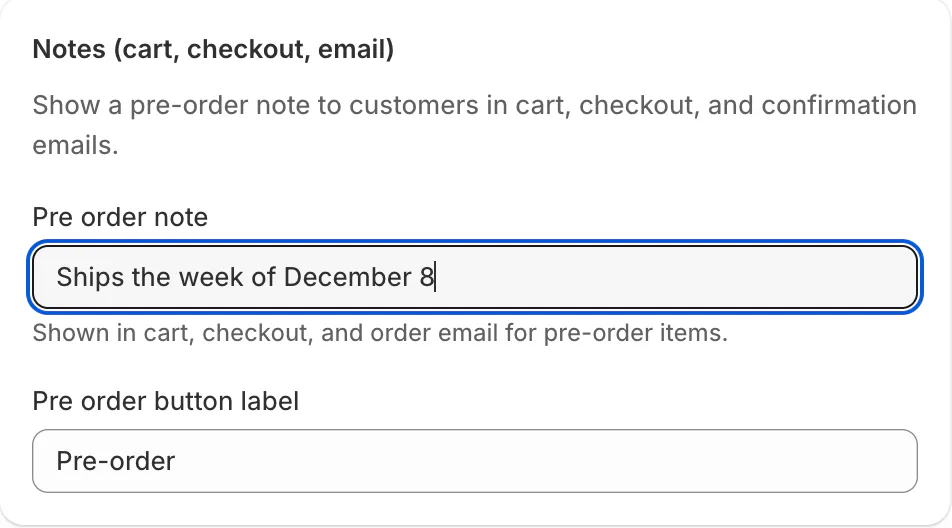
Take pre-orders (Sledge, every paid plan). Shopify's pre-order rules allow an app's pre-orders only on Shopify Payments or PayPal Express, and turn off Shop Pay, Apple Pay and Google Pay for them. In Sledge, open Tools, then Merchandising, then "Pre Order Single / Multiple Products". Pick the products and set "When show pre order button" to "Product is out of stock". The "Pre order note" carries your ship date into the cart, checkout and order email. When the batch lands, turn the campaign off or delete it, and Sledge switches back only the Continue selling settings it turned on. An end date does not switch them back.
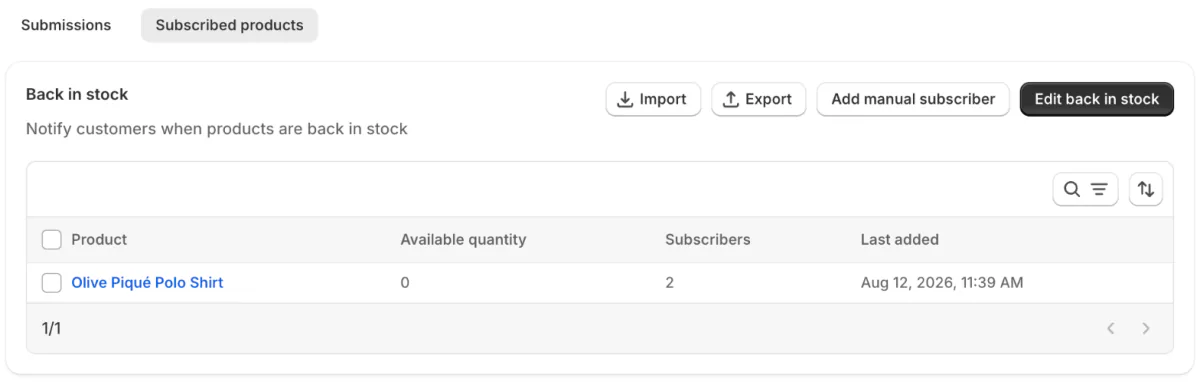
Collect emails (Sledge Back in Stock, Accelerate plan and up). A notify-me form on the sold-out product emails each shopper who signs up once it is back. It works per product, by email only. The "Subscribed products" tab lists Subscribers beside Available quantity. Say 40 shoppers are waiting and 0 are in stock: that is a number to weigh your next order against, though not every sign-up buys.
If you know the week the batch arrives, take pre-orders. If you can't promise a date, collect emails first and switch to pre-orders once your supplier confirms one. Notify me or pre-order weighs the two, and the pre-order guide covers the ship-date rules. Sledge pre-order and Back in Stock have their own pages.
What is just-in-time manufacturing, and does it apply if you make your own products?
Just-in-time manufacturing makes goods only when an order or a near-term plan calls for them, and if you make what you sell, you usually meet it as made-to-order. If you make each piece after the sale, every sale is a pre-order by nature. Keep the product buyable at zero, as in the first two ways above, and state the ship date plainly. Shopify's pre-order rules ask for a reasonable basis for any ship time and, with no date given, a reasonable belief that the order ships within 30 days.
Shopify's purchase orders list only products already in your store, so an order for wax, jars or wicks lives in a sheet or on your supplier's own site. The inventory spreadsheet template shows the columns for a sheet, with lead time and a reorder level.
FAQ
Questions, answered
-

14-day free trial
Explore Sledge on your store before you decide to commit.
-

No credit card required
Start improving your store with no upfront commitment.
-

Setup in minutes
Get Sledge running without a lengthy setup process.
-

Built to grow sales
Turn shopper behavior into actions that help you sell more.
What are the advantages and disadvantages of just-in-time inventory?
The advantages are less cash tied up in stock, less storage and less unsold stock to mark down. The disadvantages are sold-out products when a supplier is late, more orders to place and less room to bargain on price, because you buy in small amounts. It suits steady sellers and a supplier that delivers fast.
What does just-in-time inventory look like for one product?
Say your candle shop sells 4 candles a day and your supplier delivers in 14 days. You reorder at 68: 56 to cover the wait and 12 as a cushion. Each batch is small, so little cash sits in stock, and the next batch lands a few days before the last candles sell.
Can Shopify order stock just in time for you?
Not on its own. Shopify's own feature list marks auto-restock and forecasting as not supported, so you choose when to reorder. It gives you the parts: Purchase orders to order, Transfers to follow the wait, and a report of days of stock left. Shopify Flow, free on Basic and up, can email you at a stock level you set.
What is just-in-time manufacturing?
Just-in-time manufacturing means making goods only when an order or a near-term plan calls for them, and buying materials in small amounts as the work needs them. If you make what you sell, it usually means made-to-order: each sale starts the work, so the product page keeps selling and states a ship date.
What is the difference between just-in-time and just-in-case inventory?
Just-in-case means holding extra units in case demand or deliveries surprise you. Just-in-time means holding only what the wait for the next batch needs. A store can mix the two: keep slow sellers lean and hold a cushion on the best sellers that would cost the most if they sold out.
Does Sledge manage just-in-time inventory?
No. Sledge doesn't count stock, forecast demand or order from a supplier. On a paid plan, the Signals tab in Sledge Analytics lists a best seller running low. A Sledge pre-order keeps a sold-out product taking orders, and on Accelerate and Ultimate, Back in Stock collects emails for the restock.
A batch runs late. What does the product page say?
Sledge doesn't count stock, forecast demand or order from your supplier. Shopify holds your counts and purchase orders, and the reorder call is yours. Sledge keeps a sold-out product taking orders with a pre-order, on every paid plan, and on Accelerate and up its Back in Stock form collects emails for the restock. Try it free for 14 days. Growth Intelligence turns on when you pick a paid plan, and its suggested fixes add up to one dollar figure, labeled Est. potential.