A purchase order template lists the buyer, the supplier, a PO number, each item with its quantity and unit cost, the total, the delivery date and the payment terms. Copy the one below into Word, Excel or Google Sheets and fill in the brackets. In Shopify, most of those lines have a box on the Purchase orders screen, under Products.
A supplier says yes to 150 candles over chat, then asks for a purchase order with a number, a delivery date and payment terms. All you have is the chat.
Purchase order template to copy
Fill in each highlighted bracket and cut the lines you don't need.
Purchase order
PO number: [PO-0001]. Date: [the day you send it]. Deliver by: [a calendar date].
Buyer. [Your store name], [full address, with country], [email], [phone].
Supplier. [Supplier company], [contact name], [address], [email].
Deliver to. [Warehouse or shipping address, if different from the buyer's]
| Item and supplier code | Qty | Unit cost | Amount |
|---|---|---|---|
| [Product, size or color, supplier's code] | [Qty] | [Cost per unit] | [Qty x cost] |
| [Product, size or color, supplier's code] | [Qty] | [Cost per unit] | [Qty x cost] |
| [Product, size or color, supplier's code] | [Qty] | [Cost per unit] | [Qty x cost] |
Subtotal [sum of the amounts]. Shipping [the amount the supplier quoted]. Tax [if the supplier charges it].
Total [subtotal plus shipping plus tax].
Payment terms. [what you and the supplier agreed]
Notes. [packing, labeling or carrier instructions]
Ordered by. [your name], [date].
Written for this page, November 2026. Shopify Help Center checked November 23, 2026.
- Give each purchase order a number you never reuse. Shopify's guide suggests a numbering system, or one that includes the supplier, such as VENDOR-Q1-26.
- Write the delivery date itself, not "soon", so both sides read the same day.
- Settle the payment terms with the supplier first, as Shopify's Help Center advises, then put them on the order.
- Read it twice before you send it. Shopify's guide says the supplier's acceptance makes a purchase order legally binding.
In Word or Google Docs, paste the block as it is. In Excel or Google Sheets, paste the item table first, add a column that multiplies each quantity by its unit cost, and total that column under the table. Keep one clean copy and fill in a new one for each order.
What does a filled-in purchase order look like?
Here is one from Example Store to Example Supply Co. The names and figures are made up.
Purchase order
PO number: PO-0001. Date: December 2, 2026. Deliver by: December 18, 2026.
Buyer. Example Store. Supplier. Example Supply Co.
| Item and supplier code | Qty | Unit cost | Amount |
|---|---|---|---|
| Cedar soy candle, 8 oz (CND-8C) | 150 | $3.80 | $570.00 |
| Matte white mug, 12 oz (MUG-12W) | 80 | $4.60 | $368.00 |
| Linen gift bag, small (BAG-S) | 100 | $1.90 | $190.00 |
Subtotal $1,128.00. Shipping $60.00, as quoted by the supplier.
Total $1,188.00.
Payment terms. Net 30, due 30 days after the invoice date.
Each line carries the supplier's own code, so both sides name the same product. When the supplier's invoice arrives, check it against these lines. The purchase order glossary page shows how a short delivery changes the bill.
Where does each line go on Shopify's Purchase orders screen?
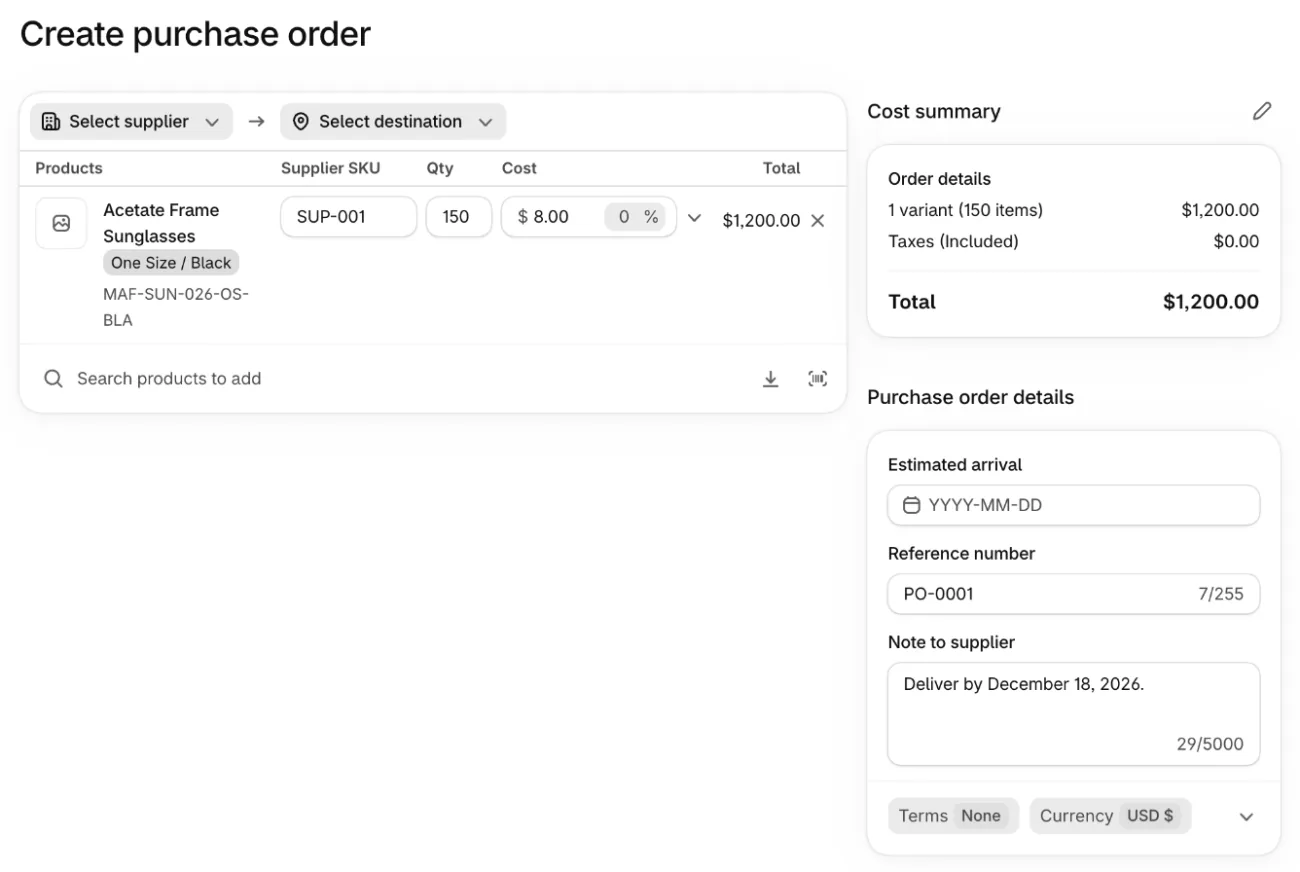
Shopify's purchase order has a box for most lines of the template, the delivery date and the shipping included. You start one under Products, then Purchase orders, with the "Create purchase order" button. The glossary has the steps in order, from saving a draft to "Mark as ordered", the click that records the order as placed.
| Template line | Shopify box | What to know |
|---|---|---|
| PO number | "Reference number" | Type your own number here. |
| Deliver by | "Estimated arrival" | A date box. Type the day as year, month, day. A shipment on the linked transfer, the record Shopify keeps of the goods arriving, has its own "Expected arrival" date. |
| Supplier | "Select supplier" | Pick one, or choose "Create new supplier". |
| Deliver to | "Select destination" | One of your Shopify locations. You can save a draft without one and add it later. |
| Items | "Search products to add" | Then "Qty", "Supplier SKU" (your supplier's code for the product) and "Cost", with a tax percentage, for each product. Shopify fills in the code, cost and tax from your earlier purchase orders with that supplier. Only products already in your store can be added. |
| Subtotal, tax, total | "Cost summary" | Shopify adds up the lines for you. |
| Shipping | The pencil beside "Cost summary" | It opens "Manage cost summary". Its "Adjustment" menu lists "Shipping amount", "Customs duties" and "Freight fee", with an "Amount" box. If you don't know the cost yet, Shopify's Help Center says you can add it later to a shipment on the linked transfer. |
| Payment terms | "Payment terms" and "Supplier currency", under "Purchasing information" | The "Terms" and "Currency" buttons open "Purchasing information". Agree both with the supplier first, then choose them here. |
| Notes | "Note to supplier" | Packing, labeling and carrier instructions go here. |
| Date, buyer, ordered by | No box | The form has no box for these, so they stay on your own copy. |
The "Payment terms" menu offers nine choices, from None and Net 7 to Payment in advance. Shopify doesn't save your pick as a default for the supplier, so you choose again on each purchase order. You pay the supplier outside Shopify.
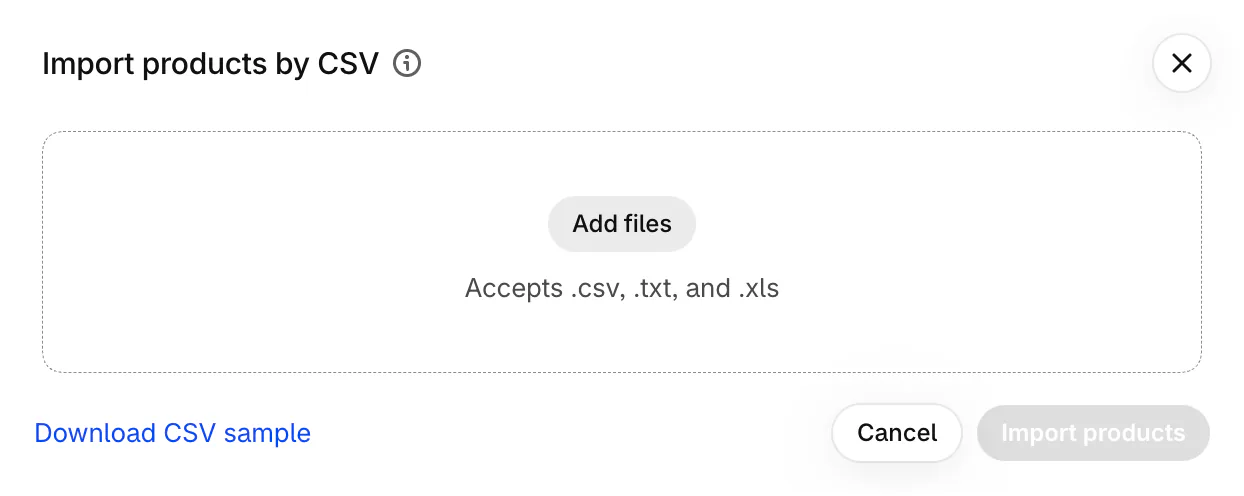
Ordering 40 products? Click the Import icon and add a CSV file. The icon sits beside "Search products to add". A CSV file is a spreadsheet saved in a plain format, with one row per product and columns for SKU, Barcode, Supplier SKU, Quantity, Cost and Tax. Shopify finds each product by its SKU, its barcode or both, and Cost and Tax are optional. A row for a product already on the order doesn't import and shows as an error. The dialog has a "Download CSV sample" link, and Shopify's Help Center covers the import.
Does Shopify have a free purchase order template?
Shopify runs a free purchase order generator, a four-step form that emails you a link to download the PDF. It asks for your company, the vendor, the order details and the items, and you can make as many as you like. Copy the template above when you want text to edit in Word, Excel or Google Sheets, or lines to type into the Purchase orders screen.
FAQ
Questions, answered
-

14-day free trial
Explore Sledge on your store before you decide to commit.
-

No credit card required
Start improving your store with no upfront commitment.
-

Setup in minutes
Get Sledge running without a lengthy setup process.
-

Built to grow sales
Turn shopper behavior into actions that help you sell more.
Is there a free purchase order template for Word, Excel or Google Sheets?
Copy this page's template into a blank Word or Google Docs file, or into Excel or Google Sheets, and replace each bracket. This page has no file to download. Shopify's free generator makes a PDF instead: you fill in a four-step form and it emails you a link to download it.
What is the difference between a purchase order form and a template?
Usually they are one document. The template is the blank copy you keep, and the form is that copy filled in for one order. The block on this page works as both: keep one clean copy, then fill in a new one for each supplier and each order.
How do I number purchase orders?
Give each one a number you never reuse, so a supplier's invoice can be matched to its order. Shopify's guide suggests a numbering system, or one that includes the supplier, such as VENDOR-Q1-26. In Shopify's admin, type the number in the Reference number box on the purchase order.
Can I add many products to a Shopify purchase order at once?
Yes. Click the Import icon beside the product search on the purchase order and add a CSV file, a spreadsheet saved in a plain format, with one row per product. Its columns are SKU, Barcode, Supplier SKU, Quantity, Cost and Tax. A product already on the order doesn't import again, so change its quantity on the order itself.
What payment terms can I pick on a Shopify purchase order?
The Payment terms menu on a Shopify purchase order, under Purchasing information, offers None, Net 7, Net 15, Net 30, Net 45, Net 60, Cash on delivery, Payment on receipt and Payment in advance. Terms are set for each order, not saved to the supplier. You pay the supplier outside Shopify, by a method you agree with them.
A purchase order buys stock. Who is already waiting for it?
Sledge doesn't write purchase orders, keep supplier records, receive stock or work out how much to order. On Accelerate and up, Back in Stock lets shoppers sign up for a product that is sold out. Once five or more shoppers wait for a sold-out product, the Signals tab in Analytics lists it under "Shoppers waiting for a restock". A Sledge pre-order keeps that product taking orders until the stock arrives. Growth Intelligence turns on when you pick a paid plan. It reads your store's orders and searches and suggests fixes, and one dollar total, labeled "Est. potential", shows what they could add.