A profit and loss template lists what you sold, what the products cost, every other cost, and what is left. Copy the table below into a blank Google Sheets or Excel file and fill it from your Shopify reports. Cash flow gets its own table, because a payout reaches your bank days after the sale.
Your bookkeeper asks for last month's profit and loss. A template asks for "total revenue", and Shopify shows total sales, net sales and payouts, each a different number.
Profit and loss template for a Shopify store, to copy
Free to copy. Replace each highlighted figure with yours. The bold lines are totals: line 4 is line 1 minus lines 2 and 3, line 6 is line 4 minus line 5, and line 15 is line 6 plus line 7 minus lines 8 to 14. The figures are an example store's three months, in US dollars.
Profit and loss, one column a month
| # | Line | Month 1 | Month 2 | Month 3 |
|---|---|---|---|---|
| 1 | Gross sales | [12,400] | [14,900] | [18,600] |
| 2 | Minus discounts | [1,100] | [1,500] | [3,400] |
| 3 | Minus returns and refunds | [600] | [400] | [1,000] |
| 4 | Net sales | 10,700 | 13,000 | 14,200 |
| 5 | Minus product cost | [4,500] | [5,400] | [6,100] |
| 6 | Gross profit | 6,200 | 7,600 | 8,100 |
| 7 | Plus shipping charged to customers | [900] | [1,100] | [1,300] |
| 8 | Minus shipping labels | [1,850] | [2,250] | [2,600] |
| 9 | Minus payment fees | [420] | [510] | [560] |
| 10 | Minus packaging and other per-order costs | [380] | [470] | [520] |
| 11 | Minus ads | [1,800] | [2,400] | [3,300] |
| 12 | Minus Shopify plan and apps | [340] | [340] | [340] |
| 13 | Minus wages and contractors | [900] | [900] | [1,400] |
| 14 | Minus other running costs | [260] | [260] | [260] |
| 15 | Profit before income tax | 1,150 | 1,570 | 420 |
Written for this page, November 2026. Shopify reports and settings checked November 24, 2026.
- Month 3 has the most net sales and the least profit. Discounts reached $3,400, ads $3,300 and wages $1,400.
- This table puts shipping labels, payment fees and packaging below gross profit. Choose one place for them and keep them there every month. Line 6 is Shopify's own gross profit, net sales minus product cost, so it matches Shopify's report once every product has a cost recorded. GMROI sets that gross profit against the stock it needed.
- A small store can merge lines 8 to 10 into one "per-order costs" line.
- This table is for running your store, not for a tax filing. Which accounting method your tax office expects, and how to treat each cost, is a question for an accountant.
Where does each profit and loss line come from in Shopify?
One Shopify report holds the sales and product-cost lines. Your bills and payouts hold the fees, labels, plan and apps, and the rest is outside Shopify.
Open Analytics, then Reports, filter the Category to "Finances" and open "Finance summary". Set the month's dates and read the "Total sales breakdown" card: "Gross sales", "Discounts", "Sales reversals" (Shopify's word for returns and refunds) and "Net sales".
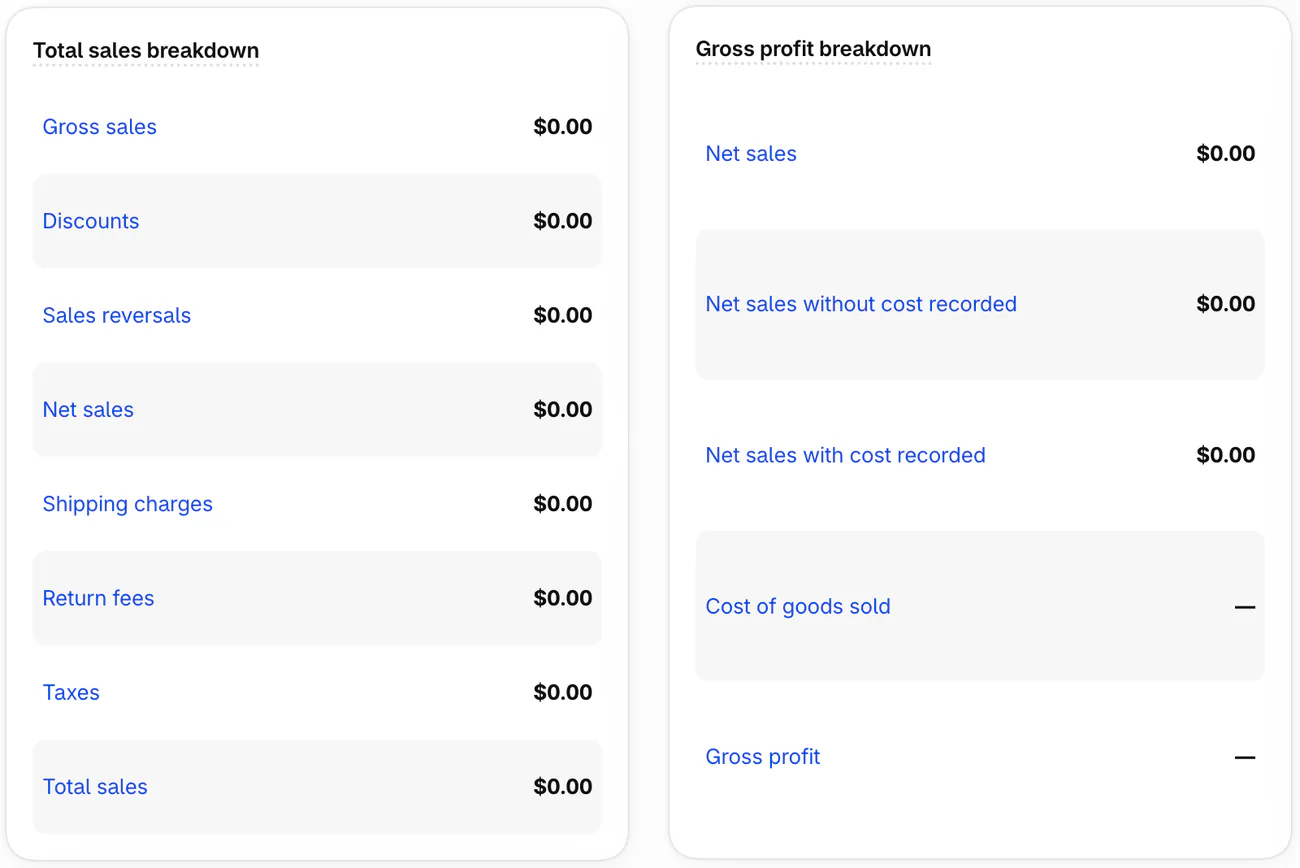
Use net sales, not "Total sales", which also adds shipping, taxes and fees. Shopify's Help Center defines each line, and net sales vs gross sales and revenue vs profit cover the difference between them.
| Template lines | Where in Shopify | What to know |
|---|---|---|
| 1 to 4: gross sales, discounts, returns and refunds, net sales | Finance summary, "Total sales breakdown": "Gross sales", "Discounts", "Sales reversals", "Net sales" | Net sales leaves out shipping and taxes. A sale counts on the day the order was placed. |
| 5 and 6: product cost, gross profit | Finance summary, "Gross profit breakdown": "Net sales with cost recorded". The "Cost of goods sold" report | Only sales with a cost recorded count toward gross profit. Cost comes from "Cost per item" in each product's Price section. |
| 7: shipping charged | Finance summary, "Total sales breakdown": "Shipping charges" | A refunded shipping charge shows here as a negative, not under "Sales reversals". |
| 8: shipping labels | Settings, Billing, a bill's "Breakdown", "Shipping" | The Finance summary's sales figures leave label purchases out. Shopify's Help Center lists the charges a bill can hold. |
| 9: payment fees | Finance, Documents, "Shopify Payments activity report": "Fees" | Shopify Payments fees come out of each payout and never reach your bill. Another payment provider sends its own statement, and without Shopify Payments Shopify also bills "Transaction fees". Count those on this line as well. In the cash table they sit in the Shopify bill row. |
| 12: Shopify plan and apps | Settings, Billing, "Past bills", a bill's "Breakdown": "Subscription" and "Apps" | Apps bill on a different cycle from the plan. |
| 10, 11, 13, 14: packaging, ads, wages, other | Not in Shopify: your receipts, ad accounts, payroll and bank | Count each cost once. |
| 15: profit before income tax | Your sheet | Sales tax collected ("Taxes" in the same card) goes to the government, so it stays off this table. |
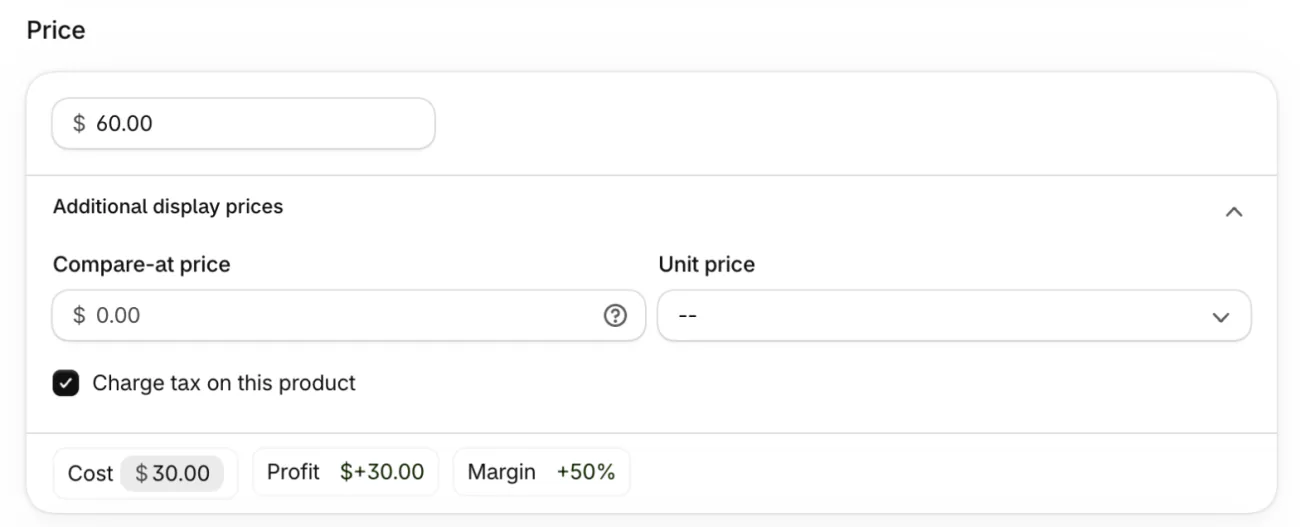
Enter product cost first, because a cost you add today does not reach old orders. Shopify files product cost under cost of goods sold, and its Help Center says the cost is saved on each order when the order is placed. In Products, open each product, click "Cost per item" in the Price section, type what one unit cost you, and do it for every size and color. To fill many at once, use the bulk editor. Check that "Net sales without cost recorded" reads zero, or line 6 will not match Shopify's.
Cash flow template for a Shopify store, to copy
Cash flow counts money on the day it moves, so fill this table from your bank and payout statements, not from Shopify's sales reports. Your payouts are listed in the Shopify Payments activity report (Finance, then Documents), and your Shopify bills are under Settings, then Billing. The example is the same store and the same three months.
Cash flow, one column a month
| Line | Month 1 | Month 2 | Month 3 |
|---|---|---|---|
| Opening cash | [8,000] | 8,680 | 9,160 |
| Plus Shopify payouts | [10,610] | [12,900] | [14,100] |
| Plus other payment providers | [600] | [700] | [800] |
| Minus stock paid to suppliers | [4,000] | [5,500] | [11,000] |
| Minus Shopify bill (plan, apps, labels, transaction fees) | [2,190] | [2,590] | [2,940] |
| Minus ads | [1,800] | [2,400] | [3,300] |
| Minus wages and contractors | [900] | [900] | [1,400] |
| Minus packaging and other costs | [640] | [730] | [780] |
| Minus taxes paid | [0] | [0] | [0] |
| Minus loan repayments and your own pay | [1,000] | [1,000] | [1,000] |
| Closing cash | 8,680 | 9,160 | 3,640 |
| Coming up: pre-order balances due | [ ] | [ ] | [ ] |
| Coming up: supplier bills due | [ ] | [ ] | [ ] |
- Payment fees and refunds have no row, because Shopify Payments takes both out before each payout. Credit card processing fees shows what one fee is made of.
- Shopify's activity report also has a "Shipping" group for label charges, so check whether yours come off your bill or your balance, and count each once. If you use Shopify Capital, a repayment taken from your Shopify Payments balance is already out of your payouts, so leave it off the table. In the US, Shopify's Help Center says repayments on loans accepted from March 9, 2026 come out of that balance, and older ones are debited from your bank. Put a bank-debited repayment on the "loan repayments" row, and give funding paid into your bank a row of its own.
- The example store charges no sales tax, to keep the sums short. Sales tax you collect sits inside your payouts until you pay it out. When that is due is a question for your accountant.
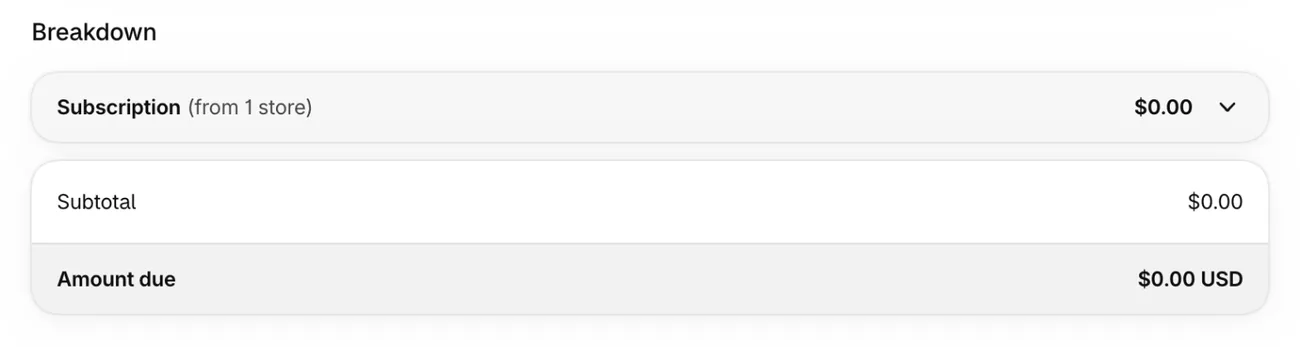
The "Minus Shopify bill" row is the amount of each bill, "Transaction fees" included. Click a bill under "Past bills" to see its "Breakdown".
When does a sale's money reach your bank?
A sale counts in the month of the order, and its money counts in the month it arrives, which is one reason the two tables differ. Shopify's Help Center gives the example: an order placed in May and paid in June is in May's Sales report and June's Payments report.
On Shopify Payments in the US, the minimum from payment to payout is 3 business days, and Friday to Sunday sales go out together as one payout. Then your bank can take 1 to 3 more days. Some accounts wait longer, because Shopify can hold a share of each payment as a reserve for a set period, or put an account on a custom schedule of 5 to 20 business days. The Shopify Payments guide covers payout timing and holds.
You can usually choose daily, weekly or monthly payouts. Go to Settings, then Payments, click "Manage" on Shopify Payments, and find "Payouts schedule" under Payouts.
In the example, three months make $3,140 of profit and leave $4,360 less cash than the store started with. You paid suppliers $20,500 for stock, against $16,000 of product cost, so $4,500 is stock bought and not yet sold, and $3,000 went to loan repayments and your own pay. Together they explain the $7,500 between the profit and the drop in cash. The cash conversion cycle measures how long stock ties up your cash. An inventory spreadsheet keeps the count and cost of that stock.
Can a pre-order deposit bring cash in before the stock arrives?
Where your payment provider supports it, a pre-order deposit brings part of the payment in at checkout and sets the balance to be charged on the due date you pick. In Sledge, open Tools, then Merchandising, click the pre-order card, then "Add pre-order". In the "Payment" section, pick "Partial payment", type the "Fixed amount to pay now" and choose a "Due date". Shoppers pay that amount once for each product in their cart at checkout, and the balance is set to be charged on the due date. Sledge Pre-order is in every paid plan and has the rest.
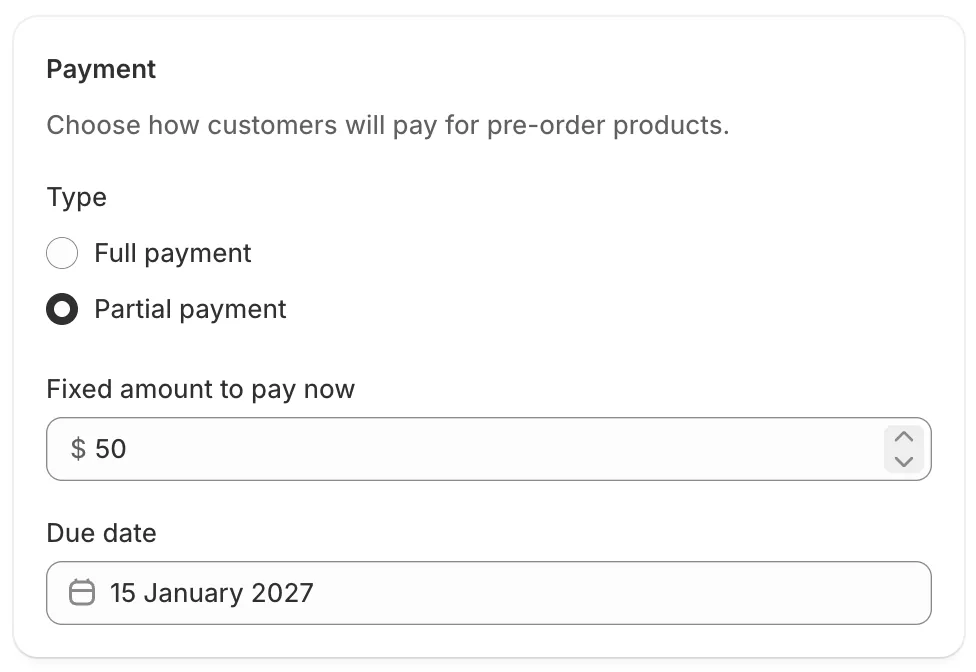
On your two tables, the order counts in the month it is placed. The deposit reaches your bank with the payouts that follow, and the balance after its due date. Put the balances you are waiting for on the "Coming up: pre-order balances due" row.
A pre-order deposit does not work for every store. Shopify's Help Center says pre-orders, deposits included, run only on Shopify Payments or PayPal Express. It also lists pre-orders among the cases that can lead to a reserve.
To collect early, open the order, find "Partially paid" and click "Collect payment", as Shopify's Help Center describes. Filter Orders by "Unpaid" to see what is still owed. How to take a deposit walks through the setup.
FAQ
Questions, answered
-

14-day free trial
Explore Sledge on your store before you decide to commit.
-

No credit card required
Start improving your store with no upfront commitment.
-

Setup in minutes
Get Sledge running without a lengthy setup process.
-

Built to grow sales
Turn shopper behavior into actions that help you sell more.
Does Shopify make a profit and loss statement for you?
Not as one report. Shopify's Finance summary shows sales, payments and gross profit, and the Reports list has profit reports, but they cover sales, product cost and payments only. Shipping labels, ads, wages and Shopify's own bills come from elsewhere, so copy this page's table and fill those lines yourself.
Is there a free profit and loss template for Google Sheets or Excel?
Yes, as a table to copy, not a file. Copy this page's table into a blank Google Sheets or Excel file, replace the example numbers with yours, and work out the bold lines in your sheet. The example's $1,150 profit in month one lets you check your sums.
Is profit the same as cash flow?
No. Profit counts a sale in the month of the order and takes off the product's cost then. Cash flow counts money on the day it moves. In this page's example, three months leave $3,140 of profit and $4,360 less cash, because $4,500 more went on stock than the products cost and $3,000 on your own pay and loan repayments.
How do I make a 13 week cash flow template?
Use the cash flow table with one label column and 13 weekly columns, each headed by a week-ending date. Put each item in the week the money moves: payouts when they reach your bank, bills when they leave. On Shopify Payments in the US, the minimum from payment to payout is 3 business days.
How often should a store make a profit and loss?
Monthly suits most stores. Set the same dates on every Shopify report, such as the first to the last of the month, so the lines match. Shopify records a product's cost on each order when the order is placed, so enter every cost before the month's sales, or those sales stay out of gross profit.
Pre-order deposits and sales fixes, with Sledge
Sledge does not make your profit and loss, and its admin shows no costs or profit. Sledge Pre-order can take a fixed deposit at checkout and set the balance to be charged on the due date you pick, where your payment provider supports it. Try Sledge free for 14 days. Growth Intelligence turns on when you pick a paid plan. It totals the sales its suggested fixes could add into one figure, labeled "Est. potential", and that figure counts sales, not profit.