
A brand voice is how your store sounds in writing, the same few traits in a product description, an order email and a sale banner. These six brand voice examples write one candle in six voices, then give you a one-page guide to fill in and the Shopify screens where each line goes.
Your product page reads like a supplier's catalog. The order email says "Your order has been received." The sale banner shouts "BIG SALE!!!" Three lines, three different writers, and a shopper can hear the seams.
What is brand voice, and how is it different from tone?
Brand voice is the way your store sounds in writing, and it stays the same on every page. Tone is how that voice bends for the moment.
Say your voice is warm and plain. A product page lets it be curious, a sale banner lets it be brisk, and a late-order email lets it go quiet. The traits stay put while the volume changes.
A voice needs three words you can check a line against, such as warm, plain and specific. "Friendly" alone fits every store, so it fits none.
What do 6 brand voice examples look like on one product?
Each sample writes the same candle, for a made-up candle shop, in a different voice. A highlighted [bracket] marks where your own facts go. Fill the brackets and delete any claim that isn't true for you.
| Voice | Its rule | Fits a store that |
|---|---|---|
| Plainspoken | Facts first, short sentences | Sells things people compare on details |
| Playful | A twist in the first line, never in the facts | Sells gifts and small treats |
| Warm | Talks to one person and names the moment | Sells for the home |
| Expert | Says how it's made, in exact terms | Sells craft or technical goods |
| Dry | Understates and never oversells | Wins on calm, not on noise |
| Bold | Short claims and a confident close | Sells to people who want a statement |
1. Plainspoken
An 8 oz soy candle with a cotton wick. It burns for about [40 hours]. The scent is cedar and rain, light enough for a small room. Poured by hand in [town].
2. Playful
Rain on a cedar porch, minus the wet socks. This 8 oz soy candle burns for about [40 hours], which is a lot of bath.
3. Warm
For the evening you've been waiting on all week. Cedar and rain, hand poured in an 8 oz soy candle, about [40 hours] of burn. Light it when you get home.
4. Expert
Soy wax and a cotton wick, poured at [temperature] and cured for [five days] so the scent carries evenly. 8 oz, about [40 hours] of burn. Trim the wick to [a quarter inch] before each light.
5. Dry
It's a candle. It smells like cedar and rain and burns for about [40 hours]. 8 oz.
6. Bold
Light it and the room changes. Cedar and rain, hand poured in 8 oz of soy, [40 hours] of burn. No perfume haze, no filler.
Copying a famous brand's voice copies words it earned over years. Your brackets hold facts only you have, and a line built on them is one another store can't print.
Written for this page, November 2026. Shopify settings checked November 18, 2026.
How do you write brand voice guidelines?
Brand voice guidelines fit on one page: three voice words, what each one means in practice, and the words you use and avoid.
- Underline the words shoppers already use about you in your last 20 reviews and support emails.
- Pick three voice words from that list, such as warm, plain and specific.
- For each word, write what it means and what it doesn't: "We are plain, not blunt."
- List five words you use and five you avoid.
- Name the tone for a product page, an order email, a sale banner and a late order.
- Read one real page aloud and cross out any line another store could print.
Copy the page below and fill the brackets.
[Store name] voice guide
We write for: [one sentence, such as someone buying a candle for a quiet evening].
Our voice in three words: [warm], [plain], [specific]. In practice:
Warm, not [gushing]. Plain, not [blunt]. Specific, not [technical].
Words we use: [home, evening, hand poured, cedar, burn time].
Words we avoid: [luxury, perfect, must-have, premium, amazing].
We call the reader [you]. Exclamation marks: [one a page, at most]. Emoji: [none].
Tone by moment: product page [curious and specific]. Order email [calm and grateful]. Sale banner [brisk and upbeat]. Late order [plain, sorry once].
Before we publish: [Could another store print this line? Would we say it out loud? Is every claim true?]
Keep three lines from your own pages that sound like you and three that don't. They give a new writer lines to match, which an adjective can't. If you aren't sure who you write for, the target market entry helps you name them.
How should your voice change from a product page to an order email to a sale banner?
Keep the voice and move the tone. The "before" lines below are generic ones a store might print.
| Moment | Tone | Before | After, in a warm, plain voice |
|---|---|---|---|
| Product page | Curious, specific | High-quality soy candle with a long burn time. Perfect for any occasion. | Cedar and rain in an 8 oz soy candle you can light tonight. It burns for about [40 hours] and suits a small room. |
| Order email subject | Grateful | Order #1042 confirmed | Thank you, [first name]. Your candle is being packed. |
| Order email heading | Calm | Your order has been received. | We're packing your candle now. It ships by [Thursday], and we'll email the tracking the day it leaves. |
| Sale banner | Brisk, upbeat | BIG SALE! UP TO 50% OFF EVERYTHING!!! | Candle season starts Friday. [20% off] through Sunday night. |
A late order needs a quieter tone still: name the delay, say sorry once and say what you did about it. The customer service email templates have the full reply. A banner's button is another place a voice slips, and the call to action examples show button words in a few tones.
Where do you set your brand voice in Shopify?
Start with four places in the Shopify admin: the Brand page, each product's description, the order emails and your pages.
The Brand page
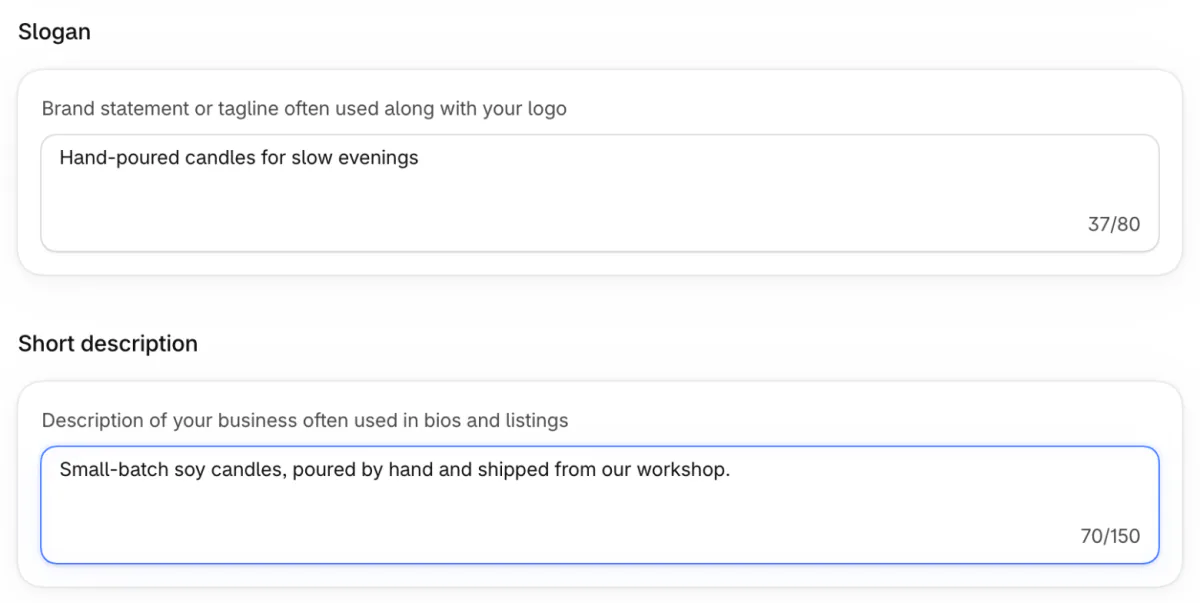
Open Settings, then General, then Brand. "Slogan" takes up to 80 characters and "Short description" up to 150, Shopify's Help says. It adds that the description is often used in bios and listings, so write both in your voice.
Product descriptions
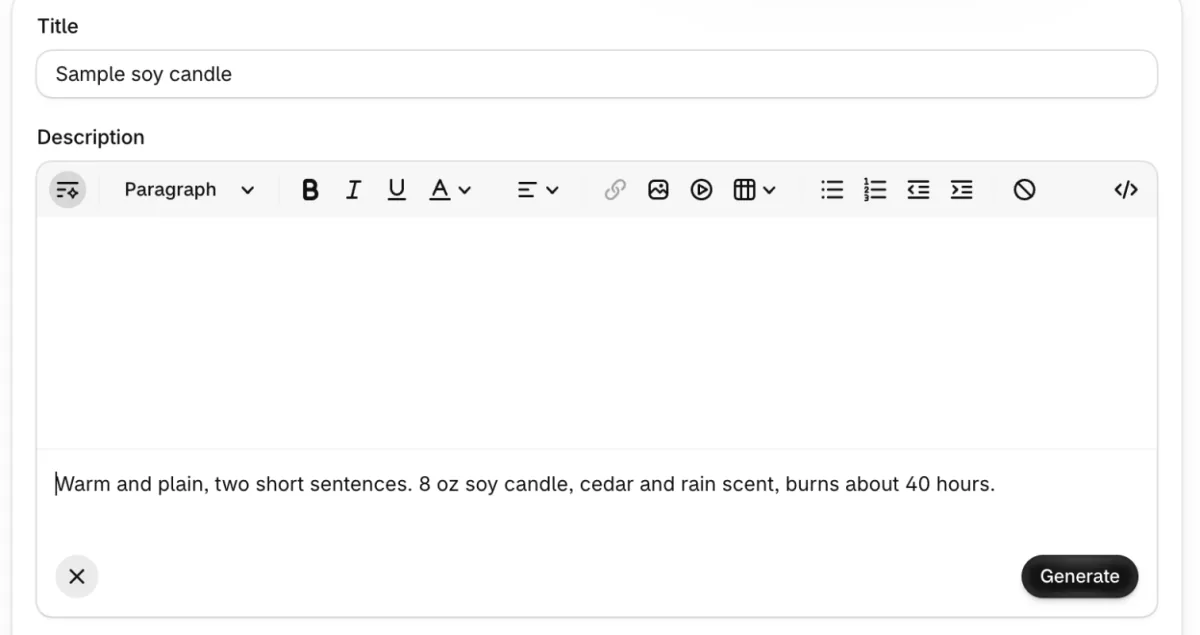
Open Products, click a product and use the "Generate text" icon in the Description toolbar. Put the tone in the prompt, as the box suggests with "Make it playful". Shopify says to read the text closely, because generated text can add benefits you never listed. The draft then waits with "Discard" and "Add" buttons, so read it before you click Add. It works on a desktop computer, not in the phone app.
To reuse your guide, ask Sidekick, Shopify's built-in assistant, to create a skill from it. Shopify's Help says Sidekick keeps a skill as reusable instructions and decides when one applies, so read every draft before you save it.
Order emails
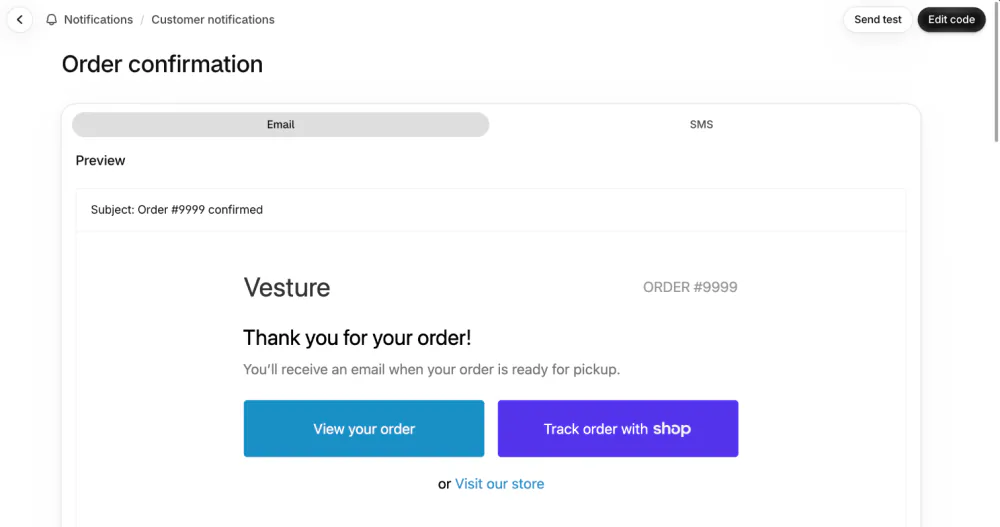
Open Settings, then Notifications, then Customer notifications, then Order confirmation. Click "Edit code", which opens an "Email subject" box and an "Email body (HTML)" box, the one that holds the wording among its code. Change only the words, keep the "View your order" button and use "Send test" on the preview page to email yourself one. If code is new to you, Shopify suggests hiring a Shopify Partner. Our order confirmation email template walks through each click.
Pages
Open Online Store, then Pages. The About page is where your voice usually gets its longest run, and the About Us page examples give seven samples to fill in.
How do you keep your voice on sale banners, countdowns and badges?
A sale is where a voice often slips, because the words get typed in a hurry. Write the sale line in your guide first, then type it once in each place.
If your theme has an announcement bar, you edit it in the theme editor, under Online Store, then Themes, then Customize. In the theme we checked it is a section named "Announcement bar" in the header group, and it usually holds one line across the top of the store.
Sledge, a Shopify app, puts your words on a sale in three more places. Under Promotion, a Banner has tick boxes "Add title", "Add description" and "Add button" that open a "Button text" box, and a Global Countdown has "Title", "Subtitle" and "Button text". Under Merchandising, a Badge Campaign has "Badge label". A new Global Countdown opens with ready-made words, "Massive sale", "Sale ends in:" and "Shop now", so replace each with a line from your guide.
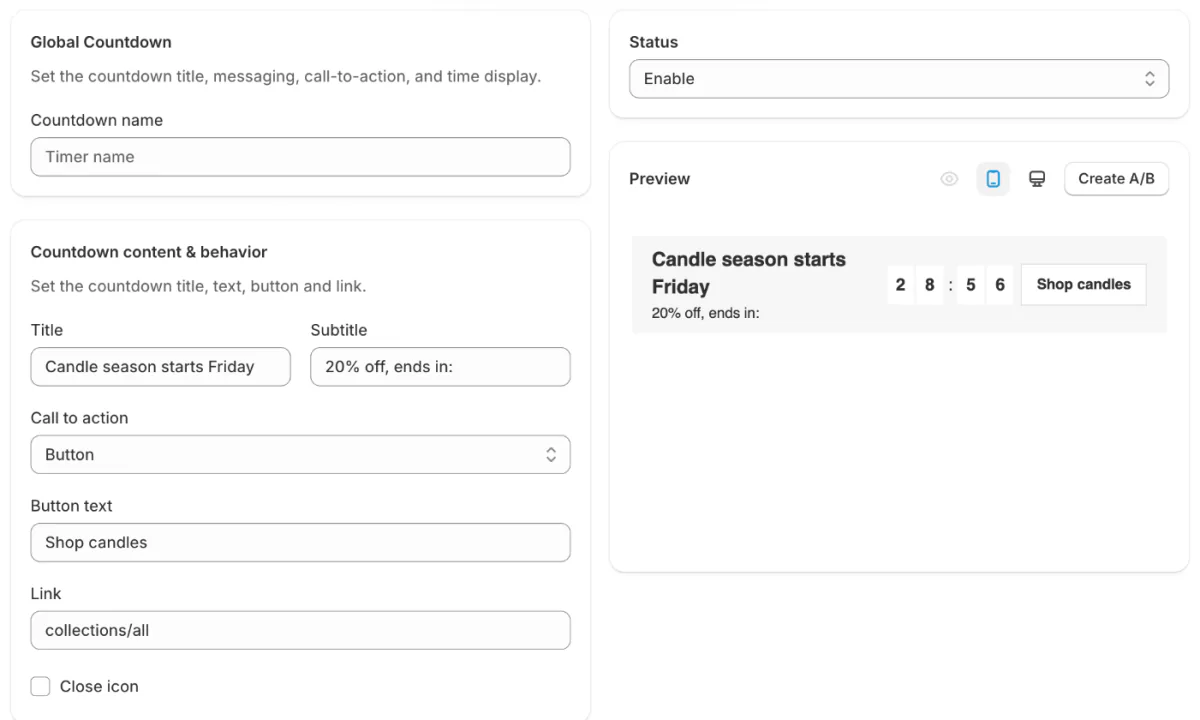
Sledge does not check your voice. If you start a banner from a Growth Intelligence suggestion, its headline is only a starting point, so rewrite it in your voice.
FAQ
Questions, answered
-

14-day free trial
Explore Sledge on your store before you decide to commit.
-

No credit card required
Start improving your store with no upfront commitment.
-

Setup in minutes
Get Sledge running without a lengthy setup process.
-

Built to grow sales
Turn shopper behavior into actions that help you sell more.
What is brand voice?
Brand voice is the way your store sounds in writing. It shows in the same few traits across a product description, an order email, a sale banner and an About page, so a shopper can tell the lines came from one place. It is set by word choice, sentence length and how you address the reader.
What is the difference between brand voice and tone?
Voice is who your store sounds like, and it stays the same everywhere. Tone is how that voice adjusts to the moment. A warm, plain voice can be brisk on a sale banner and quiet in a late-order email. The traits stay put while the volume and pace change.
How do you write brand voice guidelines?
Keep them to one page. Pick three voice words from what shoppers already say about you, write what each one means and does not mean, list five words you use and five you avoid, and set the tone for a product page, an order email, a sale banner and a late order. Test the page on one real product.
What are examples of brand voice for a small online store?
Six common ones for small stores are plainspoken, playful, warm, expert, dry and bold. Each has a rule: plainspoken puts facts first, playful keeps jokes out of the facts, and warm speaks to one person. The samples above write one candle in all six, so you can hear the difference.
Can Shopify's Sidekick write in my brand voice?
On a product description, Sidekick's Generate text box takes a tone in your prompt, such as make it playful. Shopify warns that generated text can add benefits you never listed, so read it closely before you save. Sidekick can also keep reusable instructions as a skill, and it decides when one applies.
Does Sledge write or check my brand voice?
No. Sledge does not write your product descriptions or emails, and it does not judge your voice. Its banner, countdown and badge tools show the words you set, in boxes such as Title, Subtitle, Button text and Badge label, so a sale can sound like the rest of your store.
The page sounds like you. Does your sale?
Sledge doesn't write your product pages or emails, and it doesn't check your voice. Its banners, countdowns and badges show the words you set, so a sale can sound like the rest of your store. Try it free for 14 days. Growth Intelligence turns on when you pick a paid plan, and its suggested fixes add up to one dollar figure, labeled "Est. potential".

