
To sell art online, choose what you sell: originals, prints or digital files. Photograph or scan each piece, price it from your costs and time, then list it in your own store, on a marketplace, or both. On Shopify, an original is a product with a stock of 1, and a download goes through Shopify's free Digital Products app.
Say your painting took 30 hours and you list it at $600. A gallery would keep 30% to 60% of that. A print of the same piece at $40 could sell 50 times, $2,000 in sales before your costs. What you sell first, and where, decides what you keep.
What kind of art should you sell online?
Originals sell once at the highest price, prints sell many times, and files sell with no shipping at all. You can mix them, so one piece reaches buyers at more than one price.
| What you sell | Who ships it | The catch |
|---|---|---|
| Originals | You, once per piece | One sale per piece, and it needs careful packing |
| Limited-edition prints | You or your printer | You stop at a set number |
| Open-edition prints | You or your printer | A lower price, since the run never ends |
| Digital files | Nobody: the shopper downloads it | The buyer prints it, so you never see the result |
A limited edition is a fixed number of copies, each numbered as its place in the run, so the fourth print of 50 reads 4/50.
Where can you sell art online, and what does each keep?
A $600 original leaves a different amount in each place, and each place does a different job for its cut. These are the fees each company publishes, read in November 2026.
| Where | What it takes from $600 | What it does for that |
|---|---|---|
| Your own Shopify store | $17.70 card fee, plus $29 to $39 a month for Basic | Takes the payment. You bring the shoppers and ship |
| Saatchi Art | 40%, so you keep $360 | The collector pays shipping, and a courier collects the piece |
| Etsy | $39.20 in listing and transaction fees, plus payment processing | Shows the piece to shoppers already searching Etsy |
| A gallery | 30% to 60%, so you keep $240 to $420 | Shows the work in person and sells it for you |
The store figure is Shopify's online card rate on Basic, 2.9% plus 30 cents, with the plan at $29 a month paid yearly or $39 monthly. Saatchi Art's page says you pay for the packaging. Etsy also takes 6.5% of any shipping you charge, per its fee page. The gallery range is the one Shopify's own guide gives.
You can use more than one. The full Etsy math is in Etsy vs Shopify fees, the marketplace side in Amazon vs Shopify, and every plan in Shopify pricing.
How do you price art to sell online?
Start from your costs plus your time, then check what artists at your stage charge. For an original, add materials, your hours at a rate you choose, and a markup. That is cost-plus pricing.
Say a print sells for $40. Printing costs $9, packing $3, and the card fee $1.46. That leaves $26.54, or 66% of the price. A markup and a margin give two different percentages from the same numbers, so pick one and keep to it. Track your profit margin per size.
Price a limited edition above an open edition of the same piece, as Shopify's guide advises. That is value based pricing: the print costs you the same, but fewer copies make it worth more to buyers.
How do you photograph or scan art for your store?
Shoppers can't see the piece in person, so the photo has to show its true color, size and surface. Scan flat work, in parts if a piece is larger than the scanner. Shoot canvases in soft, even light to avoid glare. Add one picture on a wall for scale and one close-up for texture. The lighting setup is in our product photography guide.
How do you sell an original painting on Shopify?
Make it a product with a stock of 1, and Shopify stops the sale once it sells.
- From your Shopify admin, go to Products, then Add product. Enter the title, price and photos.
- In the Inventory section, switch on Inventory tracked, the setting that makes Shopify count stock. Set the quantity to 1.
- In the Shipping section, keep Physical product on and enter the painting's weight.
- Save.
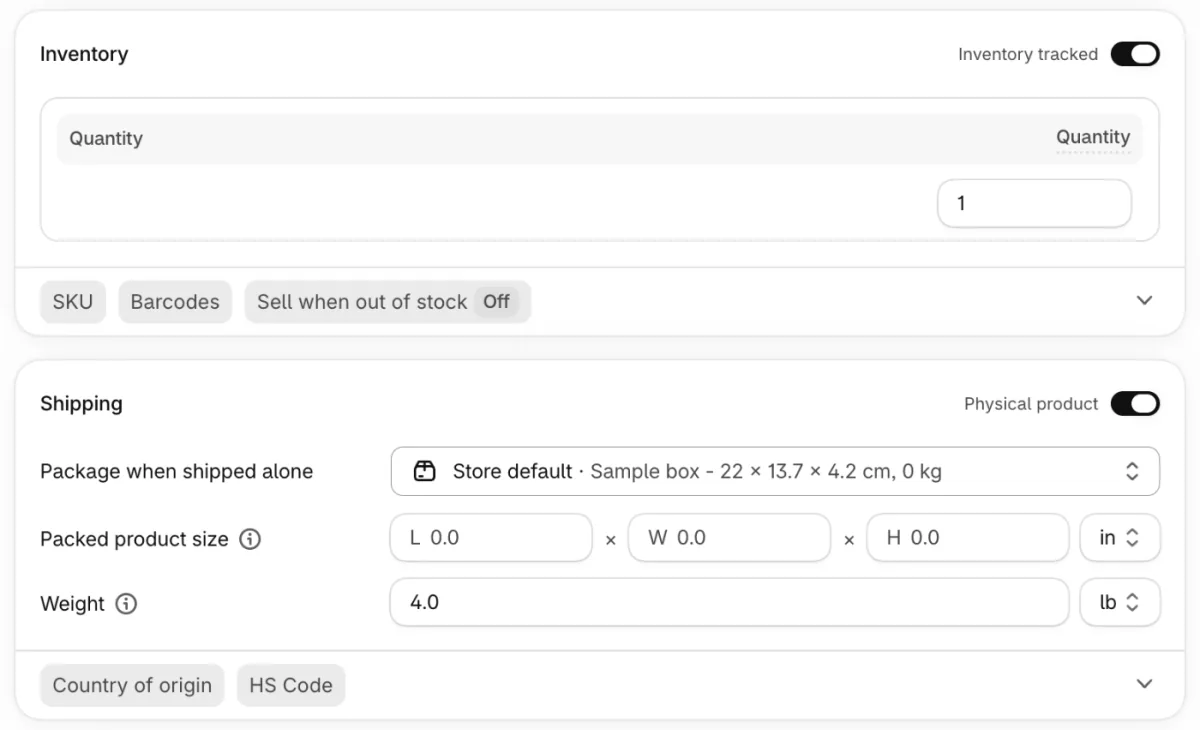
Sell when out of stock stays Off by default, so at zero shoppers can't add the piece to their cart. Inventory tracked and Quantity are the labels on the redesigned product form, as Sledge's demo store showed it on November 9, 2026. On the older form, the switch reads Track quantity and the field Available.
Once it sells, you can keep it out of the collection shoppers browse. Build an automated collection with the condition Inventory stock is greater than 0, and sold pieces drop out of it. Their product pages stay live. Or leave them up as a record of what sold, and check how your theme shows a sold-out piece.
How do you sell prints in several sizes, or a limited edition?
Make one product with a Size option, and give each size its own price. In the Variants section, the part of the product form for sizes and colors, click Add options like size or color. Type Size and create it, then type each size and click Done. Shopify lists one row per size, with its own price and stock. A product takes up to 3 options and 2,048 combinations. Before you order a large size, ask your printer what file size it needs.
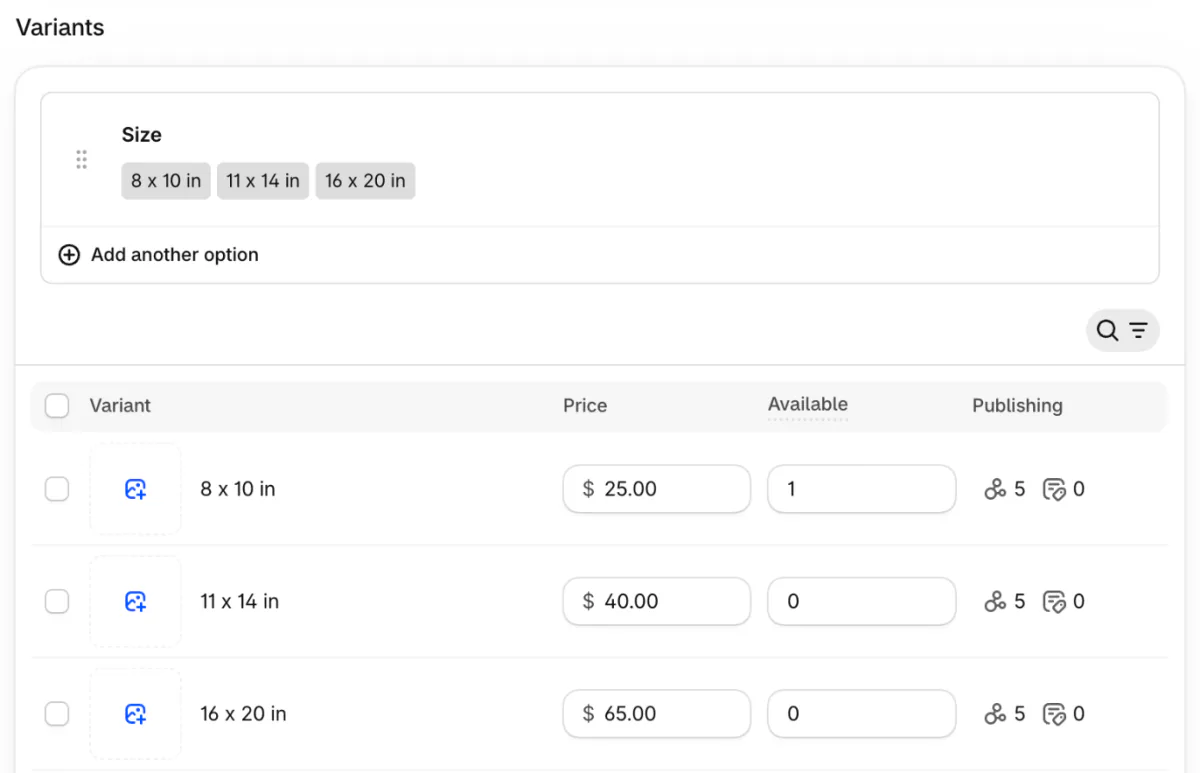
Shopify counts stock per size, so split an edition up front: 50 prints in three sizes might be 20, 20 and 10. Number each print as it ships.
If you'd rather not print or pack at all, print-on-demand prints and ships each order for you. Start with how to start a print on demand business, then Printful vs Printify.
To take orders for an edition you haven't printed, open Sell when out of stock in the Inventory section and tick Shopify's Continue selling when out of stock, which keeps it buyable at zero. A pre-order app such as Sledge switches that setting on for the products you pick and adds a "Pre-order" button and a note shoppers see in the cart, at checkout and in the order email. When you turn the pre-order off, Sledge switches back only the settings it changed.
How do you sell digital downloads of your art?
Shopify's free Digital Products app emails the shopper a download link after payment. It used to be called Digital Downloads.
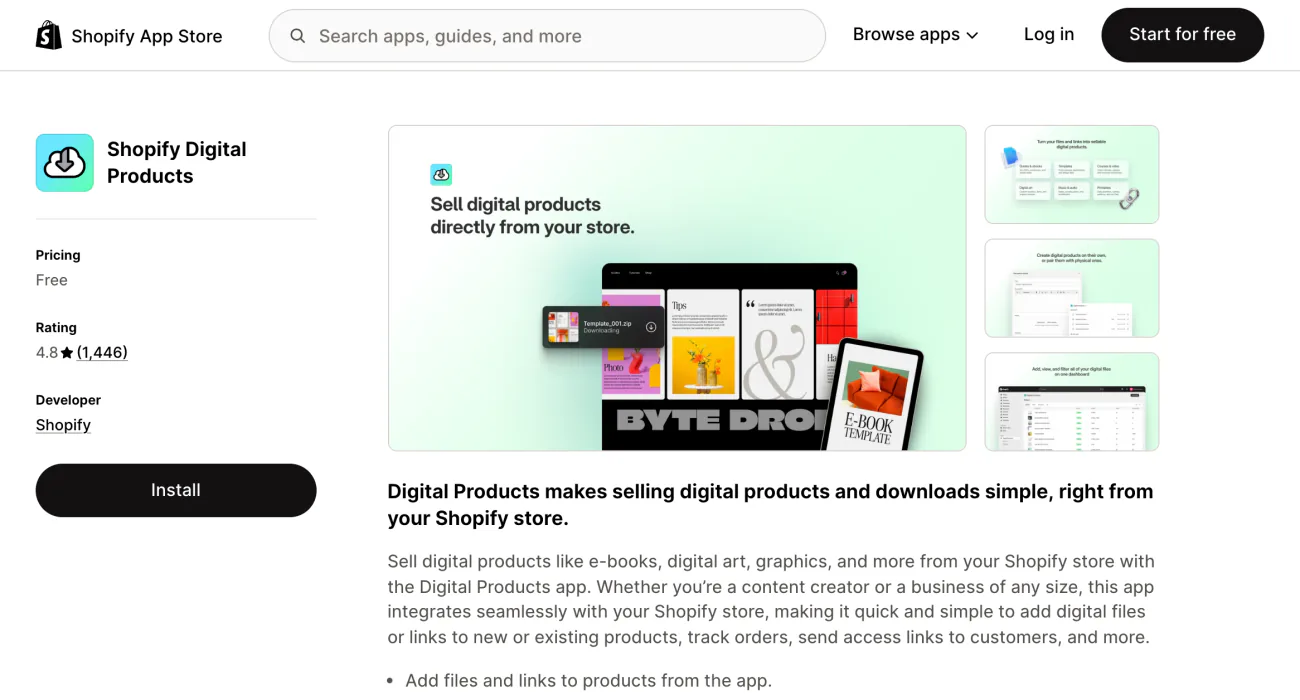
Install the app, then go to Apps and open Digital Products. Click Add assets, pick File and upload the art. Keep Delivery method on Send automatically, and save, which creates the product. Then open it from Products to set the price, and check that Physical product is off in its Shipping section so no shipping is charged.
Each size or version takes up to 50 files, 5 GB in all, with no bandwidth limit, per Shopify's Help Center. Access limit, the number of times a link works, starts at Unlimited. Shopify adds no fee for selling digital products on your online store.
Place a test order before you launch, and check that the email with the link arrives.
How do you ship art without damage?
Pack for rough handling, weigh it with the packing, and insure the original. Shopify's guide gives the basics:
- Large prints and posters go in a mailing tube, small prints in a rigid cardboard mailer.
- A glassine or cellophane sleeve keeps the surface clean.
- Cardboard corners protect framed works and canvases.
- An unstretched canvas can be rolled to cut freight.
Shopify's package types are box, soft pack, envelope and carrier flat rate. A soft pack thicker than 3/4 inch doesn't qualify for USPS First Class Mail rates. FedEx's own tube is among the carrier packages. With weight-based rates, Shopify adds your default package's weight to the product's weight at checkout, so set that package to what your tube or box weighs. More on rates in Shopify shipping rates and on labels in how to make a shipping label in Shopify.
On labels you buy in Shopify and ship from the US, Grow and higher plans with Shopify Payments include up to $200 of insurance per eligible label. Extra cover costs $0.89 per $100 on a domestic label, up to $5,000, so $600 of cover on Basic, which includes none, is about $5.34. Shipping protection is a different thing: the shopper pays for it at checkout.
How do you find your first buyers?
Nobody finds a new store by chance, so the first shoppers come from you. Three places to start:
- An email list from your first sale, with Shopify's email tools.
- The platform where people already see your work, with a link to the store.
- A marketplace listing as a test of what sells and at what price.
FAQ
Questions, answered
-

14-day free trial
Explore Sledge on your store before you decide to commit.
-

No credit card required
Start improving your store with no upfront commitment.
-

Setup in minutes
Get Sledge running without a lengthy setup process.
-

Built to grow sales
Turn shopper behavior into actions that help you sell more.
Can you sell digital art on Shopify?
Yes. Install Shopify's free Digital Products app, upload the file there as a new product, and check that Physical product is off so no shipping is charged. After payment the shopper gets an email with a download link. Each product version takes up to 50 files, 5 GB in all. Place a test order before you launch.
How much does it cost to sell art on Shopify?
As of November 2026, Shopify's Basic plan costs $39 a month, or $29 a month paid yearly, and online card payments cost 2.9% plus 30 cents. The Digital Products app is free. On top come your printing, packaging and shipping. Etsy charges $0.20 a listing and 6.5% of each sale, shipping included, plus payment processing.
Do you need to copyright your art before selling it?
In the US, your art is protected by copyright from the moment you make it, and registering is voluntary. You need a registration to sue someone over a copy. The Copyright Office charges $45 to register one work of your own online, or $85 for a group of two-dimensional artworks. This is general information, not legal advice.
How do you number limited edition prints?
Number each print as its place over the edition size, so the fourth of 50 reads 4/50, and stop at the last one. In Shopify, set each size's stock to its share of the edition, because Shopify counts stock per size. A set of 50 in three sizes might be 20, 20 and 10.
Should you sell art on Etsy or your own website?
You can do both. Etsy brings shoppers already searching Etsy and charges per listing and per sale. Your own store charges a monthly plan and card fees, keeps the customer list yours, and fills only as fast as your own email list, posts and ads send people. Saatchi Art takes 40% of an original and arranges the courier.
What kind of art sells best online?
It depends on who buys from you. Shopify's own guide says lower-cost originals and prints reach a wider audience, and that print-on-demand products widen it further, since not everyone can afford originals. Offer more than one price point: an original, a numbered print and a small open-edition print or a download.
Your next print run isn't printed yet. Can shoppers order it?
Sledge doesn't print your art, ship it or deliver your files. Try it free for 14 days and open a pre-order on your next print edition. Growth Intelligence turns on when you pick a paid plan, and its suggested fixes add up to one dollar figure, labeled Est. potential.

