

A testimonial page is one page on your store that gathers what real customers said about your products and your store. On Shopify you can build it three ways: from your theme's own sections, from a review app's all-reviews page, or with Sledge's Happy Customer page. Use customers' real words and keep the honest low ratings.
A shopper lands on your store from an ad, likes the jacket, and hesitates: who are you? You'd like one page of real customers to send them to. Your theme has no Testimonials section, the apps you tried put their own logo on it, and every answer you find starts with code.
What is a testimonial page?
A testimonial page is one page of customer praise that a doubtful shopper reads before a first order: short quotes, star ratings and photos. Reviews on a product page tell a shopper whether the product is good. A testimonial page tells them whether to trust your store.
Shopify has no page like it built in. You build it from your theme's sections or from an app.
What should you put on a testimonial page?
Each entry should settle one doubt, in the customer's own words. A strong one carries five things.
- The product, linked, so a shopper can go and buy it.
- The doubt it settled, such as fit, color in daylight, how it washed or how fast it came, told through one detail only a buyer would know, as in these customer review examples.
- A customer photo, where you have one.
- The stars, a first name and last initial used with permission, and the date.
- Your reply, under a critical one.
Across the page, keep some three- and four-star reviews. In product reviews, the odds of a purchase peak at average ratings of 4.0 to 4.7 and fall toward 5.0, per Northwestern's Spiegel Research Center.
Open with a short intro in your own words, and end with links back to your products. Sidekick, Shopify's assistant, can draft that intro. Never let it write the quotes.
Find quotes in your reviews, order emails and messages, and ask each customer before you use their words. When you ask for reviews, ask every buyer the same way. If you offer a reward, offer it for any honest review, good or bad, and say so beside the review.
Testimonial page examples: which layout fits your store?
Dawn and Horizon, two of Shopify's free themes, can build three of the four layouts below with no app. The fourth takes a review app or Sledge.
- Quote wall
- One big quote
- Photo cards
- Full reviews page
- The quote wall: six to nine short quotes in a grid. Use Multicolumn, one quote per column, in either theme.
- The one big quote: a single standout line with a shop button under it. Use Pull quote in Horizon, or Rich text in Dawn.
- The photo cards: quotes with customer photos that slide. Horizon's Carousel arrives with four cards, each with a picture, a heading and text. In Dawn, use Multicolumn and switch on "Carousel" in its mobile settings, so phones can swipe through the columns.
- The full reviews page: an average rating, a review count and a button to add a review. A review app's all-reviews page makes it, and so does Sledge's Happy Customer page, which also splits product and store reviews into two tabs.
Each layout comes from one of three ways to build the page.
| Way to build it | Layouts | Live star average | Shoppers add reviews | Cost |
|---|---|---|---|---|
| Your theme's sections | Quote wall, one big quote, photo cards | No | No | Free with Dawn or Horizon |
| A review app's all-reviews page | Full reviews page | Yes | Yes | One more app, and at least one keeps the page for a paid plan |
| Sledge's Happy Customer page | Full reviews page, with product and store tabs | Yes | Yes, from a button on the page | Every paid plan, from $29.99 a month |
How do you make a testimonial page with your theme, no app?
Neither Dawn nor Horizon has a section called Testimonials, so build the page from Multicolumn, one customer per column. It's free and needs no code.
- Add the page: in Online Store, click Pages, then "Add page". Give it a title, choose Visible, and save.
- Give it its own design: in the theme editor, open the "Home page" drop-down, pick Pages, and click "Create template", which starts a new page design. Name it, pick your default page under "Based on", and confirm.
- Click "Add section" and choose Multicolumn, listed under Text.
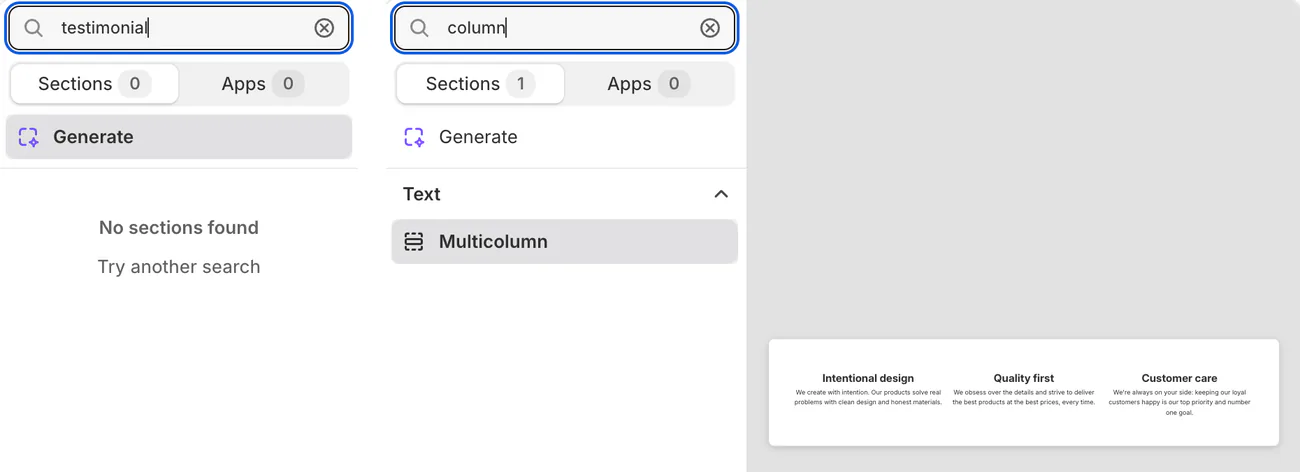
- Fill the columns: one customer each, with their words as the text and their first name, last initial and product as the heading. Type the stars they gave as star characters, such as ★★★★☆ for four, and never round a rating up. Save.
- Apply the design: in Online Store, click Pages and open your page. On the right, the "Template" menu lists the page designs your theme has. Pick your new design there and save.

- Add it to your menu, since a new page appears in no menu until you link to it. In Content, click Menus, open your main menu, and click "Add menu item". Name it, pick the page in "Search or paste a link", click Add, then Save. Pasting the page's address instead can break the link later, Shopify warns.
A theme page shows only what you type. You add and update every quote by hand, it shows no star average or count, and shoppers can't add a review there. It suits five to ten quotes that rarely change.
How do you make a testimonial page with a review app?
The five large review apps we checked in the Shopify App Store all list an "All reviews page" among their display options, and that page pulls in your real reviews with a live average. At least one of the five keeps it for a paid plan.
The page stays current as reviews come in, and shoppers can add their own. The catch is one more app to install, and possibly to pay for.
Shopify has no review display of its own. So the reviews page you admired on another store, with its average and its write-a-review button, came from an app or a developer's work.
See which review app does what, and how to add reviews without a separate monthly bill.
How do you build a testimonial page with Sledge?
Sledge is a Shopify app with built-in product reviews, and its Happy Customer page is a ready testimonial page on every paid plan. It shows your average rating, a five-row star breakdown, and your product and store reviews on two tabs, with photos and your replies. A button lets shoppers add a store review in three short steps: their stars, their words with up to five photos, then their name and email.
In Sledge, open Product Review, then Happy Customer, pick "Grid layout" or "List layout", and save.
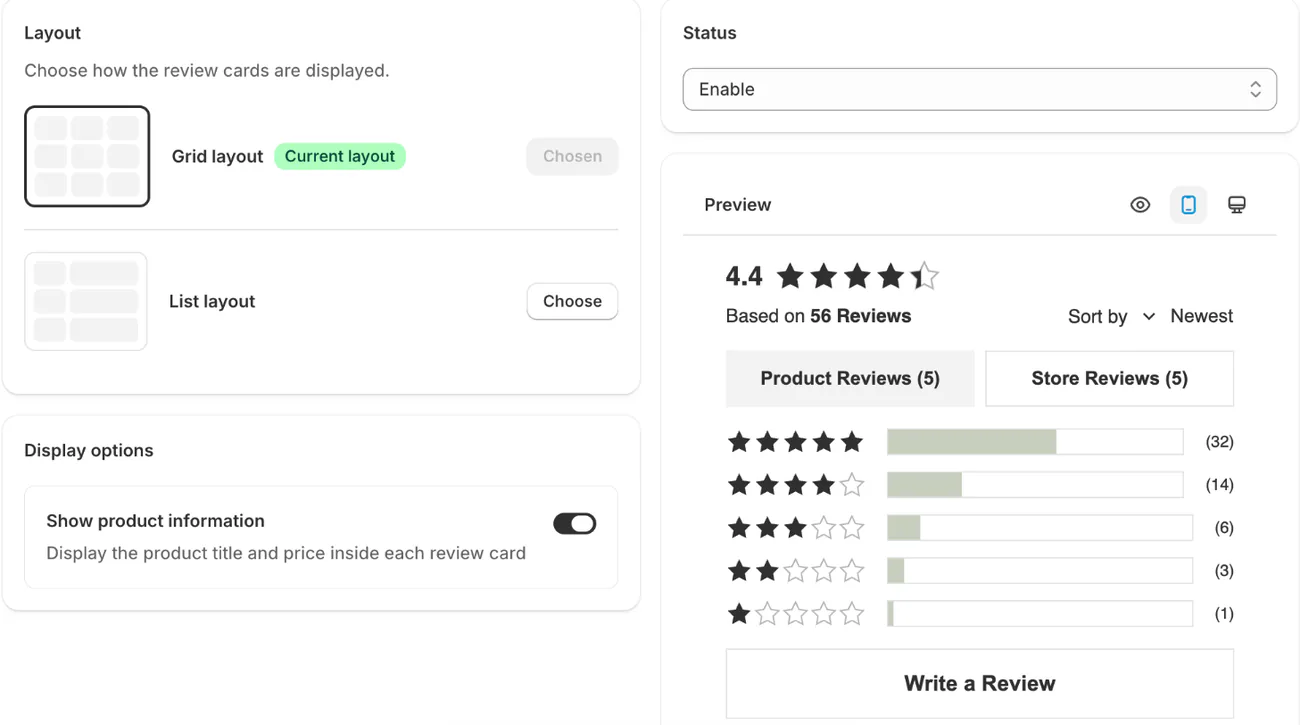
Click the eye icon above the preview, labeled "Open storefront in new tab", then copy the page's address from your browser. The page isn't one of your Shopify pages, so your menu's page list won't offer it. Add it to your menu as in step 6 above, but paste the address into the link field, and wait for the drop-down to show it before you select it.
Under Product Review, open Display Settings and switch on "Show review date", which is off by default, because a dated quote reads as real.
By default, four- and five-star reviews go live on their own and the rest wait for you. Sledge doesn't import reviews from another app or send review requests, so if you move over from another app, this page starts empty. Reviews run during the 14-day trial.
How do you keep a testimonial page honest?
In the US, fake reviews and testimonials are banned, AI-generated fakes included. The Federal Trade Commission (FTC) can seek up to $53,088 per violation from anyone who breaks the rule knowingly. The rule was announced on August 14, 2024, and took effect on October 21, 2024. Four of its limits apply to a testimonial page.
- You can't write, create or sell a testimonial from someone who doesn't exist, or who didn't use the product or have that experience.
- You can't pay or reward a customer for a review that says a particular thing, good or bad.
- A review by you or a manager needs a clear note of the relationship, and so does a staff member's review you share, unless it's plain they work for you.
- On a page that collects and shows reviews, you can't hide the low ones for their rating and present the rest as most or all of your reviews.
You may hold a review back when the reason applies to every rating alike: abuse, harassment, defamation, obscene or discriminatory content, someone else's personal details, trade secrets, a likely fake, clearly false claims, or a post wholly unrelated to what you sell.
Sledge's default, set out above, holds the lower ratings back. Open them in your review list and publish each one that none of those reasons covers.
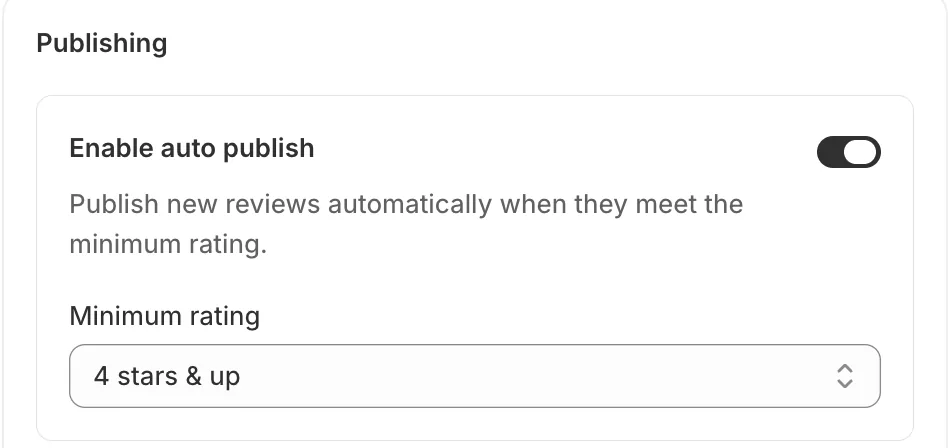
To check every review before it goes live, switch off "Enable auto publish", the setting that publishes new reviews on their own. In the review list, "Publish" puts a review live and "Reply" adds your answer under it. Mark a review "Verified" only when you know the customer bought, since Sledge doesn't check a purchase.
On a page of quotes you picked by hand, keep the customer's exact words inside quotation marks, and never trim a quote so it changes what they meant, per the FTC's Endorsement Guides. The same guides say a quote about a result is likely to be read as what a typical buyer will get, so don't let one promise a result most buyers won't see. That matters most for skin, health and fitness products.
This isn't legal advice, and other countries have their own rules. Rules checked November 3, 2026.
Where else should testimonials go?
A testimonial page reaches only the shoppers who open it, so show reviews beside the buy button too. Per the Spiegel Research Center, a product with five reviews is 270% more likely to be bought than one with none.
Sledge can show product reviews on your product pages, and also in a slide-out sidebar, a trust badge and review snippets. For other ways to earn a first order, see trust signals that stop cart abandonment and social proof.
FAQ
Questions, answered
-

14-day free trial
Explore Sledge on your store before you decide to commit.
-

No credit card required
Start improving your store with no upfront commitment.
-

Setup in minutes
Get Sledge running without a lengthy setup process.
-

Built to grow sales
Turn shopper behavior into actions that help you sell more.
What is a testimonial page?
A testimonial page is one page on your store that gathers what customers said about your products and your store: short quotes, star ratings and photos. A shopper weighing a first order reads it to decide whether to trust you. On Shopify you can build it from your theme's sections, a review app or Sledge.
What should I write on a testimonial page?
Let customers do the writing and pick real reviews to show. A strong entry names the product, says which doubt it settled, such as fit, color or how it washed, and adds a photo. Show the stars, a first name and last initial with permission, and the date. Keep a few three-star reviews, with your reply.
Does Shopify have a testimonials section?
Not by that name in Dawn or Horizon, two of Shopify's free themes. Both have a Multicolumn section that holds one short quote per column. Horizon adds Pull quote for one large quote and Carousel for cards that slide. You type every quote yourself, so the page shows no live star average and shoppers can't add a review there.
Can I hide negative reviews on a testimonial page?
In the US, not on a page that collects and shows reviews. The FTC's 2024 rule bans hiding reviews for their rating and presenting the rest as most or all of your reviews. You may hold back reviews that are abusive, fake, unrelated to what you sell or that expose someone's personal details, as long as the same rule applies to every rating.
Can customers add a testimonial themselves?
Yes, with a review app or Sledge. Sledge's Happy Customer page has a button that opens a short form: a star rating, the review, photos if they like, then their name and email. It's saved as a store review. Four- and five-star reviews go live on their own by default, so open the rest and publish the honest ones.
Let your customers make the case.
Try Sledge free for 14 days: collect photo reviews, show them on your product pages and your Happy Customer page, and reply in your own words. On a paid plan, Growth Intelligence can flag when too few of your products have reviews, and it shows one dollar total, labeled "Est. potential", for what its fixes could add.

