
To upsell a customer on Shopify, offer one bigger choice right after they decide: the larger size or a multipack beside the buy button, one small step up in the cart, and one more item on the thank-you page once they have paid. Keep each jump small, and never put an offer between the shopper and checkout.
You set up a buy-more discount, and it works, but it first shows in the cart, so nobody on the product page knows it is there. Then you add an offer on the way to checkout, and shoppers leave right after it shows. The fix is timing, and Shopify already covers part of it.
What does upselling a customer mean on an online store?
An upsell trades the shopper up: the 1kg bag instead of the 500g, the 3-pack of socks instead of one pair. A cross-sell adds a different item. Online, nobody asks out loud, so the page has to ask with a price.
Upsell apps stretch the word to cover any offer that grows the order, including a small extra and an offer after payment. The strict sense is in what an upsell is.
How do you upsell a customer without pushing them away?
Make one offer at each moment, right after the shopper decides something, and keep the step small. Four rules cover it.
- Timing. Offer right after a decision: a size picked, an item in the cart, an order paid. Stay quiet before a product is chosen, and never put an offer in front of the checkout button.
- Relevance. Offer the same product, bigger, or one that clearly goes with it.
- A small step. Shopify's blog suggests capping an upsell at roughly a quarter of the cart's value.
- An easy yes. Show the saving, and make the bigger choice the one already selected.
Keep the way to checkout clear. In Baymard Institute's survey, 17% of US shoppers who abandoned an order blamed a checkout that was too long or complicated.
How do you upsell on the product page?
The product page is where a trade-up works best, because the shopper is choosing a size right there. Shopify covers three routes on its own.
Show what the bigger size saves
Unit pricing shows the bigger size's lower price per ounce or per gram. Open the product, click the size, and under Pricing add a "Unit price": the amount in the pack and the measure to price it by. Click Done, then Save. Any Online Store 2.0 theme, Dawn and Horizon included, then shows it on product, collection, cart and checkout pages. In some regions the law requires it.
Sell a multipack
The free Shopify Bundles app, on every plan, sells fixed bundles and multipacks. Pick "Add quantity as an option" while you build the bundle, and the pack size becomes a choice on the product. A new bundle starts as a draft, so set it to Active when it is ready. The catch is price: change the product's price and the bundle's price stays where it was.
Use a buy-more discount, and know its catch
An automatic discount with a "Minimum quantity of items", a rule such as two or more, applies in the cart and at checkout. The product page shows nothing unless you write the offer onto it in a text block. Each discount holds one tier, and Shopify's own help sends tiered discounts to apps.
Shopify's built-in price breaks are for B2B buyers. For tiers any shopper gets, see quantity-break pricing for every shopper.
Where Shopify's recommendation rows fit
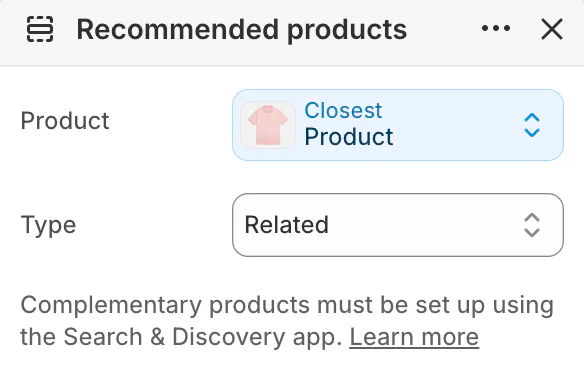
Shopify's related products are look-alikes a shopper might buy instead. Complementary products are ones often bought with it, and Shopify advises picking ones priced the same or lower. Neither row is built to trade the shopper up. You pick complementary products in the free Search & Discovery app, up to 10 for each product. Horizon shows both through its "Recommended products" section, whose "Type" setting picks Related or Complementary. Where to place them is in the product recommendations guide.
Put the tiers beside the buy button with Sledge
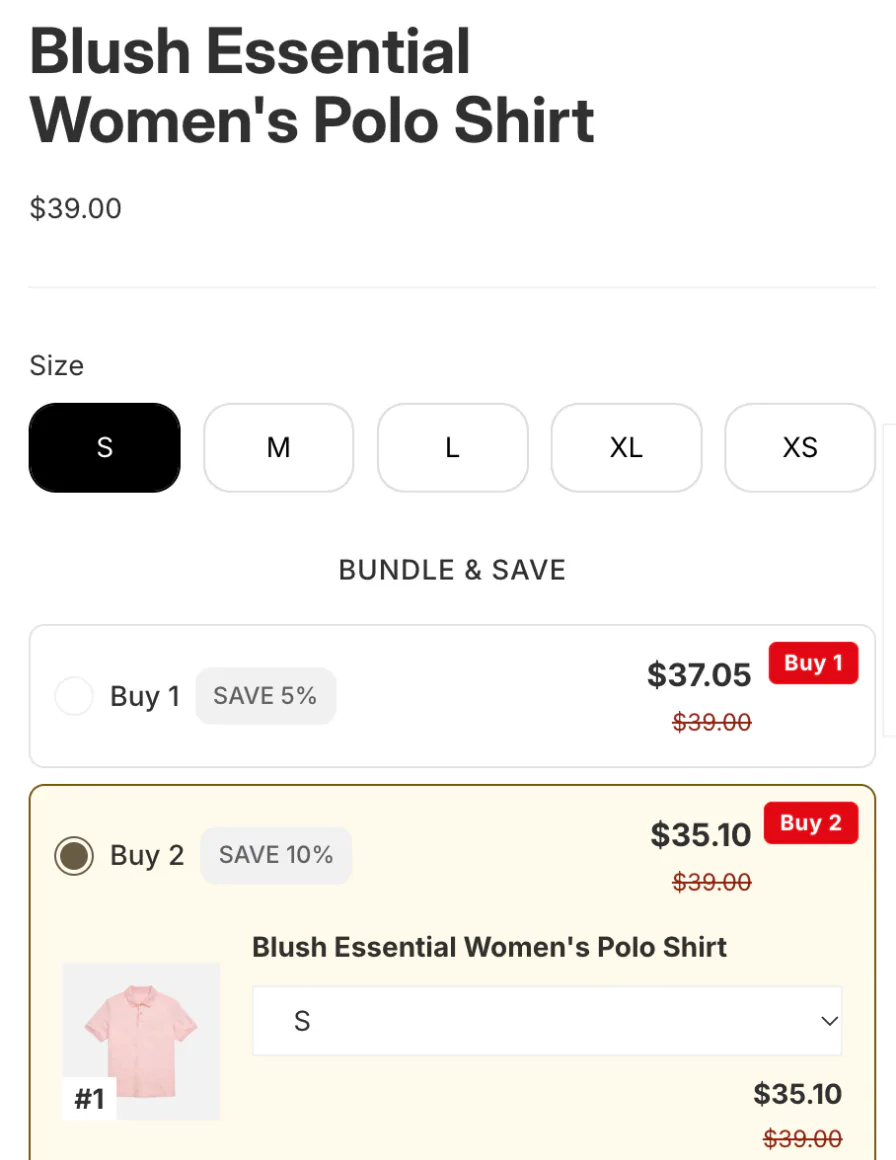
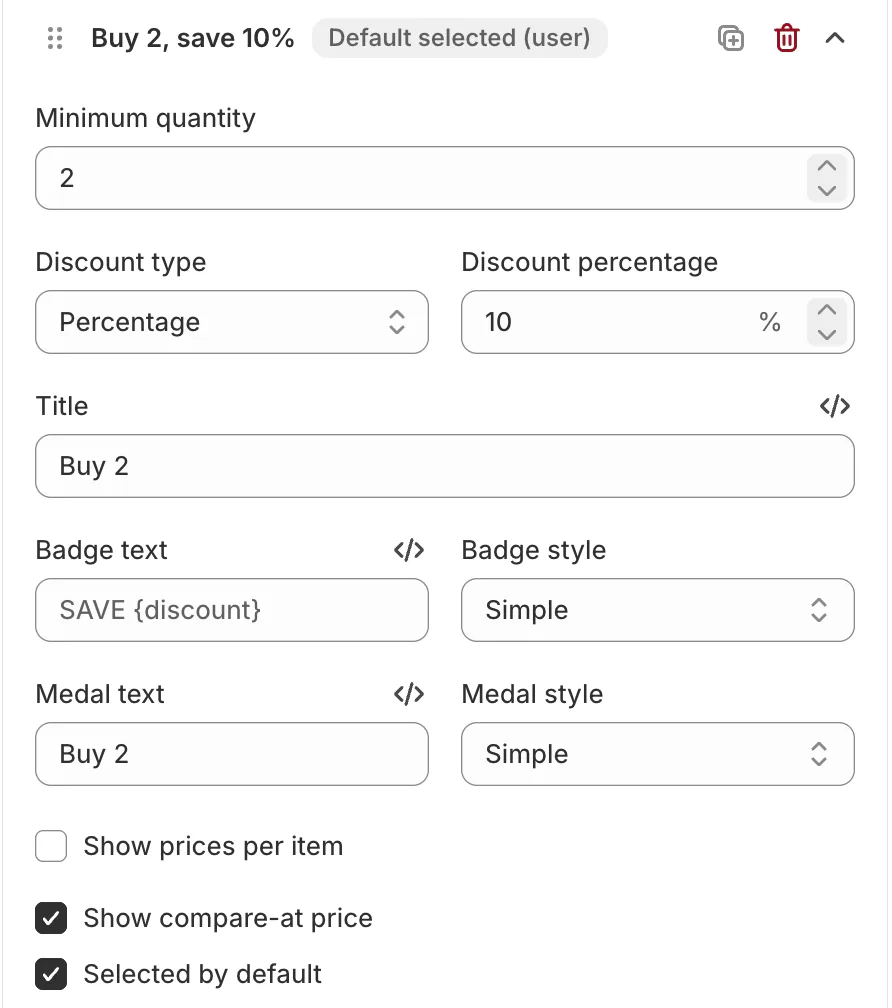
Sledge is a Shopify app whose Volume Discounts show quantity tiers on the product page itself, so a shopper sees Buy 2 at 10% off before adding one. Each tier is a minimum quantity and a percentage or amount off. Tick "Selected by default" on the tier you want shoppers to start from, and the page opens with it chosen. A smaller card can point to the same offer on collection pages, the search page and the search drop-down.
Sledge creates the discount in Shopify, and it combines with other discounts where Shopify's rules allow. For a small extra above the button, Sledge's add-ons sit on the product page too. Both come with all four paid plans.
How do you upsell in the cart?
In the cart, the shopper has already decided, so one related step up is an easy yes. Shopify's free themes offer little here.
In Dawn's theme settings, open Cart and set "Type", how the cart opens, to "Drawer", so the whole cart slides open over the page. Dawn's drawer shows a collection only while the cart is empty. Neither Dawn's nor Horizon's drawer suggests products once something is in it. Horizon's Recommended products section can sit on the cart page, but it recommends for one product you pick, not for what is in the cart.
A free-shipping discount with a minimum purchase gives shoppers a reason to add one more. Pairing a pick with that goal is covered in the cross-sell strategies.
Add a row of picks to the cart drawer with Sledge
Sledge's cart drawer has a "Product recommendations" block, a row of picks beside the cart, on all four paid plans. It stays off until you switch it on. Make a row just for the drawer and give it a percentage or fixed discount, with the compare-at price shown. Or reuse a recommendation you already built, which keeps its own discount. Either discount applies only to items added from that row.
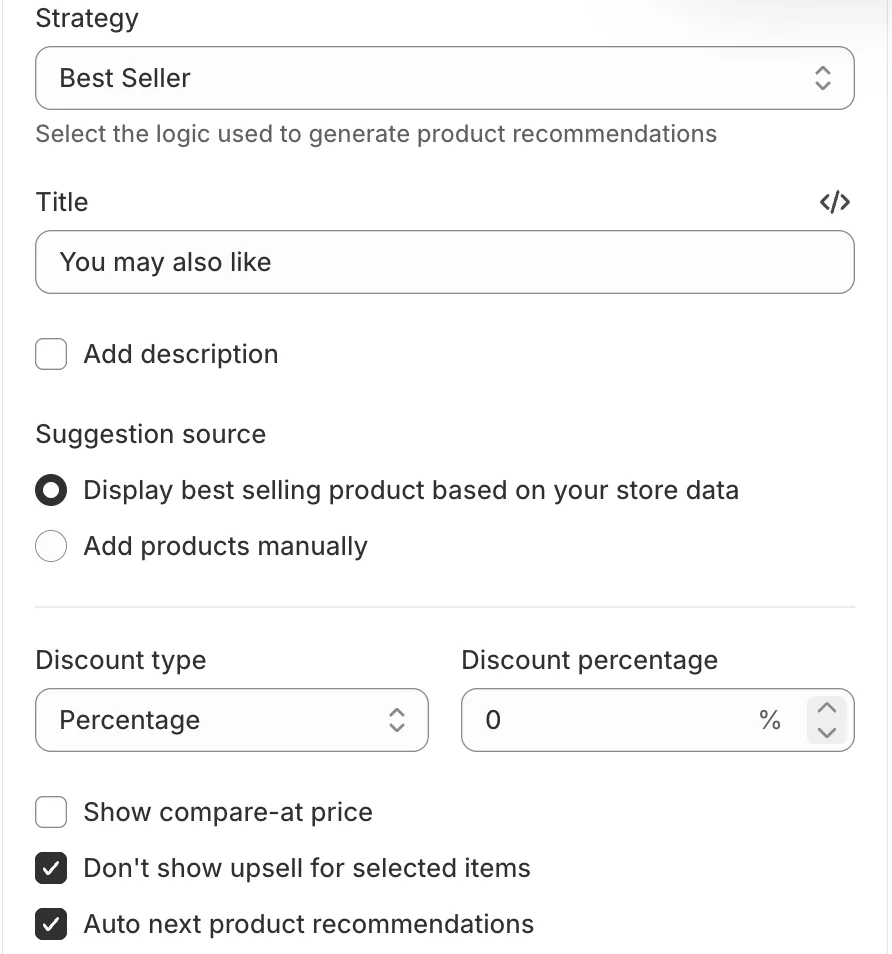
The progress bar in the same drawer counts toward free shipping, a discount or a gift. For the picks, Sledge's Frequently Bought type draws on your own orders and shows related products until orders come in. Here is how to turn order history into offers.
How do you upsell after the order?
Inside checkout, upsell apps need Shopify Plus, but after payment they work from the Basic plan up. Shopify's plan table puts the information, shipping and payment steps behind Plus. An app can show an offer on the thank-you page, and on the post-purchase page that opens between payment and the order confirmation. Only one post-purchase app runs at a time. Some post-purchase apps follow a no with a cheaper second offer, a downsell. Below Plus, Shopify's free Checkout Blocks app adds only content blocks, and only on the thank-you and order status pages.
For the checkbox kind of offer, see what an order bump is.
Add one offer to the thank-you page with Sledge
Sledge's Thank You Page offer shows your picks on the thank-you page, on all four paid plans. The shopper taps "Buy Now" and buys the pick through checkout, as its own order. You add Sledge's block to the thank-you page once, in Shopify's checkout editor.
What to offer and how deep to discount are in the post-purchase upsell playbook, and the setup in how to add a thank-you page upsell. Selling to the same shoppers again later is a separate job: how to get repeat customers.
Which upsells work on Shopify without an app?
Shopify alone does the most on the product page and the least in the cart.
| Moment | Shopify alone | With Sledge |
|---|---|---|
| Product page, bigger choice | A unit price on each size; a multipack through Shopify Bundles; buy-more discounts, one tier each, first seen in the cart | Volume Discounts: tiers shown beside the button, one selected by default; a smaller card on collections and search |
| Product page, small extra | Complementary products, picked in Search & Discovery | Add-ons; Frequently Bought from your own orders |
| Cart | Dawn's and Horizon's drawers suggest nothing once the cart has items; a free-shipping minimum | A recommendations row in the cart drawer, with an optional discount; a progress bar to free shipping, a discount or a gift |
| After payment | Below Plus, content blocks only, through Checkout Blocks; an offer needs an app, and checkout steps need Plus | Thank You Page offer, bought through checkout as its own order |
Sledge has no offer inside checkout, its add-ons sit on the product page only, and its trade-up is quantity tiers rather than a swap to the bigger size.
To compare upsell apps, see which one does what.
How do you know an upsell isn't costing you the sale?
Read two numbers for each placement: how many shoppers take the offer, and whether the page's sales held. Add one placement at a time, so you can tell which one moved them.
In Sledge, each offer in the list shows its visitors, click rate, total revenue and "Extra rev.", the revenue the offer added. An offer can also run as an A/B test. On a paid plan, Growth Intelligence can suggest a volume discount, with your top sellers as the products to set it on. The suggestion's button opens the form filled in, for you to check and save.
FAQ
Questions, answered
-

14-day free trial
Explore Sledge on your store before you decide to commit.
-

No credit card required
Start improving your store with no upfront commitment.
-

Setup in minutes
Get Sledge running without a lengthy setup process.
-

Built to grow sales
Turn shopper behavior into actions that help you sell more.
How do you upsell a customer on Shopify?
Offer the bigger choice right after the shopper decides. On the product page, show the larger size's unit price or a multipack beside the buy button. In the cart, suggest one step up. After payment, offer one more item on the thank-you page. Keep each jump small, and never put an offer in front of the checkout button.
Can you add an upsell to Shopify checkout?
Not inside checkout itself unless you are on Shopify Plus: apps that change the information, shipping and payment steps are Plus-only. From the Basic plan up, an upsell app can still show its offer after payment, on the post-purchase page or the thank-you page. Sledge puts its offer on the thank-you page, never inside checkout.
Can you upsell on Shopify without an upsell app?
Partly. Shopify's unit price shows the bigger size's lower price per ounce, and its free Bundles app sells multipacks. An automatic discount with a minimum quantity helps too, but shoppers first see it in the cart. Dawn's and Horizon's cart drawers suggest nothing once the cart has items, so picks that follow what is in the cart need an app.
How big should an upsell be?
Small enough to feel like the same decision. Shopify's own blog suggests capping an upsell at roughly a quarter of the cart's value. For quantity tiers, set the first one a single step above what most shoppers already buy, two instead of one, and keep the deepest price for the biggest pack.
When should you try to upsell services?
After the customer has chosen the item the service improves, and before they pay: engraving, gift wrap, setup or a longer warranty, beside the buy button or in the cart. On Shopify a service is sold as a product like any other, so it takes the same spots and the same small price step.
The bigger order was one tier away.
Try Sledge free for 14 days and put quantity tiers on the product page, picks in the cart drawer and one more offer on the thank-you page. Growth Intelligence turns on when you pick a paid plan. It can flag when many of your orders already hold more than one item but no offer runs yet, and it totals what its fixes could add in one dollar figure, labeled "Est. potential".

