
To cancel an order on Shopify, open Orders, click the order, then click More actions and Cancel order. Pick how the money goes back, whether to restock and whether to email the customer, then confirm. Shopify won't cancel a paid order once part of it is fulfilled: cancel the fulfillment first, or refund the order if the parcel has shipped.
Say a shopper pays $60 for a jacket, then emails ten minutes later: wrong size, please cancel. You cancel it and refund the full amount. At Shopify Payments' US Basic rate, the $2.04 card fee stays spent, and their bank can take up to 10 business days to show the money.
How do you cancel an order on Shopify?
On a paid order, Cancel order refunds the full amount, puts the items back in stock and emails the customer, unless you change those choices.
- In your Shopify admin, go to Orders and click the order.
- Click More actions, then Cancel order.
- Under "Refund payments", choose how the money goes back.
- Pick a "Reason for cancellation", and add a "Staff note" for your team if you like.
- Untick "Restock inventory" or "Send a notification to the customer" if you need to, then click Cancel order.
Shopify's Help Center lists these steps, read November 12, 2026.
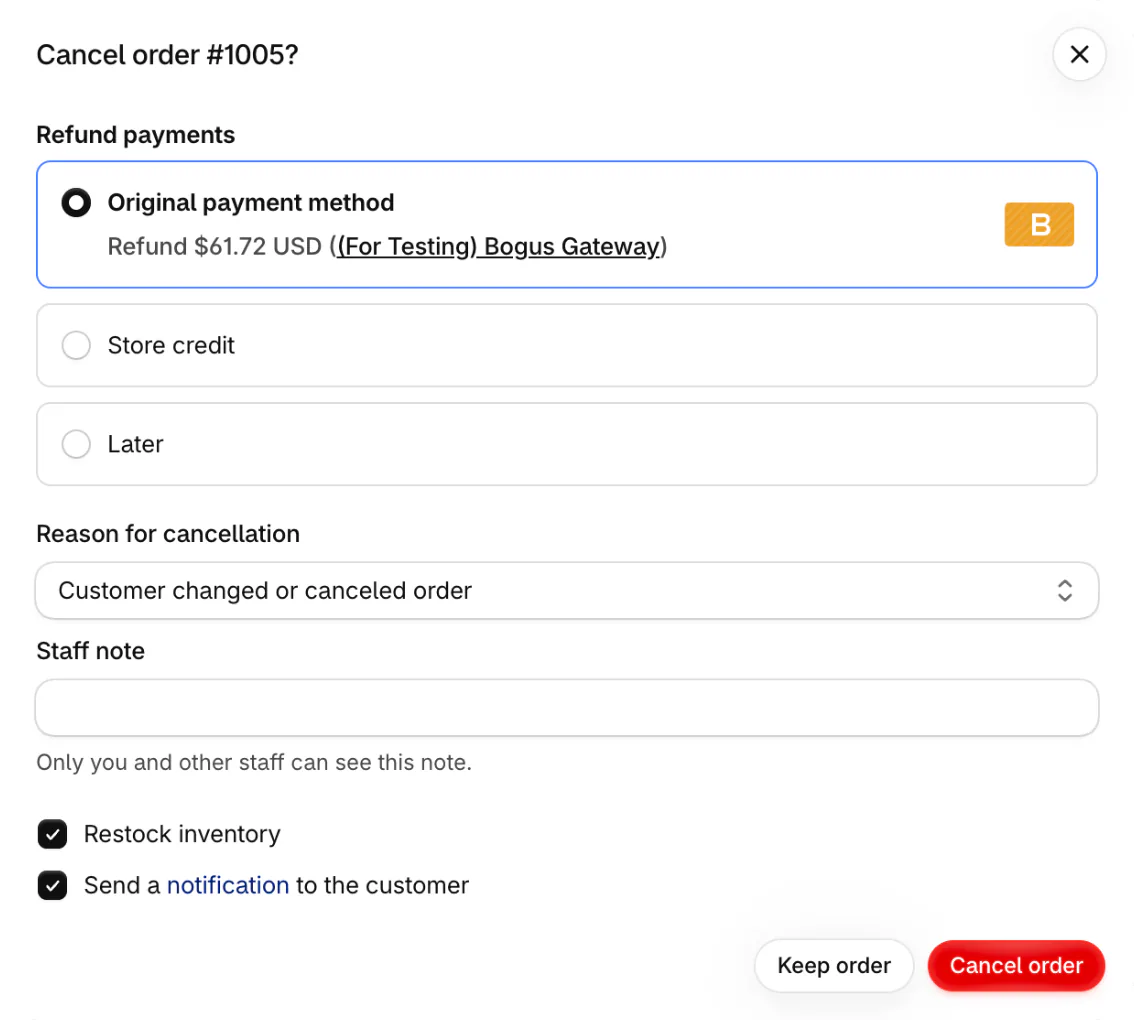
"Original payment method", the default, sends the full amount back the way the shopper paid. "Store credit" refunds the same amount as credit to spend in your store, with an expiry drop-down set to "Without expiration" until you change it. Picking store credit needs the "Refund to store credit" staff permission.
To cancel without a refund for now, pick "Later". It suits a partial refund, a split between card and store credit, or an order you want to look into first. Shopify's Help Center tells you to keep track of those orders to avoid chargebacks.
Leave Restock inventory ticked to put the items back on sale, and untick it for an item you can't resell, such as a damaged one. Untick the customer email only if you've already written to them, for example with a cancel reply you can copy.
Afterwards, the payment reads Refunded, or Voided if the card was only held and never charged. The order's Timeline records what went back in stock and what was refunded. If you bought a shipping label, you can void the label. Next time an item runs out, a backorder can keep the order open until new stock arrives, so there's nothing to cancel.
When can't you cancel a Shopify order?
Once part of a paid order is fulfilled, Shopify won't cancel it. If Cancel order isn't under More actions, that order can't be canceled as it stands.
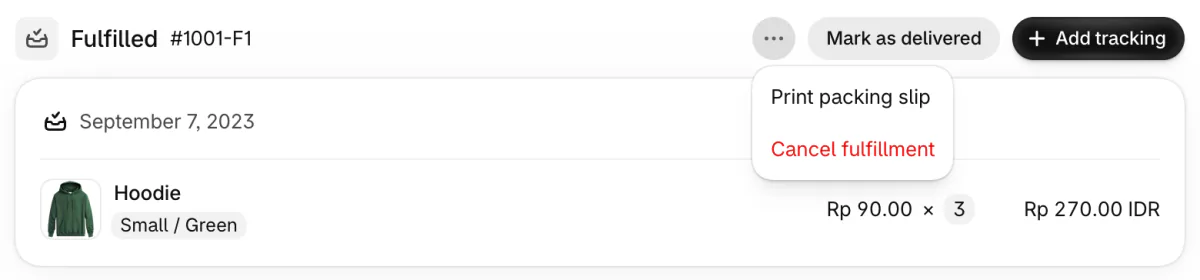
If nothing has left your shelf yet, void any label you bought. Then open the menu on the order's Fulfilled card and click Cancel fulfillment. The order goes back to Unfulfilled, and you can cancel it.
If the parcel has shipped, refund the order instead, after you create a return for anything coming back.
An order at a fulfillment service may need canceling there first. Shopify's bulk action "Cancel fulfillment requests" emails the service for you, and it fails when the service is too late to stop. Canceling in Shopify doesn't halt a shipment the service has already started.
Shopify can also block a cancel on an order waiting on scheduled payments, on some orders created by apps, and on Facebook and Instagram checkout orders edited in Commerce Manager. Staff without the Orders permission can't cancel at all. The order's Timeline may explain why the option is missing.
How do you cancel several orders at once?
In Orders, tick up to 250 orders, click the three-dot menu, then "Cancel orders".
Bulk cancel can skip the refund question and refund every selected order at once, even one you already refunded. Shopify's Help Center warns that this can send the same refund twice.
So cancel an order you've already refunded on its own, and pick Later. Do the same after you lose a chargeback: the disputed amount already left your payout, and Later closes the order without a second refund. Shopify still shows a message about refunding the original payment, but no more money goes out.
How do you refund an order on Shopify without canceling it?
To refund without canceling, open the order and click Refund, which sends money back and leaves the order standing. Refund when the shopper keeps part of it, when only shipping goes back, or when the parcel has already gone.
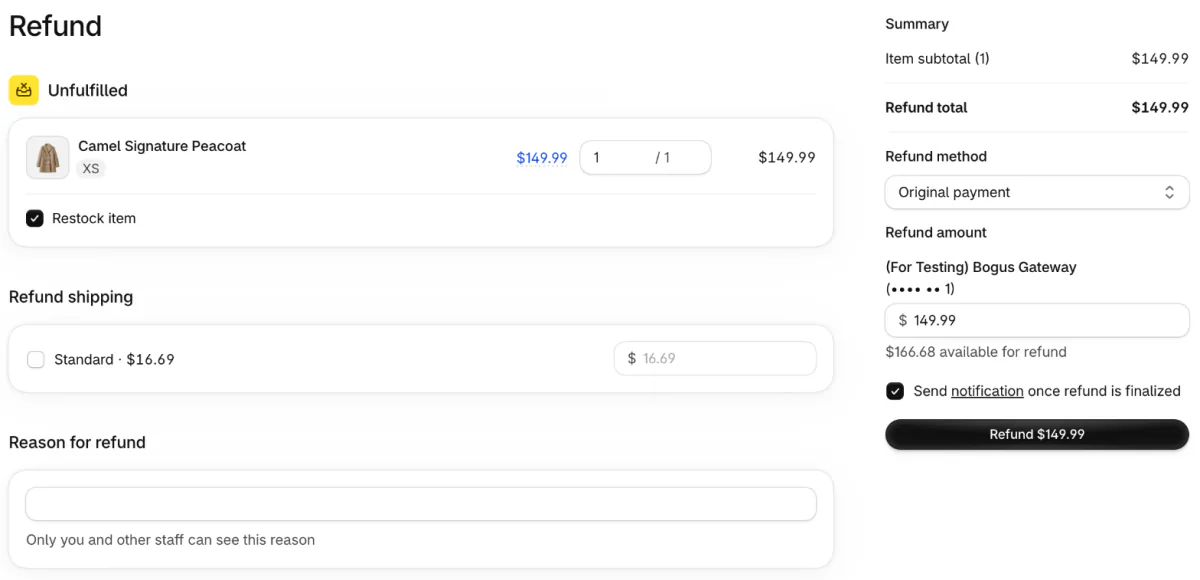
Enter how many of each item you're refunding, and 0 for the rest. Once you set a quantity, a "Restock item" box appears, ticked. It puts the item back in stock if Shopify tracks its inventory, so untick it when nothing is coming back. Under "Refund shipping", tick the shipping rate the shopper paid. Its full amount fills in, and you can lower it. "Reason for refund" is a note the shopper never sees.
In the Summary, the "Refund method" sends the money to the original payment, to store credit or to both. The "Refund amount" can be lowered, for example to keep a restocking fee. Leave "Send notification once refund is finalized" ticked to email the shopper, unless you've written to them already. Then click the button that names the amount, such as "Refund $149.99". On your phone, open the order in the Shopify app, tap the menu icon, then Refund.
You can refund part of an order more than once, up to its original total, and it then reads Partially refunded. A refunded item that hadn't shipped leaves the order and can't be fulfilled. When items are coming back, create the return before you click Refund. A refunded item can't get a return, so its reason never reaches Shopify's returns-by-reason reports.
A refund can't be canceled or reversed once you start it, Shopify says. If you refunded by mistake, send a draft order's invoice for the amount so the shopper can pay again. Getting a refund on your Shopify bill is a separate job.
What does canceling or refunding an order cost you?
On Shopify Payments, the card fee on a sale stays spent after a cancel or a refund, shipped or not. Say that $60 jacket is refunded in full at the US Basic plan's standard online card rate of 2.9% + 30¢: $1.74 plus $0.30 makes $2.04 you don't get back.
With another payment provider, Shopify's own transaction fee stays spent where Shopify Payments is offered in your country. Where it isn't, Shopify credits that fee back in proportion to what you refund, for refunds made in your admin.
The refund comes out of your next payout. If refunds push your balance past Shopify's negative balance limit, new ones wait as "Refund pending" until the balance clears, then go out oldest first. Holds, reserves and card rates are in our Shopify Payments guide.
Cancel, archive or delete: which one do you need?
Cancel stops an order, archive files it away, and delete erases it from your admin, but only a few kinds of order can be deleted.
| Action | What happens | Use it for |
|---|---|---|
| Cancel | Stops the order. Refunds now or later, and restocks unless you untick it | A change of mind, an item you can't supply, an order that looks like fraud |
| Archive | Moves the order to the Closed view. Money and stock stay as they are | An order you're done with. By default, Shopify archives paid and fulfilled orders, and fully refunded ones, on its own |
| Delete | Removes the order from your admin and your reports | Test orders, orders paid by a manual payment method, drafts marked as paid and imported orders, once canceled or archived |
Automatic archiving is the "Automatically archive the order" box under Settings, then General, in the Order processing section. To archive by hand, open the order and click More actions, then Archive. An order paid with a gift card can be archived but never deleted.
To clear a test order, cancel it and void any unused label. Then open it, click Delete order, and click Delete order again to confirm.
Can shoppers cancel their own Shopify order?
Shoppers can ask to cancel once you turn requests on, and you approve or decline each one. A request changes nothing on the order by itself.
Go to Settings, then Customer accounts. If you see an "Order actions" section, click Manage and switch on Cancel. If you don't, switch on "Self-serve returns and cancellations" and pick "Cancel requests only" or "Return and cancel requests".
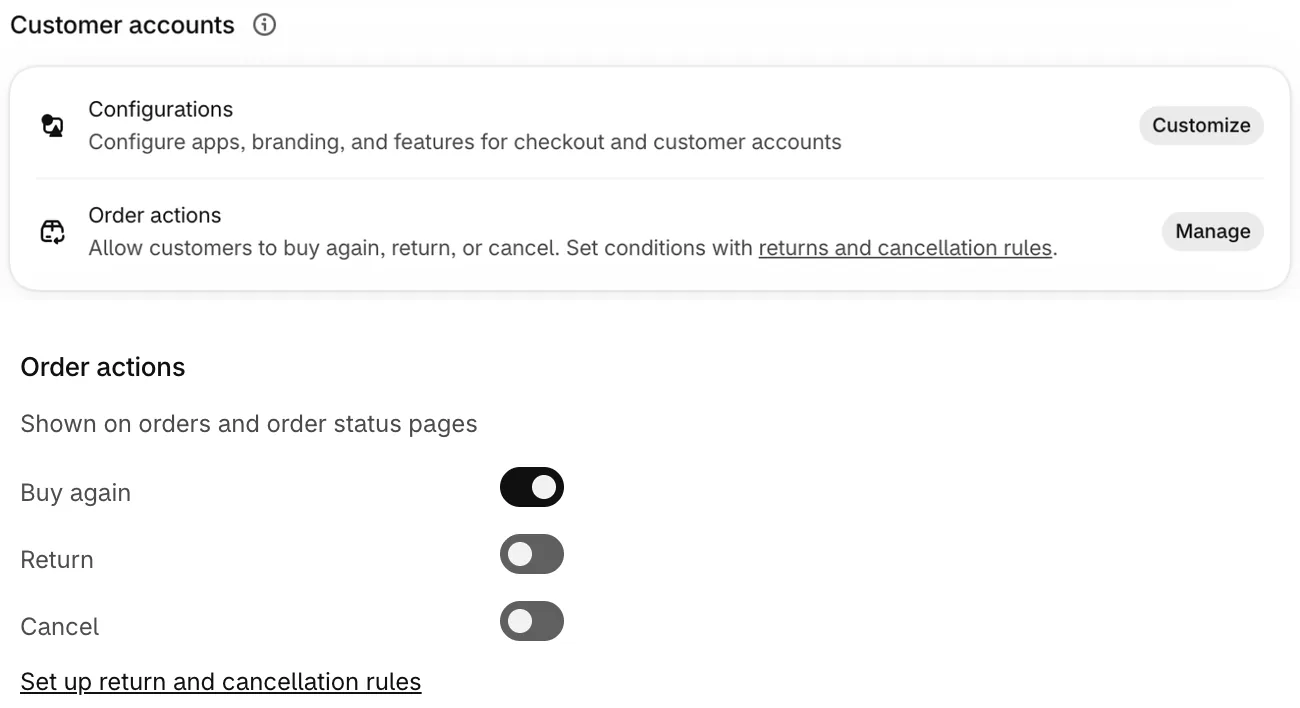
Shoppers ask from their order status page, signed in to the new customer accounts with an emailed 6-digit code instead of a password. Older customer accounts show no option. They can ask to cancel only items that haven't shipped. In the Shop app, a shopper taps "Manage your order" to reach the same page.
Shopify's Help Center says to find requests with the "Customer request" filter in Orders. Each one shows as a banner on its order: "Remove items" opens the refund page, and "Manage request" lets you decline, which emails the shopper. A shopper who asks Shopify itself for a refund is told to contact you.
If you sell to EU consumers, the EU has required a clearly visible withdrawal button or link since June 19, 2026. The shopper confirms in a second step, then gets a confirmation from your store, such as an email. Shopify's Help Center says its return and cancellation rules can help you meet it. Write the matching policy with our refund policy template. This isn't legal advice.
FAQ
Questions, answered
-

14-day free trial
Explore Sledge on your store before you decide to commit.
-

No credit card required
Start improving your store with no upfront commitment.
-

Setup in minutes
Get Sledge running without a lengthy setup process.
-

Built to grow sales
Turn shopper behavior into actions that help you sell more.
Does canceling a Shopify order refund the customer automatically?
Yes, by default. The cancel dialog refunds the full amount to the original payment method unless you pick Store credit or Later. With Later, nothing goes back until you click Refund on the order yourself, so keep a list of canceled orders still owed money. An order whose card was only held, never charged, shows as Voided instead.
How long does a Shopify refund take?
Shopify Payments takes the refund out of your next payout and marks it Pending, for 2 business days at most if your balance isn't negative. Depending on their bank, the shopper can wait up to 10 business days to see the money. For a Visa or Mastercard refund, the order's timeline lists an Acquirer Reference Number their bank can trace.
Can you cancel one item in a Shopify order?
Not with Cancel order: its dialog has no item choice and stops the whole order. Refund just that item, entering 1 for it and 0 for the rest on the refund page. An unshipped item you refund leaves the order and can't be fulfilled. Before anything ships, click Edit on the order to remove a product, then refund the difference.
Can you undo a refund on Shopify?
No. Shopify says you can't cancel or reverse a refund once you start it from the admin. If you refunded by mistake, create a draft order for the amount and send the shopper its invoice so they can pay again. Ask them first, since they'd be paying a second time.
Can you cancel a Shopify order after it ships?
Not once part of a paid order is fulfilled. If the parcel hasn't left, void any label you bought, cancel the fulfillment from the order's Fulfilled card, then cancel the order. If it has left, refund it, or create a return first and refund once the item is back.
Why does a canceled order still show on the shopper's bank statement?
Because their bank held the money when they paid. Shopify says that hold can stay on a bank statement for up to 30 days, even once you've canceled the order. Tell the shopper it's a temporary hold their bank releases, and forward the refund email if you refunded.
Orders sorted. Which searches still end in nothing?
Sledge doesn't cancel, refund or restock orders, so every step above stays in your Shopify admin. It's a Shopify app for search, filters, bundles and a cart drawer, free to try for 14 days. Growth Intelligence turns on when you pick a paid plan. It can flag searches that return nothing, and it adds its suggested fixes into one estimate in dollars, labeled "Est. potential".

