To remove Powered by Shopify, open Online Store in your Shopify admin, click the three-dot menu on your theme and choose Edit default theme content. Search powered, type one space in the Powered by Shopify box and click Save. Some themes also have a switch for it in the footer settings.
Your footer ends with a small line that credits Shopify. You open the theme editor to delete it and often find no setting with that name. The wording sits on a different screen.
Can you remove Powered by Shopify from your store?
Yes. It is a credit line your theme prints in the footer, and Shopify's Help Center has a page on removing it.
The line usually sits at the bottom of the page, by your copyright. A store in private mode can carry a second one on its password page.
Shopify's Terms of Service, updated October 20, 2026, say you may modify a theme from the Theme Store. They also say Shopify may add or change the footer in a theme that refers to Shopify. Look at your footer again after any theme update.
Two routes need no code. The third is usually a developer's job.
How do you remove it with Edit default theme content?
Search for the wording, type one space in its box and save. It is the route Shopify's Help lists first, and the one to try on any theme.
- Open Online Store in your Shopify admin, then click the three-dot menu on your theme.
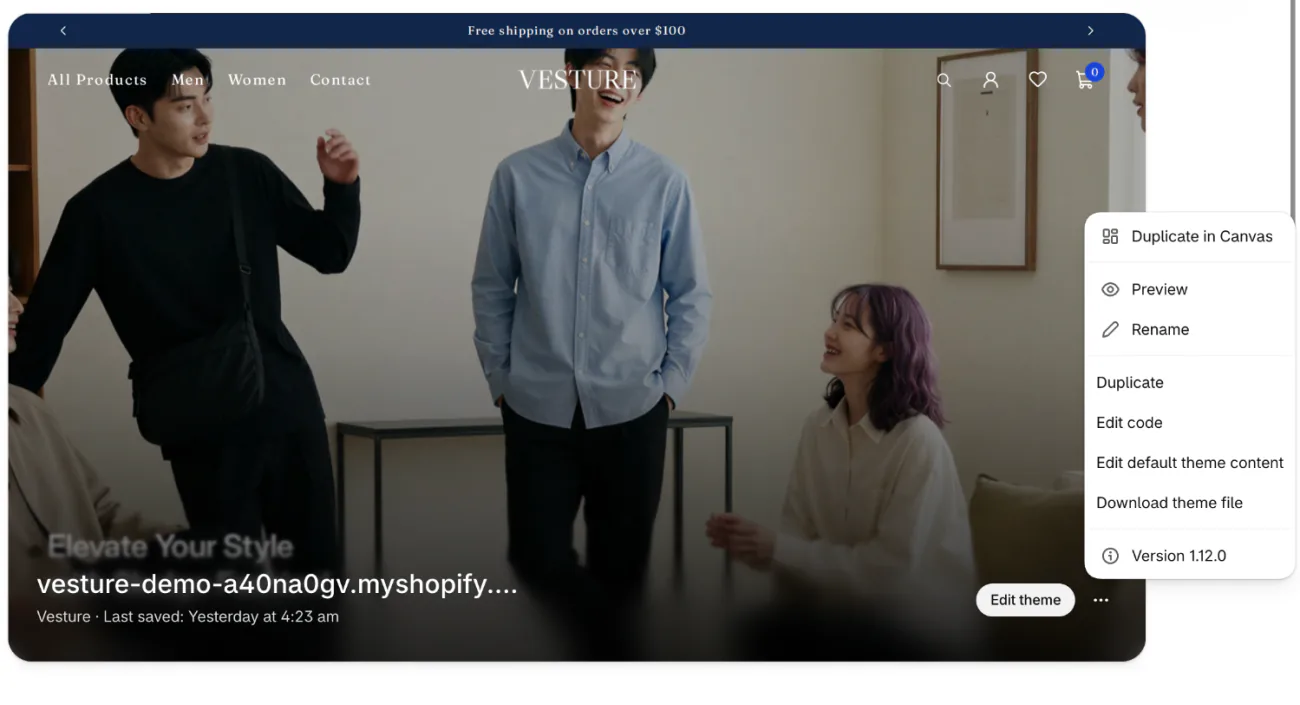
- Choose "Edit default theme content", which older guides call "Edit languages". The page that opens is titled Theme content, where a theme keeps the text it shows shoppers, such as button labels and the footer credit.
- Click the search icon at the right of the tabs and type powered. Shopify's Help calls this search box "Filter items".
- Among the results, find the box labeled "Powered by shopify", under the Checkout & system tab in a group called Links. Its faded text reads Powered by Shopify. Click in it and press the spacebar once.
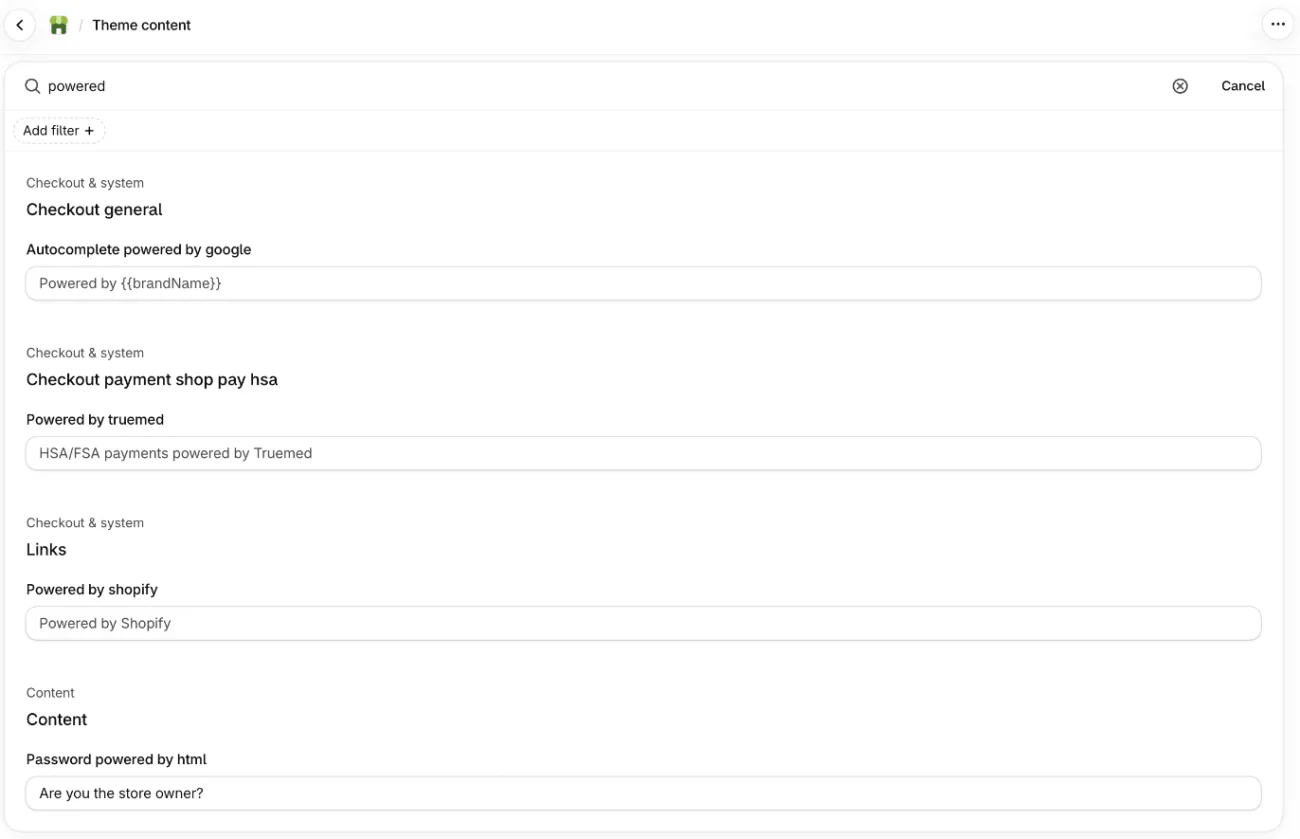
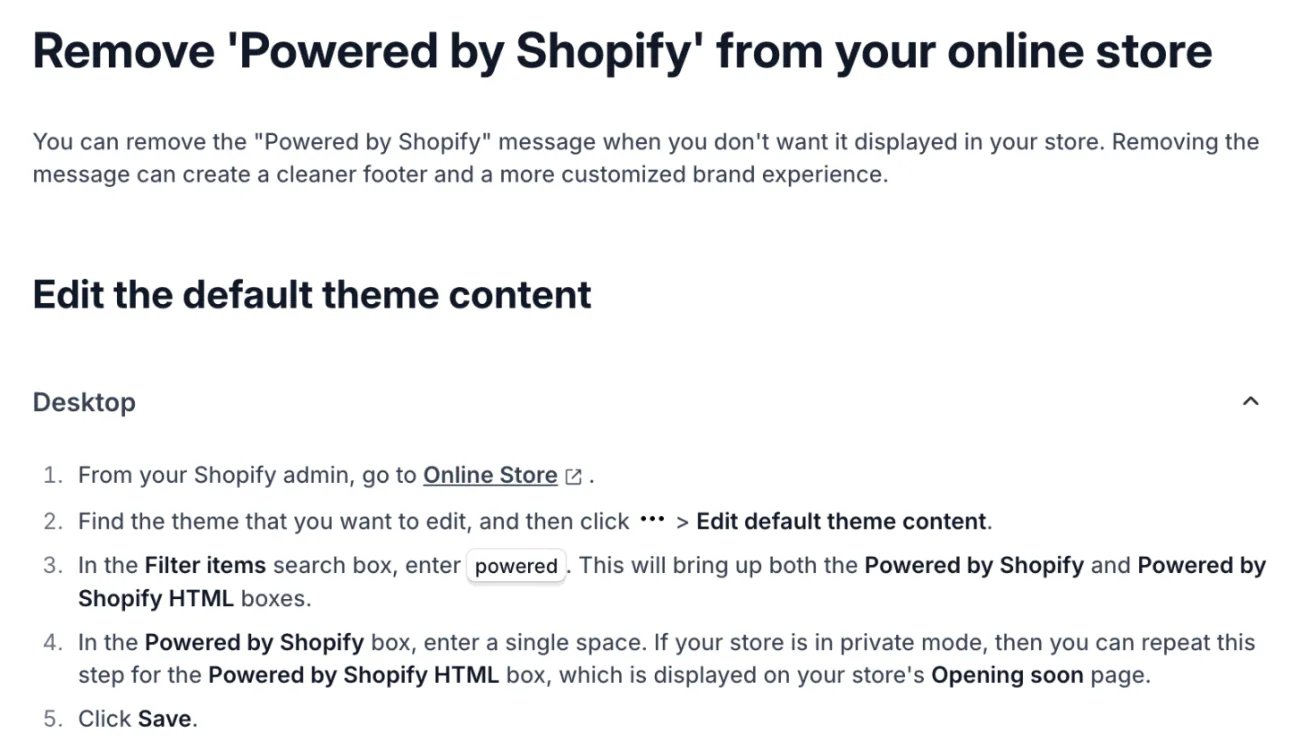
- Click Save, then open your store and scroll to the footer. If your store is in private mode, check the footer in the theme editor's preview.
On the Shopify app, Shopify's Help lists the same route. Tap the menu icon, then Online Store, then Manage all themes. Tap the three-dot menu on your theme and follow steps 2 to 4, tapping Save or the check mark at the end.
Steps checked in Shopify's Help Center on November 20, 2026.
The same page holds other wording your theme shows, such as button labels. 20 button lines for your store shows which words to try.
Can you turn off Powered by Shopify in the footer settings?
Some themes put a switch for the line in the footer settings, and turning it off hides the line. Not every theme has one.
- In Online Store, click "Edit theme" on your live theme, the button on its card.
- In the left list, open the footer part that holds the copyright line. The theme checked for this page calls it "Footer utilities".
- Turn off the switch named "Powered by Shopify", then click Save. The credit leaves the preview's footer line as soon as you turn the switch off.
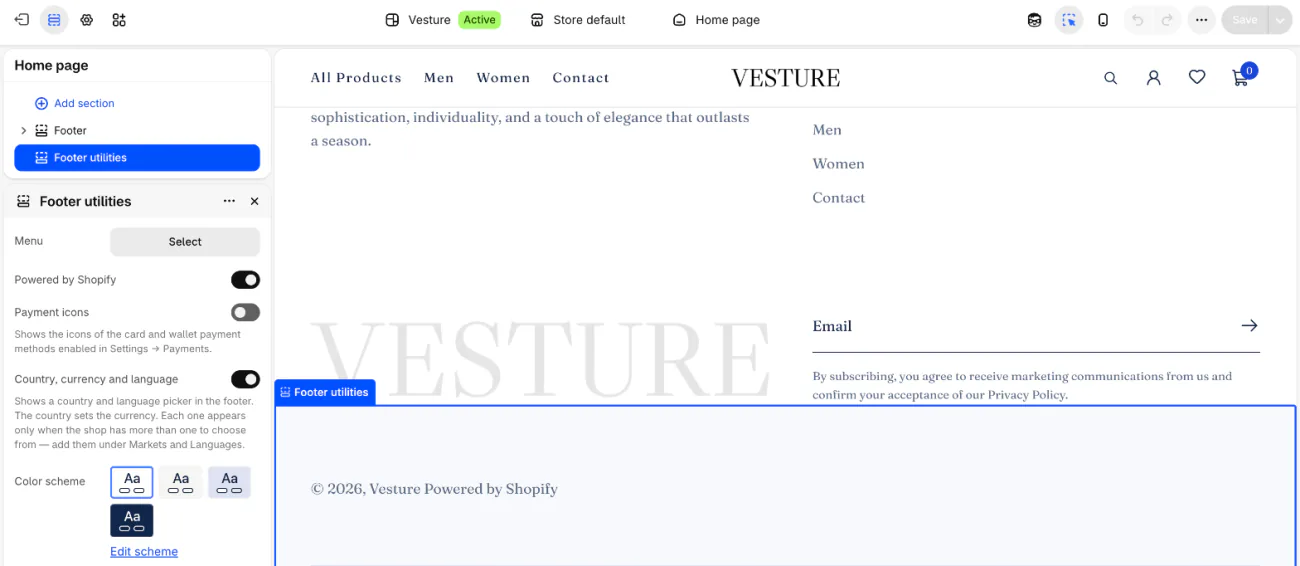
No switch there? Use the route above. The footer is one of the areas every page shares, so the change reaches the whole store. Ecommerce website design examples shows how those shared parts fit together.
How do you remove it from the password page?
A store in private mode can carry a second line, on its password page, in its own box. Shopify's Help names the box "Powered by Shopify HTML" and says it shows on the Opening soon page, the page shoppers see while your store is private.
Shopify's Help says to repeat the steps above for that box: search powered, type one space in it and click Save. Not every theme prints the credit on its password page, and labels differ by theme. On the theme checked for this page, the Password preview shows no credit line. The closest box there is labeled "Password powered by html", under the Content tab, and holds "Are you the store owner?", a prompt to keep. Clear only a box whose words credit Shopify.
To check your password page, open the page list at the top of the theme editor and choose Password. If the preview shows no Powered by Shopify line, there is nothing to remove there.
Why does Powered by Shopify still show after you remove it?
Check three places before you change anything else.
- Another language shows it when you changed only your default one. The Theme content page covers the default language only. For other languages, Shopify's Help points to the Translate & Adapt app, a file you upload or a compatible app.
- Private mode can show it on the password page, which can have its own box, as above.
- The theme itself may print it, and Shopify's Help says you might then need to change the theme, covered below.
The first two need no code. The third is the route below.
When do you need to change the theme itself?
Only when the line still shows after the steps above. Shopify's Help says to change the theme itself at that point, through "Edit code" in the same three-dot menu. That is usually a developer's job.
| Route | Works on | What you change | Code needed |
|---|---|---|---|
| Footer switch | Themes that have one | One setting in the footer | No |
| Edit default theme content | Themes that keep the credit in Theme content | One wording box, plus the password page's box where the theme has one | No |
| Edit code | A theme you own | The credit line in the footer itself | Yes: a developer, or Shopify Support, which might help on a free Shopify theme |
Editing the theme carries more risk than typing one space. Shopify's Help recommends duplicating your theme first, so you keep a backup copy, and Duplicate sits in the same menu as Edit default theme content.
On a trial of a paid theme, you can't change the theme itself until you buy it. When you update a theme, wording changes and theme editor settings carry over, Shopify's Help says. Edits to the theme carry over only if none conflicts with the update, and one conflict removes all of them from the updated copy. Shopify's Help says to edit the theme only when a Shopify app or the theme editor can't do the job, which is why the two routes above come first.
On a free Shopify theme, Shopify Support might help with this one edit. Shopify support shows how to reach a person on your plan.
FAQ
Questions, answered
-

14-day free trial
Explore Sledge on your store before you decide to commit.
-

No credit card required
Start improving your store with no upfront commitment.
-

Setup in minutes
Get Sledge running without a lengthy setup process.
-

Built to grow sales
Turn shopper behavior into actions that help you sell more.
Is it against Shopify's rules to remove Powered by Shopify?
Shopify's own Help Center has a page on removing it. Shopify's Terms of Service, updated October 20, 2026, say you may modify a theme from the Theme Store, and that Shopify may add or change the footer in a theme that refers to Shopify. Look at your footer again after any theme update.
Why does Powered by Shopify still show after I removed it?
Check three places. The Theme content page changes your default language only, so another language needs its own wording through Shopify's Translate & Adapt app. A store in private mode may have a second box for its password page. If the footer still shows it, Shopify's Help says the theme itself may need the edit.
Will Powered by Shopify come back after a theme update?
It should not, if you removed it with Edit default theme content or a theme editor setting. Shopify's Help says both are copied to an updated theme. Edits to the theme come along only if none conflicts with the update, and if one does, all are removed. Check the footer of any theme you switch to.
How do you remove Powered by Shopify on mobile?
Use the Shopify app on your phone. Shopify's Help lists the same route there: tap the menu icon, then Online Store under Sales channels, then Manage all themes. Tap the three-dot menu on your theme, choose Edit default theme content, search powered, type one space in the Powered by Shopify box and tap Save.
Does Sledge remove Powered by Shopify?
No. Sledge doesn't edit your theme's footer or its wording, so Powered by Shopify stays a theme job, done in Edit default theme content or a footer switch where the theme has one. Sledge adds search, filters, bundles and a cart drawer to the pages your shoppers browse.
A clean footer comes last. What do shoppers do before it?
Sledge doesn't edit your theme's footer or its wording, so Powered by Shopify stays a theme job. It adds search, filters, bundles and a cart drawer to the pages shoppers browse. Try it free for 14 days. Growth Intelligence turns on when you pick a paid plan, and its suggested fixes add up to one dollar figure, labeled Est. potential.