
The drawer may not be broken. First check whether Shopify's cart has the item and whether the drawer received the update. Check one theme setting first, then test every Add to cart button, then look for a second cart app.
You tap Add to cart on a collection page. The drawer slides open and the candle is not in it. You tap again, and the cart icon now says 2. A shopper who does that checks out with two candles and asks to send one back.
Why does the drawer open without the item you just added?
Shopify keeps your cart, the list of items a shopper has added. The drawer is a panel on the page that shows that list. It gets that list when the page loads, and it changes only when something tells it about a change.
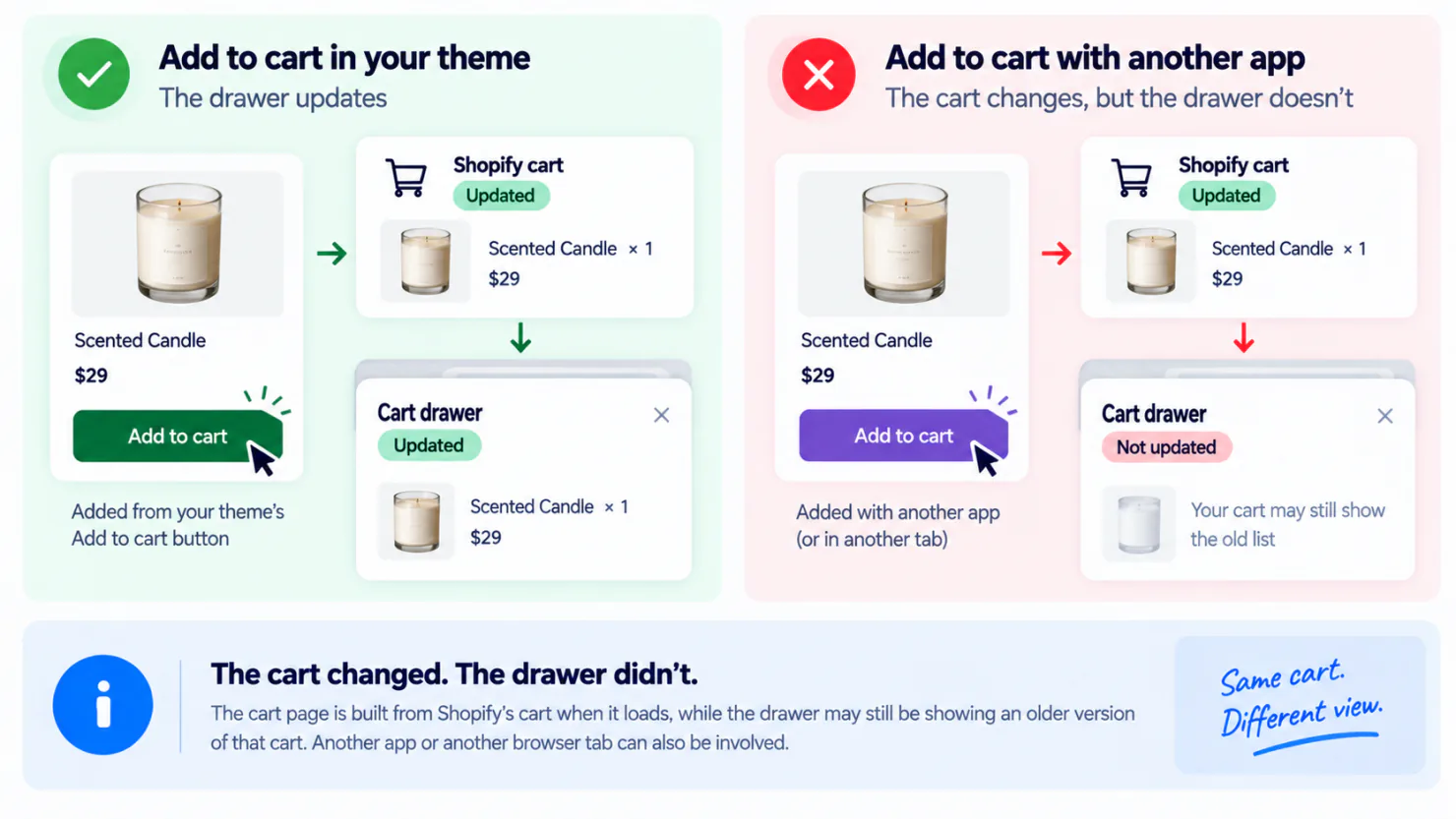
On Dawn and Horizon, two of Shopify's free themes, the theme's own button updates the cart icon count and the drawer together. So if the count went up and the drawer still shows the old list, usually something other than your theme's button added the item. In our Horizon testing, a page reached with the browser's Back button could also show a new count with an old list in the drawer.
The fault shows up three ways. The drawer opens empty. It opens without the item you just added. Or its subtotal does not match what you added or the cart page.
Your theme calls that panel a cart drawer, and apps also call it a slide cart or a cart slider. The glossary entry on cart drawers covers the basics. For this fault, what matters is which button added the item and which drawer opened.
What can keep the drawer from updating
- A button from another app, such as a bundle, upsell or page builder section, adds the item without telling your drawer.
- Your theme's drawer and a cart app's drawer are both switched on.
- A cart app loads after the page, so an early tap opens your theme's cart instead.
- An earlier edit to your theme, made by a developer or an app, changed how the button and the drawer work together.
One cart app's own help page warns about the same early tap, so test again once the page has fully loaded. If every page feels slow, that is a separate check: whether your apps are slowing the store down.
Is your cart even set to open as a drawer?
Start with the check that costs nothing. From your admin, open Online Store, click Edit theme, click the Theme settings icon (the gear), then click Cart. The first setting there is called Type on recent free themes, and Cart type on older versions and in Shopify's help pages.
On Dawn it offers three choices. Drawer slides the cart over the page. Page sends the shopper to the cart page. Popup notification opens a small box with the added item and buttons to view the cart or check out, and it stays until the shopper closes it. A new Dawn store starts on Popup notification, so no drawer opens until you pick Drawer.
Horizon offers only Page and Drawer, and a new Horizon store is already set to Drawer. The drawer still stays shut after a shopper adds an item until you tick "Add to cart" auto-opens drawer, a box in the same Cart settings that starts unticked.
If a cart app shows your cart, follow that app's setup guide instead. Some cart apps ask for Drawer, and others ask for Page so your theme's drawer cannot open instead of theirs.
On Dawn, Drawer also lets you pick a collection to show while the cart is empty. If an empty drawer shows products, they can come from that setting, so check it before you look for a fault. Horizon has no such option.
On Dawn and Horizon, the Cart settings decide how the cart opens and little else. None of them adds a free shipping progress bar, a countdown or an offer, which is the reason cart apps exist. Adding those is the next job on Dawn and on Horizon.
Which Add to cart button did you actually test?
Your store has several, and a drawer can update from one and miss another. Test them one at a time.
Add the same item four ways
- From the Add to cart button on the product page.
- From the quick add on a collection card, the small button that adds without opening the product. On Dawn it shows only after you set Quick add in the collection page's product grid settings, and a product with options opens a small window to choose them first.
- From an add button inside your search results.
- From any add button another app put on your pages, such as a bundle, an upsell or a page builder section.
Check three things each time. Does a drawer open? Is it the same drawer as last time? Is the item in it?
A drawer that looks different points to a second cart app. A drawer that does not open at all has other causes too: Horizon's auto-open box may be unticked, or the button belongs to another app. The quick add is an easy button to forget, so do not skip it.
Before you pay for a cart drawer app, check that its drawer opens from your quick add during the free plan or trial. Some cart apps miss certain buttons until you set them up, and the cart drawer app comparison covers the main apps. A wishlist page is worth a tap too, because its Add to cart button is one more a drawer can miss.
How do you find which app is involved?
Change one thing at a time, and test again from a collection page after every change. Work outside your busiest hours.
Start with any cart drawer app, and with any app that puts its own add button on your pages. Then check what you installed or updated most recently, newest first.
Switching an app off takes two steps. Turn the cart off inside the app, if it has that setting. Then switch the app off under App embeds, the list of switches in the theme editor that load each app on your store. Features the app adds to your storefront stop loading while the switch is off. That can remove a drawer, popup, or another app feature from the storefront, so test the cart after each change.
If the fault stays with every app switched off, add a fresh copy of your theme from the Theme Store and test there. Shopify's theme troubleshooting guide gives the same step. That copy shows whether earlier edits to your theme are part of the fault.
If the other tests do not identify the problem, uninstalling one app can be a last-resort test. Before uninstalling, export any data the app lets you export and record its important settings. Shopify warns that uninstalling some apps can delete app data, so do not use uninstalling as a casual first test. If the fault goes away, that app is part of it. It may be the app that adds items rather than the one that shows a cart, so tell its support team what you found, as Shopify's guide advises.
What does an out-of-date drawer cost you?
The cost shows up in what shoppers do next.
When the second candle comes back, you refund it, and depending on your return policy you may pay the shipping both ways.
A free shipping progress bar that reads an old cart is harder to notice. It tells a shopper who has already spent enough that she still needs to spend more, and she leaves to think about it.
Then there is the customer complaint you cannot solve, because you always test from a product page and it always works there.
Which drawer should your store keep?
Choose one drawer on purpose, and turn the cart off in every other app. The table shows three options, and only the third needs a paid developer.
| Feature | Your theme's drawer | One cart drawer app | A developer connects your app's drawer to every button |
|---|---|---|---|
| What you get | The items, a subtotal and a checkout button. Horizon also shows a discount code field and express checkout buttons. | One drawer, plus a progress bar, a countdown and an offer inside it | One drawer that updates from every add button on your theme |
| What it costs | Nothing | Usually a monthly plan, and some apps have a free plan for small stores | A few hours of a developer's time now. A theme update keeps that work unless it clashes with the new version, so check after each update. |
| Opens from quick add | On Dawn, once Quick add is turned on. On Horizon, once "Add to cart" auto-opens drawer is ticked. | Test it during the free plan or trial | Yes, that is the job |
| What can go wrong | Another app's button can still skip it, and it does not suggest anything to add once the cart has items | Two drawers at once, if your theme's drawer stays on | The work sits inside your theme, so the next person who edits your theme has to know the work is there |
The drawer in Dawn or Horizon is free. It cannot show a progress bar, a countdown or an offer, and if enough shoppers who open it already go on to buy, that is a fair trade.
An app can show all three. It fixes this fault only if its drawer also opens from every Add to cart button on your store, including the quick add on a collection card.
Sledge is a Shopify cart drawer app that hides your theme's drawer and shows its own. The drawer is off after install. Once you switch it on, it opens whenever a shopper adds an item and stays on the page. It does not hide other cart apps, so turn the cart off in any other cart app you keep. The drawer comes with the Pro plan, $29.99 a month, the same plan as search, filters and collections, with a 14-day free trial. See what you can put inside it.
FAQ
Questions, answered
-

14-day free trial
Explore Sledge on your store before you decide to commit.
-

No credit card required
Start improving your store with no upfront commitment.
-

Setup in minutes
Get Sledge running without a lengthy setup process.
-

Built to grow sales
Turn shopper behavior into actions that help you sell more.
Why does my cart drawer show the old cart until I refresh?
The drawer may still have the list from before your last tap on Add to cart, because it did not receive the latest update. Another app's button can add the item without telling the drawer. Or two drawers are on, and the one you see is not the one that was updated. A refresh reloads the page from Shopify's cart, so everything matches until the next tap on Add to cart.
My cart drawer is empty but the cart page shows my items. Why?
Because the cart page is built from Shopify's cart when it loads, while the drawer may still be showing an older version of that cart. Another app or button may have changed the cart without updating the drawer.
Why did my cart drawer stop working after a theme update?
Your theme editor settings carry over to the updated theme, so the Type setting usually survives. If a developer or an app edited your theme to connect an app to your drawer, those edits carry over only if they do not clash with the new version. The theme card tells you whether they did. Check the Type setting and those edits before you start removing apps.
My drawer works in the theme preview but not on my live store.
The theme editor can be open on a theme your shoppers do not see yet. The Type setting and the App embeds switches are both saved separately for each theme. Compare both between that theme and your live one.
Can two cart apps run at the same time?
They can both be installed and switched on, and that is how a store ends up with two drawers. Both can open at once, one can cover the other, or one can show an old list of items. Keep one drawer switched on, and turn the cart off in the other app.
Why is the drawer not updating when I remove an item?
Removing an item inside your theme's own drawer should update that drawer. If the item stays on screen, the drawer may not have received the latest cart update. Another app or another browser tab can also be involved.
Why is my free shipping bar stuck at the old amount?
The bar works out how far the shopper is from free shipping using the cart it last received. If that list is old, the amount is wrong. A shopper who has already spent enough is told she still needs to spend more. If the bar sits inside the one drawer you kept, it shows the right amount once that drawer updates. A bar from a separate app needs its own check.
One customer says the drawer is broken and it works for me. Now what?
Ask what they tapped and where. Many of these faults affect only one button, so the quick add on a collection card can fail while the product page button works. A tab left open all afternoon can show an old cart until it is refreshed. On Horizon, a page reached with the browser's Back button can show the drawer as it looked when the shopper left that page. Repeat their steps before you change anything.
One drawer for every Add to cart button.
Start with a 14-day free trial. Once you switch Sledge's drawer on, it hides your theme's drawer and opens from any Add to cart button that keeps the shopper on the page, including the quick add on a collection card. Turn the cart off in any other cart app you keep. On Pro at $29.99 a month, Growth Intelligence ranks the moves worth making each week, each with a dollar estimate, and names a cart move when your orders point to one.

