
A Contact Us page tells a shopper how to reach you, when you'll reply and what to try first. Pick one of the seven Contact Us page examples below, swap the brackets for your own details, and paste it into your contact page in Shopify, where your words sit above the built-in form.
Your contact page shows a heading and four empty boxes. A shopper types "Where is it?" and leaves out the order number. Your first reply asks which order, and the answer arrives the next day.
What should a Contact Us page include?
A Contact Us page should answer the common question before the shopper types it, then say how and when you'll reply. Shopify's Help Center suggests three things for the text above the form: a short message such as "We'll get back to you as soon as we can", your address with a photo of your shop if you have one, and your phone number if you take calls.
Put the parts in this order, top to bottom:
- Answers first. Link your tracking help and your returns page, so a shopper can settle an order question without writing.
- One reply promise. Name a time you can keep, such as one business day. Our customer service guide covers that promise and Shopify Inbox, Shopify's free chat app.
- What to send. Ask for the order number, and a photo if something arrived broken.
- Other ways in. Give an email address, and a phone number only if someone answers it.
- Your address. Add it if shoppers can visit or collect.
Some countries require a store to show business contact details, so check the rules where you sell. Shopify's "Contact information" policy, under Settings, then Policies, can fill in your address, phone and email from your store settings. Those details are public, so Shopify suggests a business address or PO box if you work from home, though some legal notices need a street address.
What are 7 Contact Us page examples you can copy?
Seven Contact Us page templates follow, one for each kind of store. Replace each highlighted [bracket] with your own detail.
| Sample | Use it if your store |
|---|---|
| 1. Order help first | Hears mostly about orders on their way |
| 2. Returns and sizing | Sells sizes and swaps a lot of them |
| 3. The one-person shop | Is run by you alone |
| 4. Made to order | Makes custom pieces |
| 5. Visit or pick up | Has a shop, studio or pickup counter |
| 6. Three addresses | Also sells wholesale or hears from the press |
| 7. Ships abroad | Answers shoppers in other time zones |
1. Order help first
Written for an imaginary candle shop.
Contact us
Most answers are one click away. Where's your order? [Open the tracking link in your shipping email.] Want to send something back? [Start a return here.] Still need us? Write below with your order number, and [Name] replies within [one business day], [Monday to Friday]. Or email [your store email].
Goes with: a returns page a shopper can finish alone. The refund policy template gives you its wording.
2. Returns and sizing
Written for an imaginary sneaker store.
Need a different size?
You can swap sizes within [30 days]. [Start an exchange here] and pick the new size. Unsure which size fits? Our [size chart] gives [foot length in inches and centimeters]. For anything else, write below with your order number and the size you have. We reply within [24 hours on weekdays].
Goes with: a size chart link on every product page, so fewer of these messages start.
3. The one-person shop
Written for an imaginary ceramics shop run by one person.
Hi, it's [Name]
I make and pack every order myself, so I read every message too. Replies go out within [two working days], usually in the evening. I don't take calls, but email works: [your store email]. Writing about an order? Start with the order number and I can check it straight away.
Goes with: the same reply hours in your footer.
4. Made to order
Written for an imaginary engraving shop.
Ask for a custom piece
Want [a name engraved] or [a size we don't list]? Tell us below: the product, the [wording or size], and the date you need it by. Custom pieces take [10 to 14 days] to make, plus shipping. We reply within [two days] with a price, before you pay anything.
Goes with: two or three photos of custom pieces you've made.
5. Visit or pick up
Written for an imaginary plant shop with a pickup counter.
Visit or pick up
Our shop is at [street, town], open [Tuesday to Saturday, 10 to 5]. Ordered online? Choose [Pickup] at checkout and we email you when it's ready, usually within [two hours]. Questions before you come? Call [phone] during opening hours, or write below.
Goes with: a picture of your shopfront, as Shopify's Help Center suggests.
6. Three addresses
Written for an imaginary coffee roaster that also sells to cafés.
Contact us
Orders and returns: write below or email [support address], and we reply within [one business day]. Wholesale: cafés and shops can email [wholesale address] for our [price list and minimum order]. Press and collaborations: [press address]. Writing to the right address gets you a faster answer.
Goes with: wholesale prices that cafés see once they sign in. Our Shopify B2B guide shows how to set them up.
7. Ships abroad
Written for an imaginary skincare brand that ships abroad.
Contact us, wherever you are
We're in [city], on [Central European Time]. Write overnight and you'll hear back the next [working day], in [English or German]. Asking about [duties or delivery times]? Our [shipping page] lists [delivery times and duties for every country we ship to]. For an order, write below with your order number.
Goes with: a shipping page that gives delivery times and duties for every country you ship to.
Samples written for this page in November 2026. Shopify labels checked November 13, 2026.
How do you make a Contact Us page in Shopify?
Every Shopify theme has a built-in contact form, and a page shows it once you pick contact as its page design.
- Go to Online Store, then Pages. If a contact page is listed, open it. If not, click "Add page".
- Type a title such as "Contact us" and put the sample in the "Content" box.
- On the right, open "Template", the menu of your theme's page designs, and pick "contact".
- Under "Visibility", choose "Visible", then click "Save".
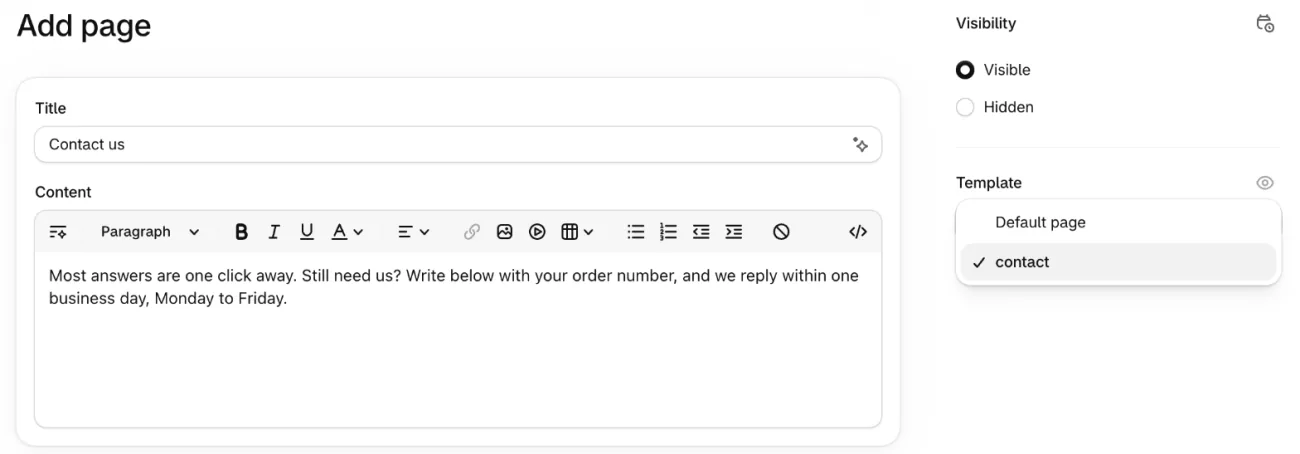
Your admin may call that menu "Theme template", as Shopify's Help Center does. Leave "Content" empty and the page shows only its title and the form.
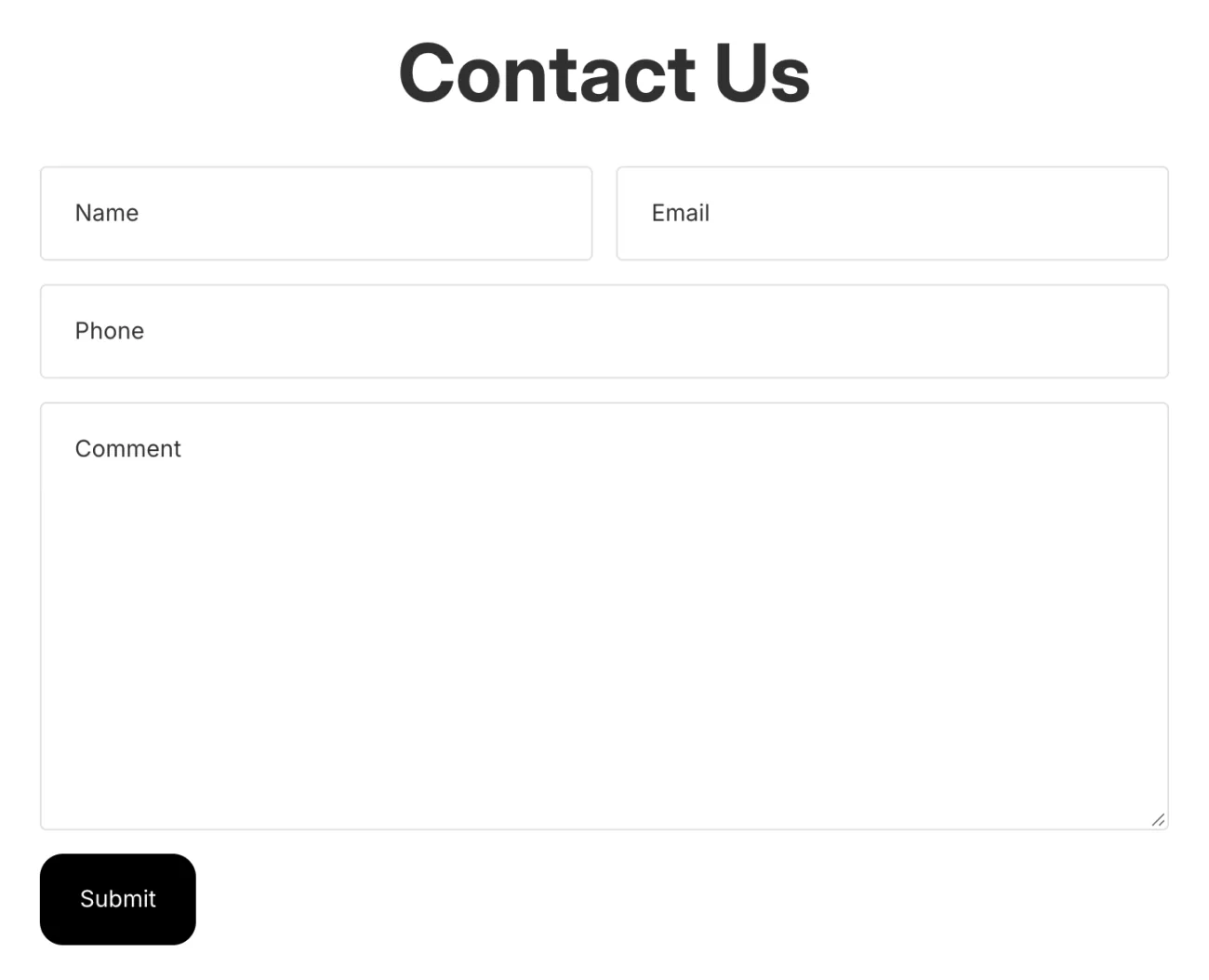
Your theme decides the boxes. On the Horizon theme they read Name, Email, Phone and Comment, above a Submit button. A box for an order number is a developer's change to your theme, or a form app. Asking for the number in your text costs nothing.
To link the page from your footer menu, follow the menu steps in our About Us page guide. Then send yourself a test message from the live page.
Where do contact form messages go, and how do you stop spam?
Every message goes to your store's sender email, including the ones Shopify's filter thinks are spam. Our customer service email templates show where to change that address and how to reply.
A suspected spam message arrives with [SPAM] at the start of its subject, so an email filter can move it aside. You can't change the subject line of these emails.
hCaptcha, the bot check built into every Shopify store, is on by default for contact forms. To confirm it, open Online Store, then Preferences. Under "Spam protection", the first switch, "Enable on contact and comment forms", should be on.

A new store still hears from strangers: "Is the owner available?", "Who handles your marketing?", an offer to fix your ads. If a message names no product and no order and offers you a service, treat it as a pitch. You don't owe it a reply, and don't click its links.
How do shoppers find your Contact Us page?
Link the page in your footer menu, then catch the shoppers who search for it instead. According to Shopify's Help Center, shoppers may look there for policies and contact details.
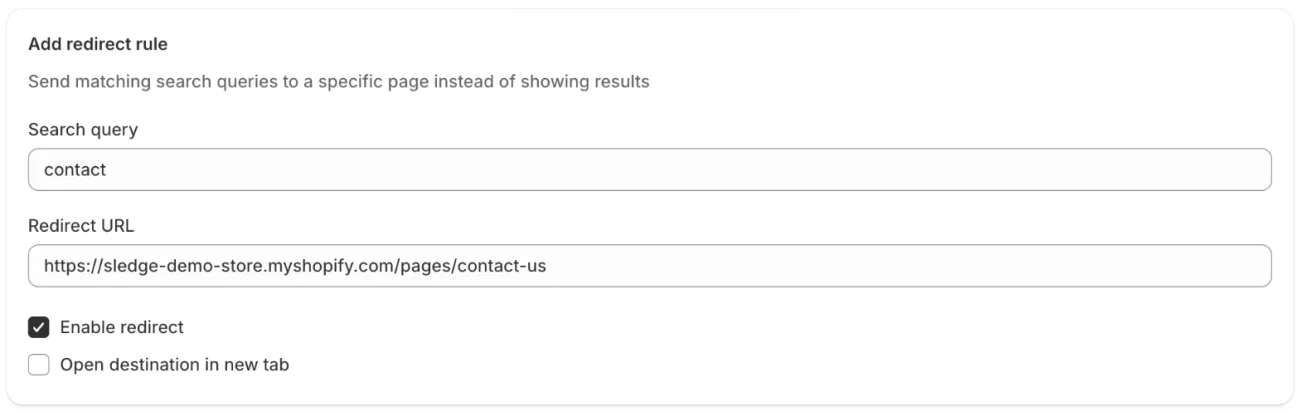
Others type "contact" into your store search. If Sledge, a Shopify app for search, filters and merchandising, runs your store search, a redirect can open the page instead of a list of products. In Sledge, open Tools, then Search, then Redirect, and click "Add redirect". Type contact in "Search query", the words to catch, and paste the page's full address from your browser into "Redirect URL". Tick "Enable redirect", which starts unticked, then save. The page opens when the shopper presses Enter. Each rule matches the whole search, so add a rule for contact us, and another for help. Redirects come on all four Sledge plans.
FAQ
Questions, answered
-

14-day free trial
Explore Sledge on your store before you decide to commit.
-

No credit card required
Start improving your store with no upfront commitment.
-

Setup in minutes
Get Sledge running without a lengthy setup process.
-

Built to grow sales
Turn shopper behavior into actions that help you sell more.
What do the best contact us pages have in common?
They answer the usual question before the shopper writes, such as where their order is or how to send it back. Then they say how to reach you and when you'll reply, and ask for the order number. An address goes on the page if shoppers can visit. Keep it short enough that the form shows on a phone without much scrolling.
How do I add a contact page in Shopify?
Go to Online Store, then Pages. Open the contact page if your store already has one, or click Add page and title it Contact us. Put your text in the Content box, choose contact in the Template menu, make it Visible and save. Then add the page to your footer menu so shoppers can find it.
How do I stop spam on my Shopify contact form?
Open Online Store, then Preferences, and check that the Spam protection switch for contact and comment forms is on. Shopify turns this hCaptcha check on by default. Messages its filter suspects arrive with [SPAM] at the start of the subject, so an email filter can move them aside. Shopify still delivers every message, so skim that folder now and then.
Do I have to put my address on my contact page?
Check the rules where you sell first, since some countries require a store to show business contact details. Shopify's Contact information policy, under Settings, then Policies, can fill in your address, phone and email from your store settings. Working from home? Shopify suggests a business address or PO box, though some legal notices need a street address.
Can I add an order number box to the Shopify contact form?
Not from the page editor. Your theme sets the form's boxes, such as Name, Email, Phone and Comment on Horizon, and a new one is a developer's change to your theme or a form app. Asking for the order number in your text above the form costs nothing. The emails the form sends keep a subject line you can't change.
What did shoppers look for before they wrote?
Sledge doesn't add a contact form, chat or help desk. It runs your store's search, filters and merchandising, so a redirect can send a shopper who types "contact" to your contact page. The first 14 days cost nothing. Growth Intelligence turns on when you pick a paid plan. It reads what shoppers searched for and bought, then suggests what to fix, with one dollar total labeled "Est. potential".

