A commercial invoice template lists who is selling and who is buying, each item with its HS code, country of origin, quantity and price, the total, and the terms of delivery. Copy the one below, then replace each bracket. Shopify says to mark the terms DDP if duties and import taxes were paid, and DAP if not.
You bought the label in Shopify, and your carrier's website now asks for a commercial invoice. It has a line for terms of delivery, with two short codes you have never had to choose between.
Commercial invoice template to copy
Free to copy. Type your own details over each highlighted bracket, and drop any line your carrier's form does not ask for. The figures are an example.
Commercial invoice
Invoice number: [CI-1042]. Invoice date: [November 23, 2026].
Order number: [#1042]. Reason for export: [Sale of goods].
Seller. [Your store or business name], [street, city, state or region, postal code, country], [email], [phone]. [Tax or business registration number, if you have one.]
Buyer. [Customer or company name], [delivery address, country], [email], [phone].
| Item | HS code | Made in | Qty | Unit price | Amount |
|---|---|---|---|---|---|
| [Linen apron, olive, 100% linen] | [HS code] | [Portugal] | [12] | [$18.00] | [$216.00] |
| [Canvas tote, natural cotton] | [HS code] | [Portugal] | [4] | [$12.00] | [$48.00] |
Currency [USD]. Items [$264.00]. Shipping charged [$15.00]. Duties and import taxes collected at checkout [$0.00].
Total [$279.00]. Total weight, with package: [2.4 kg].
Terms of delivery. [DAP]. Write DDP if the order paid duties and import taxes, and DAP if it did not.
Tax registration number. [Your local number, if you collect low-value goods tax.]
Declaration. [The declaration line your carrier's form prints, if it has one.] Name [your name]. Signature [signature]. Date [November 23, 2026].
Written for this page, November 2026. Shopify Help Center pages checked November 23, 2026.
- Shopify says to check that six details read the same on the invoice and on the order in your admin. They are the HS code (the international trade code that describes what an item is), the country or region of origin, the price after discounts, the quantity, the collected duties and import tax, and your local tax registration number if you collect low-value goods tax, which some countries charge on parcels below a set value.
- Ask your carrier which lines count toward the value customs sees before you add up the invoice.
Where do you find each number in Shopify?
Most of it sits on the order and on the product's page in your admin.
| Template line | Where to look |
|---|---|
| Order number, items, quantity, price | Orders, then click the order. |
| Country of origin, HS code | Products, then the product. In its Shipping card, click the arrow beside the Country of origin and HS Code chips. The "More details" block that opens holds "Country/Region of origin" and "Harmonized System (HS) code". |
| Weight | Shopify's Help Center says to open the order, click Create shipping label, then click "Edit customs information" in the Items section, which opens a panel for checking each item's weight, quantity, value and description. The Help Center also names a "Total weight (with package)" field on the label page. |
| Duties and import taxes | Shopify says a Duties line item appears in the order's details when duties were collected. |
| Terms of delivery | Settings, then Taxes and duties, where you choose whether to collect duties and import taxes at checkout. |
| Tax registration number | Your own record. Shopify lists it only if you collect low-value goods tax. |
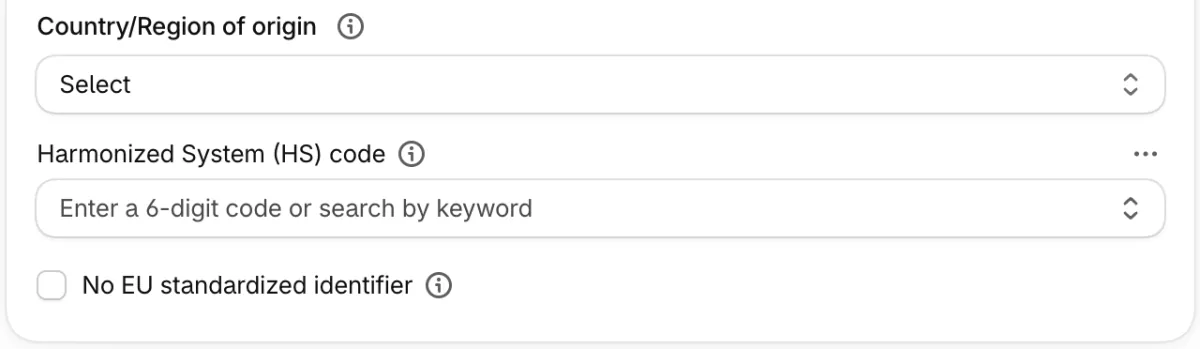
Shopify says you can add a missing HS code or country of origin on the product's page, while you buy the label, in the bulk editor, its spreadsheet-style screen for many products at once, or with a spreadsheet upload. Details you save to a product are reused on every international label for it. Where to find a code, and the dated duty rules, are in Shopify international shipping.
Does Shopify make the commercial invoice for you?
Shopify's Help Center says you can fill in your carrier's digital commercial invoice on the carrier's website, and that every international order requires one.
Its page on customs documentation says an international shipment can need two kinds of paperwork. A customs form declares what is in the shipment. A commercial invoice states its value and the terms of delivery.
With DHL Express or UPS labels bought in your admin, Shopify says customs documents go to supported countries electronically, so you print only the label. For other countries you print the customs form and attach it to the parcel. A Print customs form button shows on the order when a printed form is needed.
If a driver asks for a paper commercial invoice on a shipment sent electronically, Shopify says to tell them the invoice went to the carrier with the label. If they still need paper, it says you can create one with your carrier's own invoice tool.
Apps in the Shopify App Store can also print a commercial invoice from an order, so read each listing's current price and reviews first.
Selling through Managed Markets, Shopify's cross-border service? Shopify says Global-e, the legal seller there, handles commercial invoices on those orders, so this template is for your other orders.
Should you mark DDP or DAP on the invoice?
Shopify says to mark the terms of delivery DDP when the order has paid duties and import taxes, and DAP when it does not.
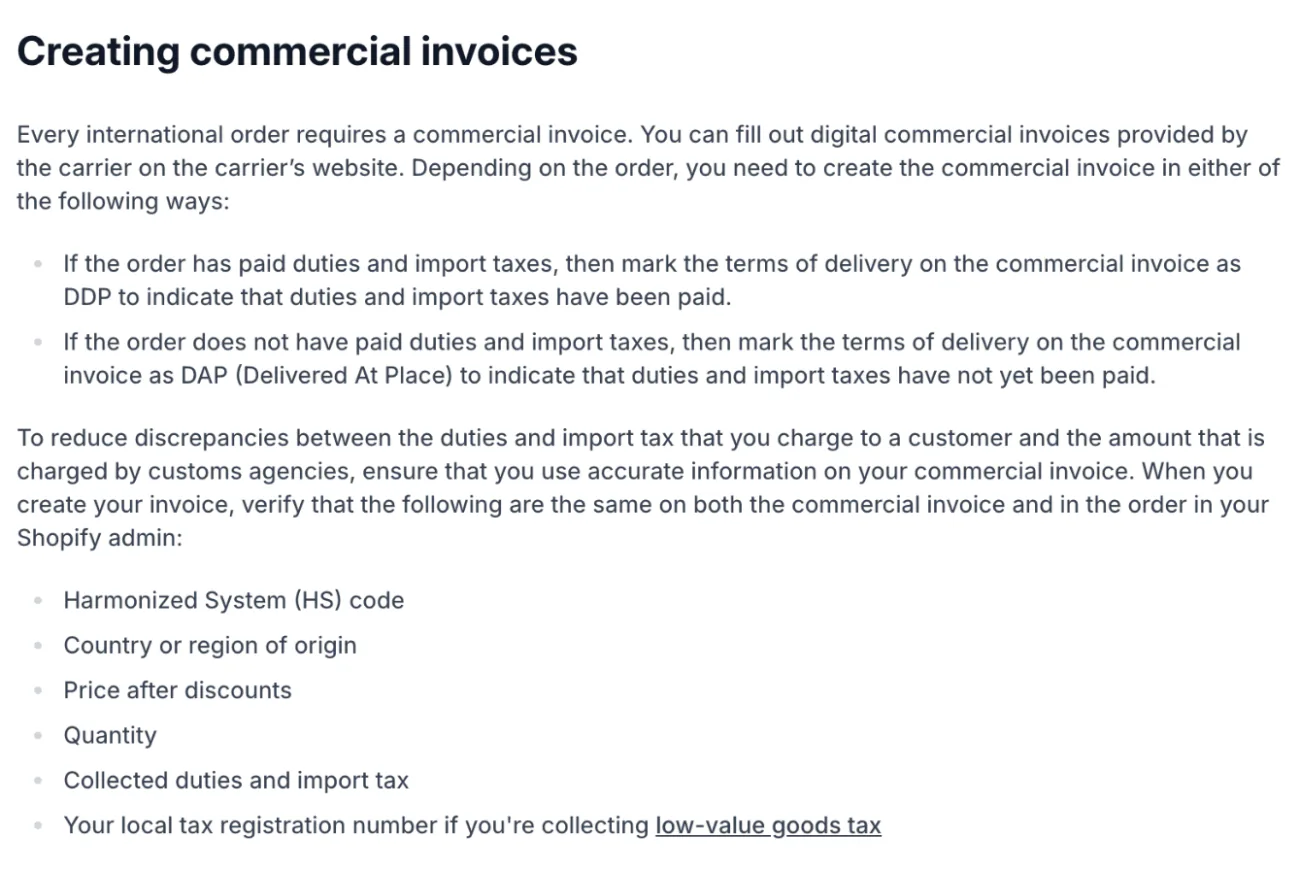
Shopify's page on carriers and shipping terms words the two this way.
| Term | What Shopify says it means |
|---|---|
| DDP, delivered duty paid | The seller takes on import costs such as duties, import taxes and brokerage fees. You can collect them at checkout, and your carrier bills you for the duties and import taxes later. |
| DAP, delivered at place | The seller only ships. The customer pays import costs to the carrier on delivery, and some carriers add a fee for collecting them. |
Check the order before you choose. When duties are collected, Shopify adds a Duties line item to the order's details, and it says to verify that before you buy a DDP label.
You choose whether to collect duties under Settings, then Taxes and duties, in the "Duties and import taxes" section, on the row "Collect duties and import taxes at checkout".
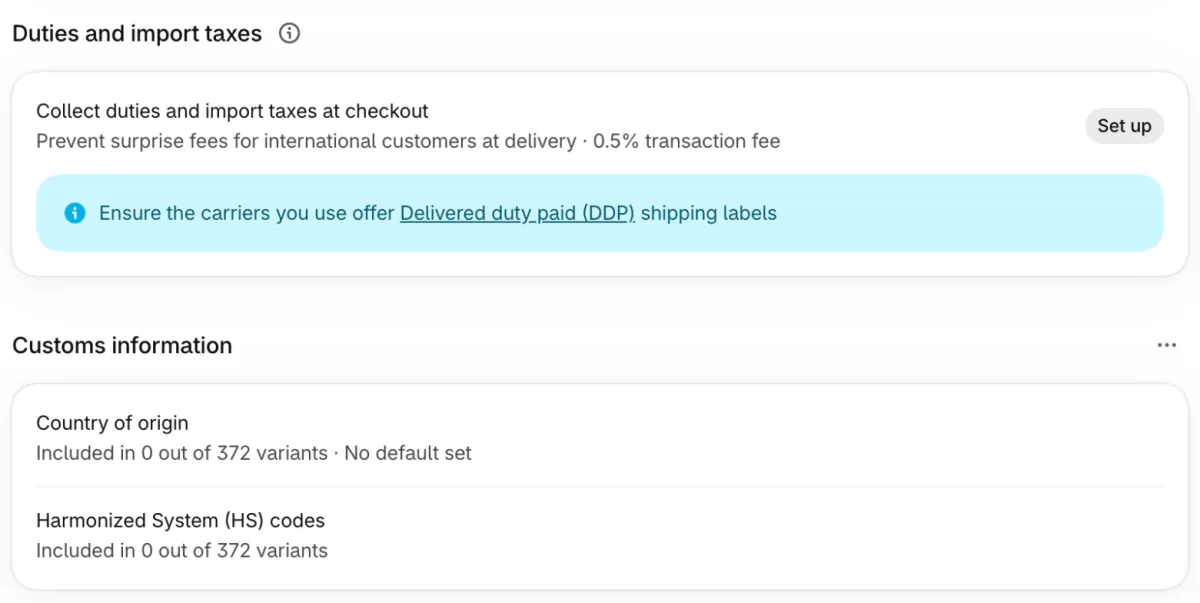
How collecting duties at checkout works, and which labels carry them, is in Shopify international shipping.
How do you fill in your carrier's invoice from the template?
Copy the facts from the order into the carrier's form, mark DDP or DAP, then check the form against the order.
- Open the order in Orders and note each item, its quantity, what was charged for it after discounts and any Duties line.
- Open each product to read its country of origin and HS code, or fix them in the Edit customs information panel when you buy the label. Shopify says the description on the customs declaration usually comes from the HS code, not your product title, and that you can edit it for one label.
- Open your carrier's digital invoice on its website, such as DHL Express's Digital Customs Invoice or UPS Paperless Invoice, and type in the lines of the template.
- Mark the terms of delivery DDP if the order paid duties and import taxes, and DAP if it did not, as Shopify says.
- Compare the finished invoice with the order, line by line.
Your carrier has the last word on its form and its copies. Ask which countries take the invoice electronically, how many paper copies it wants, and whether your destination needs more than this template lists.
For an invoice to a customer who pays later, see the invoice template.
FAQ
Questions, answered
-

14-day free trial
Explore Sledge on your store before you decide to commit.
-

No credit card required
Start improving your store with no upfront commitment.
-

Setup in minutes
Get Sledge running without a lengthy setup process.
-

Built to grow sales
Turn shopper behavior into actions that help you sell more.
What is a commercial invoice?
Shopify's Help Center says a commercial invoice states the value of a shipment and the terms of delivery, and that every international order requires one. You can fill in your carrier's digital version on the carrier's website. It is not the invoice you email a customer to be paid, which this invoice template covers.
Does Shopify make a commercial invoice for me?
Shopify says you can fill in the carrier's digital commercial invoice on the carrier's website. With DHL Express or UPS labels bought in Shopify, it says customs documents go to supported countries electronically and only the label prints. On Managed Markets orders, Shopify says Global-e, the legal seller there, handles commercial invoices.
What do DDP and DAP mean on a commercial invoice?
Shopify defines DDP, delivered duty paid, as the seller taking on import costs such as duties and import taxes. DAP, delivered at place, is the seller only shipping, with the customer paying import costs to the carrier on delivery. Shopify says to mark DDP when the order has paid duties and import taxes, and DAP when it does not.
Is there a free commercial invoice template for Word or Google Docs?
Yes, the one on this page. Paste it into a blank Word or Google Docs file and replace each bracket. Shopify points you to the digital invoice on your carrier's website, so ask your carrier whether it accepts a file of your own before you print one.
Do I need a commercial invoice for every order I ship abroad?
Shopify says every international order requires one. Whether a paper copy travels with the parcel depends on your carrier and the destination, and Shopify says DHL Express and UPS send the documents electronically to supported countries. Ask your carrier which rules apply to your destination.
Customs paper follows a sale. Where do shoppers leave first?
Sledge makes no customs papers, invoices or labels, and it sets no duties. It adds search, product filters, bundle offers and a cart drawer to your Shopify store, free for the first 14 days. Growth Intelligence turns on when you pick a paid plan. It reads your store's searches, carts and orders and suggests fixes, with one dollar total labeled Est. potential.