
STOQ alternative for Shopify: what changes when you need more than pre-orders
Summarize with AI
If you've been comparing Shopify pre-order apps, STOQ is probably already on your shortlist. It's a well-established option for pre-orders and back in stock. The questions usually start a little later: what if the product is actually a bundle, or what if you want to test the offer before deciding what works? That's where Sledge becomes worth a closer look.
STOQ, from Artos Software, keeps its focus on pre-orders and back in stock, with features such as split payments, deferred payments, payment reminders, B2B pre-orders, and SMS alerts. Sledge takes a broader storefront approach. Alongside Shopify pre-orders and restock alerts, it includes bundles, search, filters, reviews, and the cart drawer, with the option to attach a pre-order campaign to a bundle and A/B test the offer.
STOQ vs Sledge: the details that matter
| Feature | STOQ | Sledge |
|---|---|---|
| Pricing model | Free plan, then $10, $29, and $69 a month, metered on pre-orders and alerts. SMS billed separately at about $0.025 a message | Flat plans: $29.99, $89.99, $199, or $399 a month. The price never climbs on its own |
| Track record | Built for Shopify, live since 2021, with a large review base behind it | Newer app with a smaller review base. Judge it on your own store inside the trial |
| Pre-order on a single product | Yes, with availability dates, quantity limits, badges, and a progress bar | Yes, with scheduled start and end times, country targeting, and a discount on the pre-order |
| Pre-order on a bundle | Compatible with several third-party bundle apps. STOQ's own docs describe those setups as app compatibility rather than a direct integration, so the bundle lives in the other app | Built in. Pick an existing Sledge bundle inside the pre-order campaign and the bundle card renders with a Pre Order button |
| Payment options | Full, deposit, partial, split payments, deferred payments, payment reminders, B2B pre-orders on Shopify Plus | Full payment, or partial payment with the amount to pay now and a due date for the balance, set per campaign |
| A/B testing the offer | Not a built-in split test. The help center suggests updating a selling plan through the API when you want to try a different configuration | Yes. Create A/B sits inside the pre-order campaign, and the traffic split decides |
| Back in stock alerts | Email and SMS, batch send, reminders, multi-location, Markets, Klaviyo, Omnisend and Mailchimp, POS widget | Email, on four surfaces: product page, collection card, search results, and instant search. Phone stored on the record and included in the export |
| Where the notify-me form appears | Product, home, collection, featured product, and quick buy | Product page and collection card, plus search results and instant search |
| Search, filters, merchandising | Not offered | Included on every plan |
| Bundles, upsell, cart drawer, reviews, wishlist | Not offered | Included on every plan |
Data as of September 2026. STOQ's payment depth and track record are genuine strengths, and this page says so.
Which Shopify app makes more sense for your store?
STOQ may be the better fit when:
- Pre-orders and restock alerts are most of what you need, and a long Shopify track record matters to you.
- Your workflow depends on split payments, deferred payments, automatic payment reminders, split fulfillment, or B2B pre-orders on Shopify Plus.
- Back in stock notifications need SMS or integrations with Klaviyo, Omnisend, or Mailchimp.
- You want to start with a free plan and move to the $10 tier as your usage grows.
Sledge is worth a look when:
- Your launch is built around a set or bundle and you'd rather keep the bundle and pre-order setup in one app.
- You want to test practical questions such as the discount, button copy, or when the pre-order button appears.
- You want your back in stock list alongside available inventory so it can help with the next reorder decision.
- You're already paying for several storefront apps and would prefer to bring search, filters, bundles, and reviews under one flat bill.
- You want more than pre-order and back in stock: instant search, filters, merchandising, and a cart drawer can live in the same storefront setup.
A broader storefront toolkit, without stacking apps
If pre-orders are only one part of the work your storefront needs, Sledge gives you a wider set of tools in the same app. These are the areas covered by the platform:
| Discover | AI search that reads typos and intent, filters that never hide stock, merchandising rules instead of manual drag, and recommendations that fit |
| Offers | Nine bundle types, build-your-own, free gift, BOGO, and volume discounts, on top of the pre-order bundle already covered above |
| Convert | A cart drawer that keeps selling, upsell at the right moment, promotions, product reviews, and urgency badges |
| Lifecycle | Subscription, pre-order and back in stock (covered above), plus a wishlist that shows you what shoppers saved but didn't buy |
| Measure | Growth Intelligence, analytics, and the A/B testing already covered above, reading the same store instead of a different dashboard per app |
The useful distinction is really about how much of the storefront you want one app to handle. If you'd otherwise be paying for several separate apps, bringing those jobs together can simplify both the setup and the monthly bill. One install, one login, one price instead of five or six separate app subscriptions.
Deep dive 1 · The single-product pre-order
Setting up a Shopify pre-order campaign in Sledge
The basic customer journey is familiar: a product has a pre-order option and the order continues through Shopify checkout. In Sledge, the setup lives in a campaign, which makes it easier to manage separate launches and different rules throughout the season.
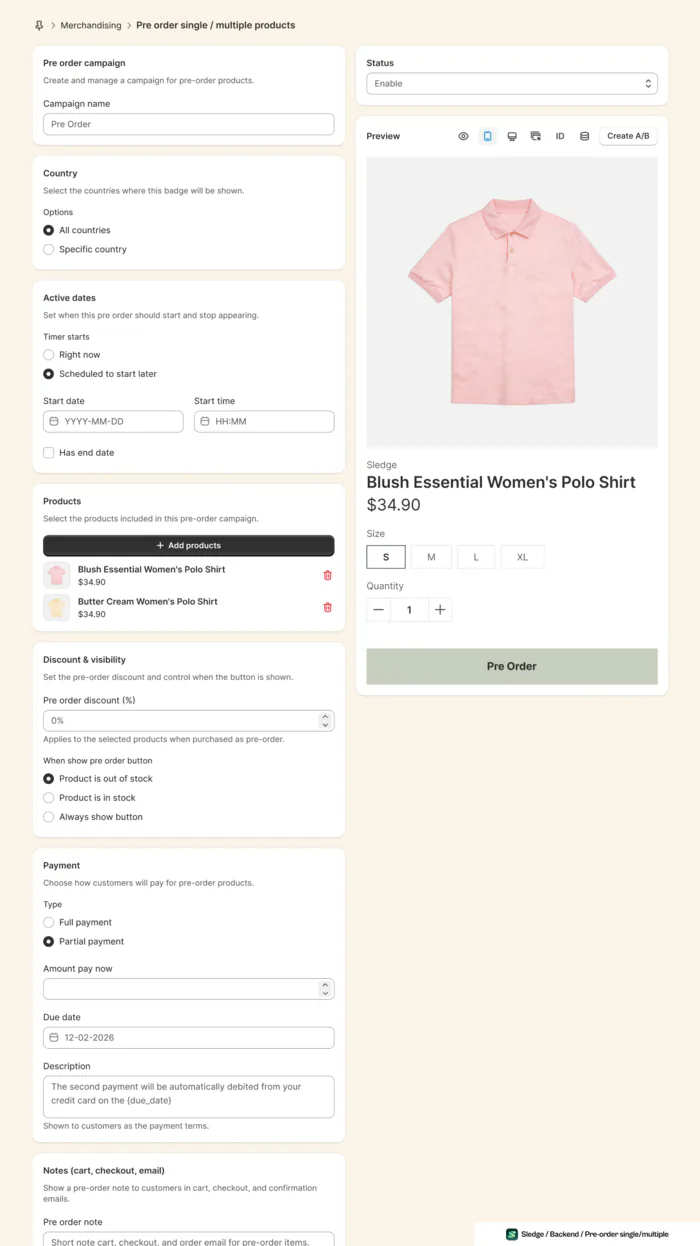
There are a couple of useful controls here. You can show the pre-order button while the product is still in stock, which is handy for a planned drop that hasn't arrived yet. You can also schedule the campaign with a specific start and end time, so a launch window can close without someone having to remember to switch it off later.
Customers can pay in full or make a partial payment, with a due date you set and a note that explains the second charge, where your payment provider and country support charging a balance later. You can also add a pre-order note that follows the item into the cart, checkout, and confirmation email, change the button label, and decide whether it appears on collection pages, product pages, search, or instant search.
STOQ has some additional payment and fulfillment options that may be important for specific stores, including split payments, deferred payments, automatic payment reminders, and B2B pre-orders on Shopify Plus. If those are part of your workflow, keep them high on the checklist before making a change.
Deep dive 2 · The pre-order bundle
What if the Shopify pre-order is a bundle?
Bundle pre-orders are where the setup can get more involved. STOQ documents compatibility with Fast Bundle, MBC Bundles, and Adoric Bundles, but describes these as compatibility setups rather than direct integrations. The bundle is created in the other app, and the exact behavior can depend on the bundle type and its settings.
With Sledge, bundles are already part of the same platform. You select the bundle in the pre-order campaign, choose full or partial payment, set the campaign window, and the storefront can show the bundle card with its discount, original price, and Pre Order button together.
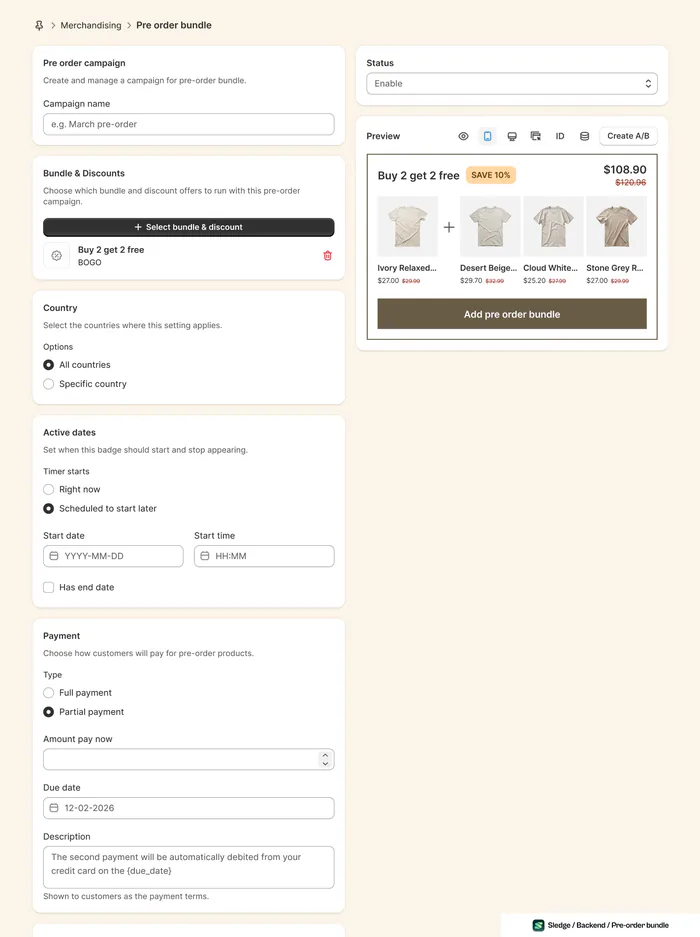
For the shopper, that means the bundle and its pre-order terms are handled together. There's less handoff between apps to worry about, especially when discounts and selling-plan behavior need to stay aligned.
It also opens up a different kind of launch. Instead of asking someone to pre-order one hero product, you can put a Buy 2 Get 2 Free set of four items in front of them as one offer, the saving already applied in the preview. That can make the bundle itself part of the product story and raise the potential order value.
Deep dive 3 · Back in stock
Use your back in stock list for more than notifications
Sledge Back in Stock adds a notify-me option across four storefront surfaces: the product page, collection cards, search results, and instant search. You can decide which products or collections use it, where the button sits, and how the form reads. The form can collect an email and, optionally, a phone number.
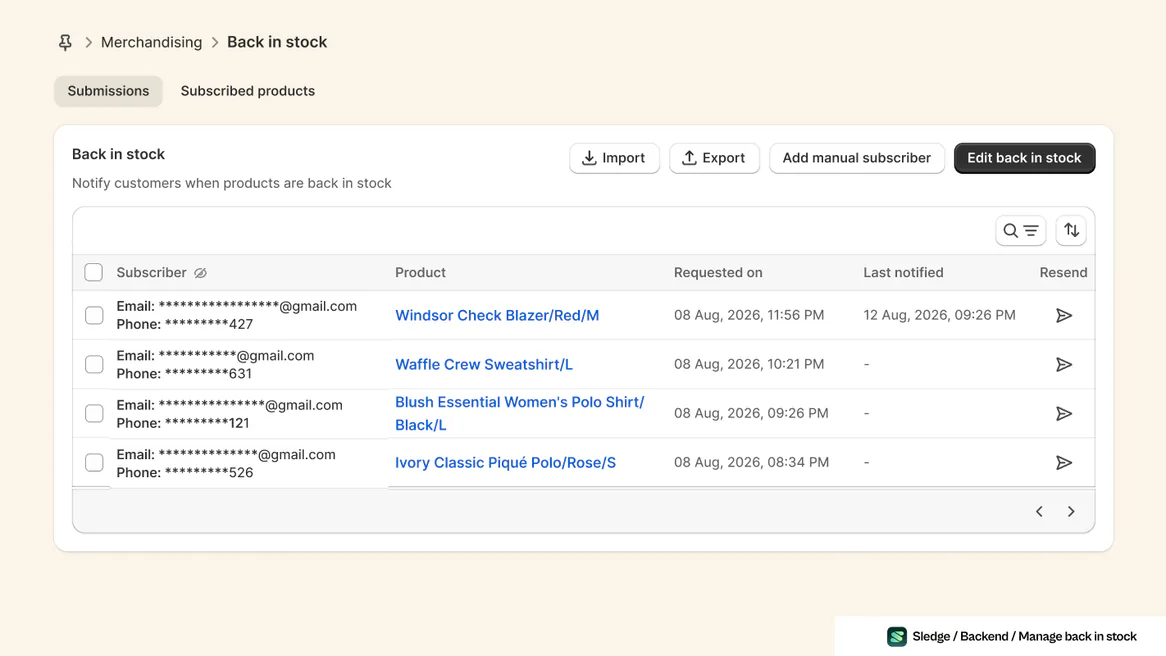
Each submission names the product a shopper asked about, and keeps their contact masked until you reveal it. The list shows when the request came in, whether a notification already went out, and a resend control per row. A second tab, Subscribed products, counts the people waiting on each one beside the quantity you have, so you can read demand at a glance instead of scrolling the submission list.
STOQ has the broader notification workflow here. It can send SMS as well as email, batch sends, send reminders to subscribers who didn't purchase, work with multi-location inventory and Shopify Markets, and connect with Klaviyo, Omnisend, and Mailchimp. Sledge sends the alert by email; the phone number can be stored on the subscriber record and exported, but Sledge doesn't send the SMS itself.
One pricing detail is worth calling out. Back in Stock is included on Sledge's Accelerate plan at $199 a month. If all you need is a basic restock alert, STOQ starts free and its Lite plan is $10. In that situation, STOQ is the more economical choice.
Deep dive 4 · Testing the launch
Want to know which pre-order offer works best?
Pre-order launches often come with a few unanswered questions. Would 10% off make more people commit to an item shipping in six weeks, or would 5% do the same job? Should the button appear before stock runs out? Does a bundled offer beat selling the same products separately? These are much easier questions to answer when you can test them.
Without built-in testing, the common workaround is to run one version, change the setup, run the next version, and compare the results. That can tell you something, but traffic, timing, and other conditions have changed too. STOQ documents an API route for updating the selling plan when you want to try another configuration.
Sledge puts a Create A/B control inside the pre-order campaign. You can run two versions during the same launch, split the traffic, and compare the results under much more similar conditions. That could mean testing a 10% discount against 5%, changing the button message, or changing when the pre-order option appears.
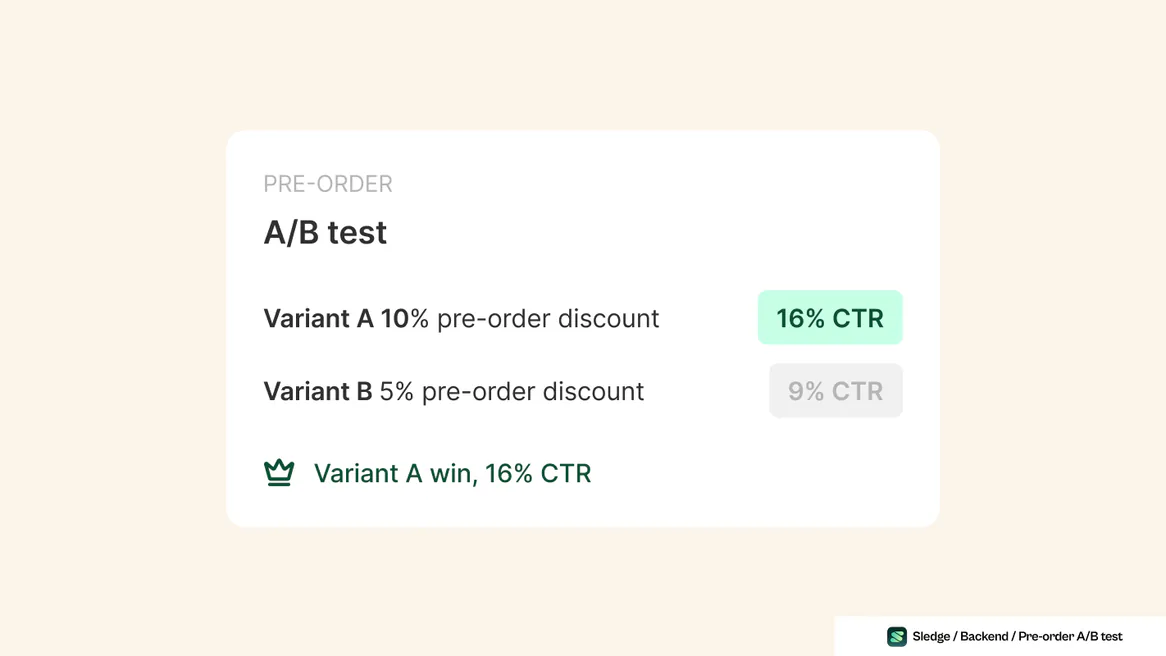
There's one important boundary: Sledge A/B testing applies to pre-order campaigns, including bundle pre-orders, not to Back in Stock.
A result this clear removes the guesswork. Here the deeper discount won by a wide margin, 16% click-through against 9%, so the next launch can start from evidence instead of a hunch.
Do you need to choose just one?
Not necessarily. Running both can be useful while you decide what belongs where. Their overlap is mainly around the pre-order and notify-me experience, while the rest of their feature sets are quite different.
- Try Sledge alongside STOQ. You can start with the areas that don't overlap, such as search, filters, bundles, reviews, and the cart drawer.
- Give each app a clear job. Both support partial payment, so that alone doesn't separate them. STOQ has the deeper options around split payments, deferred payments, reminders, and B2B pre-orders on Shopify Plus, while Sledge handles bundle pre-orders and A/B tested launches.
- Avoid duplicate storefront controls. Keep one notify-me form and one pre-order campaign responsible for a given product so shoppers don't see competing buttons.
- Look at the total app bill. If Sledge replaces separate search, filter, bundle, and review apps, compare the combined cost. If you're replacing STOQ alone, STOQ is cheaper for pre-orders and alerts, and that's worth acknowledging.
Sledge is free on development stores, so a side-by-side test can be a low-risk way to see how the setup behaves before you make a decision.
FAQ
Questions, answered
-

14-day free trial
Explore Sledge on your store before you decide to commit.
-

No credit card required
Start improving your store with no upfront commitment.
-

Setup in minutes
Get Sledge running without a lengthy setup process.
-

Built to grow sales
Turn shopper behavior into actions that help you sell more.
Is Sledge a good alternative to STOQ?
Yes, especially if your Shopify store needs pre-order bundles, A/B testing, and broader storefront tools alongside pre-orders. Sledge also supports partial payment, with the amount due now and the balance due later. STOQ remains a strong option if you need split payments, deferred payments, automatic payment reminders, B2B pre-orders on Shopify Plus, or SMS alerts.
Can you run a pre-order on a bundle in Shopify?
Yes. In Sledge, you can select an existing bundle inside a pre-order campaign and show the bundle with its discount and Pre Order button. With other setups, the bundle may live in a separate bundle app, so it's worth checking how the two apps handle the handoff.
Can you A/B test a pre-order offer?
Yes. Sledge has a Create A/B control inside the pre-order campaign, including bundle campaigns, so two offers can run during the same launch. A/B testing applies to pre-order campaigns, not Back in Stock.
Which is cheaper, Sledge or STOQ?
For pre-orders and stock alerts alone, STOQ is cheaper. Its free plan covers 10 pre-orders and 30 alert emails per month, with paid plans at $10, $29, and $69. Sledge uses flat plans at $29.99, $89.99, $199, and $399, with Back in Stock on the $199 Accelerate plan. Sledge also includes search, filters, bundles, reviews, and the cart drawer.
Can I run STOQ and Sledge at the same time?
Yes. You can run both, provided each storefront action has a clear owner. Keep one app responsible for the notify-me form on a product and one responsible for its pre-order campaign so shoppers don't see duplicate buttons.
Choose the app that matches how you sell.
STOQ is a solid choice when pre-orders and back in stock are the main job. Sledge gives you those tools alongside bundles, search, filters, merchandising, reviews, and the cart drawer, with bundle pre-orders and A/B testing built into the same setup. Try it on your store, keep the comparison practical, and let the numbers make the call.

